EasyManua.ls Logo

Schwinn IC7 - User Manual

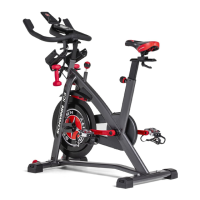
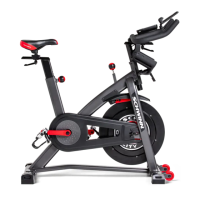
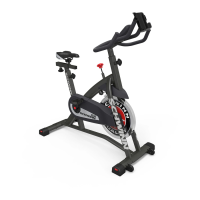
Schwinn IC7
63 pages
Print Icon
To Next Page IconTo Next Page
Loading...
Schwinn
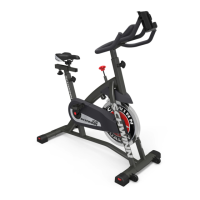
IC3 / IC7 / 700IC Bikes
Service Manual
8018628.041521.D
Service Manual
Section Code Section Page Number
1 Important Safety Instructions 2
1 Safety Warning Labels and Serial Number 3
1 Reading the Serial Number 3
 6SHFL¿FDWLRQV
1 Maintenance 4
1 Leveling the Machine 5
1 Moving/Storing the Machine 5
1 Troubleshooting 6
1 Changing Unit Measures 7
1 Maintenance Parts Exploded View 8
1 Replacement Procedure Skill Level 9
Mechanical Procedures 10
2 Brake Lubrication 10
3 Brake Adjustment 13
4 Belt Tension Adjustment 15
Part Replacement 19
5 Pedals 19
6 Console 22
7 Handlebars and Handlebar Post 24
8 Fender 27
9 Brake Pad Assembly and Brake/Resistance Knob Assembly 29
10 Crank Arm 32
11 Drive Belt Cover 36
12 Flywheel Tensioners 39
13 Drive Belt 43
14 Flywheel Assembly 49
15 Speed Sensor 55
16 Crank Axle Wave Washer 61
Table of Contents
Nautilus, Inc., www.NautilusInc.com, 5415 Centerpoint Parkway, Groveport, OH 43125 U.S.A. - Customer Service: North America (800) 605-3369, csnls@nautilus.com | outside U.S.
www.nautilusinternational.com | © 2018 Nautilus, Inc. | Schwinn and the Schwinn Quality logo are trademarks owned by or licensed to Nautilus,Inc., which are registered or otherwise
protected by common law in the United States and other countries. Polar® is a trademark of its owner. | ORIGINAL DOCUMENT - ENGLISH VERSION ONLY
8018887.041521.D


Questions and Answers

  • D
    Debra ThompsonAug 16, 2025
    How to fix Schwinn IC7 console that will not turn on?
    • J
      James NelsonAug 16, 2025
      If the console of your Schwinn Exercise Bike isn't powering up, start by ensuring the batteries are correctly installed. If they are, try replacing them with a fresh set. Also, check the cable for any visible damage like crimps or cuts; if found, replace the cable. Ensure the cable is securely connected and properly oriented, making sure the small latch on the connector snaps into place. Inspect the console display for cracks or damage, and replace it if necessary. If the problem persists after these steps, further assistance may be needed.
  • M
    Mary FletcherAug 18, 2025
    What to do if speed displayed is always 0 on Schwinn IC7?
    • G
      Gail WeaverAug 18, 2025
      If your Schwinn Exercise Bike is showing a speed of '0' or is stuck in Pause mode, ensure the data cable is properly connected to both the console and the main frame assembly. Also, verify that the RPM sensor magnet and the RPM sensor are correctly positioned.
  • D
    Donna DeleonAug 21, 2025
    Why is the speed displayed not accurate on Schwinn IC7?
    • E
      Elizabeth BlairAug 21, 2025
      If the speed displayed on your Schwinn Exercise Bike is inaccurate, check that the speed sensor magnet is correctly placed on the flywheel.
  • A
    angela68Aug 25, 2025
    How to troubleshoot no speed/RPM reading on Schwinn IC7 Exercise Bike?
    • N
      Noah CarneyAug 26, 2025
      If you're not getting any speed or RPM readings on your Schwinn Exercise Bike, first check the cable for any cuts or crimps and replace it if damaged. Ensure the cable is securely connected and properly oriented, with the small latch on the connector snapped into place. Verify the speed sensor magnet is in place on the flywheel. Also, check the speed sensor assembly's alignment with the magnet and its connection to the data cable; realign if needed, and replace the sensor if damaged.
  • R
    Rachel CunninghamAug 28, 2025
    What to do if Schwinn IC7 rocks or does not sit level?
    • K
      karenwatkinsAug 28, 2025
      If your Schwinn Exercise Bike is rocking or not sitting level, try adjusting the levelers. If the surface is extremely uneven, you may need to move the bike to a more level area.
  • S
    Sierra ColeAug 31, 2025
    How to stop seat post movement on Schwinn IC7 Exercise Bike?
    • B
      Brittany JacksonAug 31, 2025
      To address seat post movement on your Schwinn Exercise Bike, make sure the adjustment pin is locked into one of the seat post adjustment holes and the knob is securely tightened.
  • C
    Calvin ElliottSep 3, 2025
    Why is the console display dim on my Schwinn Exercise Bike?
    • D
      Douglas OlsonSep 3, 2025
      If the console display on your Schwinn Exercise Bike is dim, try replacing the batteries.
  • B
    Brad MezaSep 5, 2025
    How to fix clicking sound when pedaling Schwinn IC7 Exercise Bike?
    • J
      Judith SmithSep 5, 2025
      If you're experiencing a clicking sound when pedaling your Schwinn Exercise Bike, remove the pedals, ensure there is no debris on the threads, and then reinstall them.
  • N
    nleSep 9, 2025
    Why do the pedals lose difficulty to pedal on Schwinn Exercise Bike?
    • K
      Kenneth JacobsonSep 9, 2025
      If you're losing difficulty while pedaling your Schwinn Exercise Bike, ensure the pedal is securely tightened to the crank arm, being careful not to cross-thread the connection. Also, check that the crank arm is securely tightened to the axle.
  • M
    Michael JonesSep 12, 2025
    Why is telemetric heart rate not displayed on Schwinn IC7?
    • A
      Antonio JohnsonSep 12, 2025
      To ensure your Schwinn Exercise Bike displays your telemetric heart rate, use a 'POLAR®' compatible and uncoded strap. Ensure the strap is directly against your skin and the contact area is wet. If the strap has replaceable batteries, try installing new ones. Also, try moving the bike away from potential sources of interference like TVs or microwaves. If the heart rate still doesn't function after eliminating interference, replace the strap. If the issue persists, the console may need replacement.

Summary

Schwinn Bike Safety and Specifications

Important Safety Instructions

Essential safety precautions for using and servicing the equipment.

Warning Labels and Product Specifications

Details on warning labels, serial number, and technical specifications.

Bike Maintenance and Troubleshooting

Routine Maintenance Schedule

Outlines daily, weekly, and monthly checks for equipment upkeep.

Troubleshooting Common Bike Issues

Provides solutions for problems like console errors, no speed reading, or dim display.

Unit Measurement and Compliance

Instructions for unit conversion and regulatory compliance.

Component Service and Adjustment Procedures

Lubricate Brake Pad

Step-by-step guide to lubricating the brake pad for smooth operation.

Adjust Brake Assembly

Procedure for adjusting the brake for proper resistance.

Adjust Drive Belt Tension

Instructions on how to set the correct tension for the drive belt.

Replace Pedals

Guide on how to safely remove and install new pedals.

Replace Console

Instructions for replacing the bike's console unit.

Replace Handlebar and Post

Steps for replacing the handlebar and its supporting post.

Replace Fender

Procedure for replacing the bike's fender.

Replace Brake Assembly and Knob

Guide for replacing the brake mechanism and resistance knob.

Replace Crank Arm

Instructions for removing and installing the crank arm.

Replace Drive Belt Cover

Steps for replacing the protective cover for the drive belt.

Replace Flywheel Tensioners

Guide for replacing the flywheel tensioning components.

Replace Drive Belt

Detailed procedure for replacing the main drive belt.

Replace Flywheel Assembly

Instructions for replacing the entire flywheel assembly.

Replace Speed Sensor

Procedure for replacing the speed sensor.

Replace Crank Axle Wave Washer

Steps for replacing the wave washer in the crank axle.

Schwinn IC7 Specifications

General IconGeneral
Product typeMagnetic bicycle trainer
Product colorBlack
Adjustable seatYes
Number of programs-
Maximum user weight136.2 kg
Training displayed parametersCalories, Distance, Heart rate, Time
Display typeLCD
Weight and Dimensions IconWeight and Dimensions
Depth584 mm
Width1143 mm
Height1245 mm
Weight45400 g
Flywheel weight18100 g

Related product manuals