PROGRAM INSTRUCTIONS
SCIFIT • Scientific Solutions for Fitness • SCIFIT • Scientific Solutions for Fitness • SCIFIT
28
RANDOM
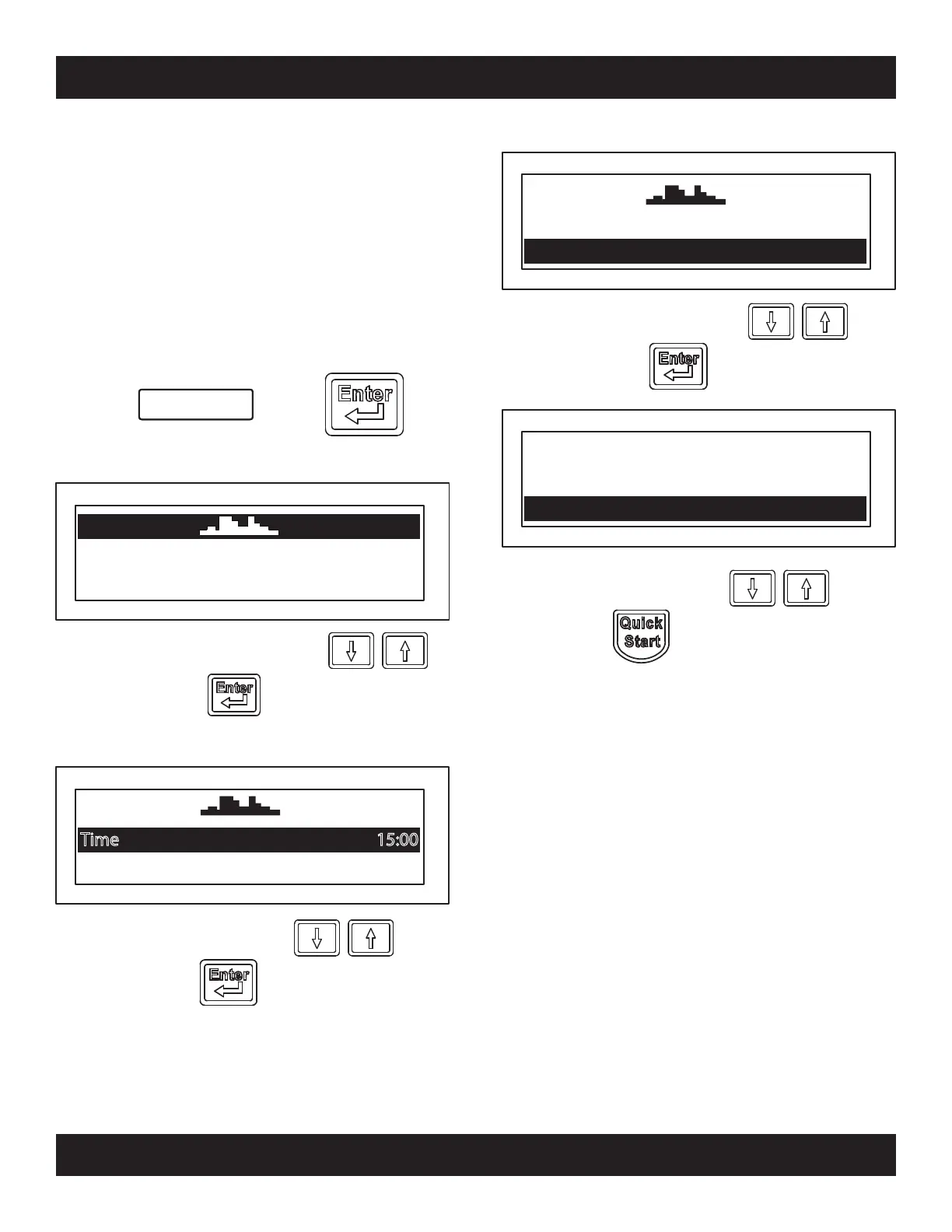
Press Then
Random Program
The Intelli-Fit console will randomly display
different workout profiles each with its own level of
difficulty. The operator only has to choose the type
of the profile, then select the time length of the
workout and the level difficulty.
Note: The highest column of the profile represents
the workout level you selected. Columns below it
are percentages of the level selected.
Time 15:00
Level 1.0
Select a random profiles with the
keys, then press
Prole Random
Level 1.0
Adjust workout time with the
keys, then press
Time 15:00
Level 1.0
Adjust level intensity with the
keys, then press
Time 15:00
Weight 150
Time 15:00
Enter user weight with the keys,
then press and begin exercise
Level 1.0
Prole Random
Prole Random


 To Next Page