19
FURTHER SETTINGS
I. ADJUSTING THE VOLUME OF YOUR COFFEE / HOT WATER
The desired volume of Espresso, Lungo and hot water can be memorised, ranging from 25ml to
250ml.
1. To make your coffee (either Espresso or Lungo) or dispense hot water, press and hold the
corresponding button. Hold the button while the appliance is making the drink.
2. When the drink reaches your desired volume, release the button. Two beep sounds will
be heard, indicating that the volume is memorised. You can get the exact volume of
coffee every time during future use.
3. Reset the volume to factory settings by selecting default settings (see FURTHER SETTINGS
- IV. MODE SELECTION on page 21).
II. ADJUSTING THE VOLUME OF YOUR LATTE MACCHIATO / CAPPUCCINO
The desired volume of Latte Macchiato and Cappuccino can be memorised, ranging from 25ml
to 250ml. If less than 25ml, the memory saving function will not work. These steps allow for
setting the volumes of milk and coffee independently.
1. Place a cup under the spout.
2. Turn on the machine.
3. Press the button of the drink you want, either the latte macchiato or cappuccino. Only the
selected button will remain lit.
WHEN the latte macchiato or cappuccino coffee BEGINS TO FLOW INTO YOUR CUP
CONTINUOUSLY, press and hold the button again. The appliance will continue to brew the
drink.
When the desired volume is reached, release the button. Two beeps sounds will indicate that
the volume is memorised.
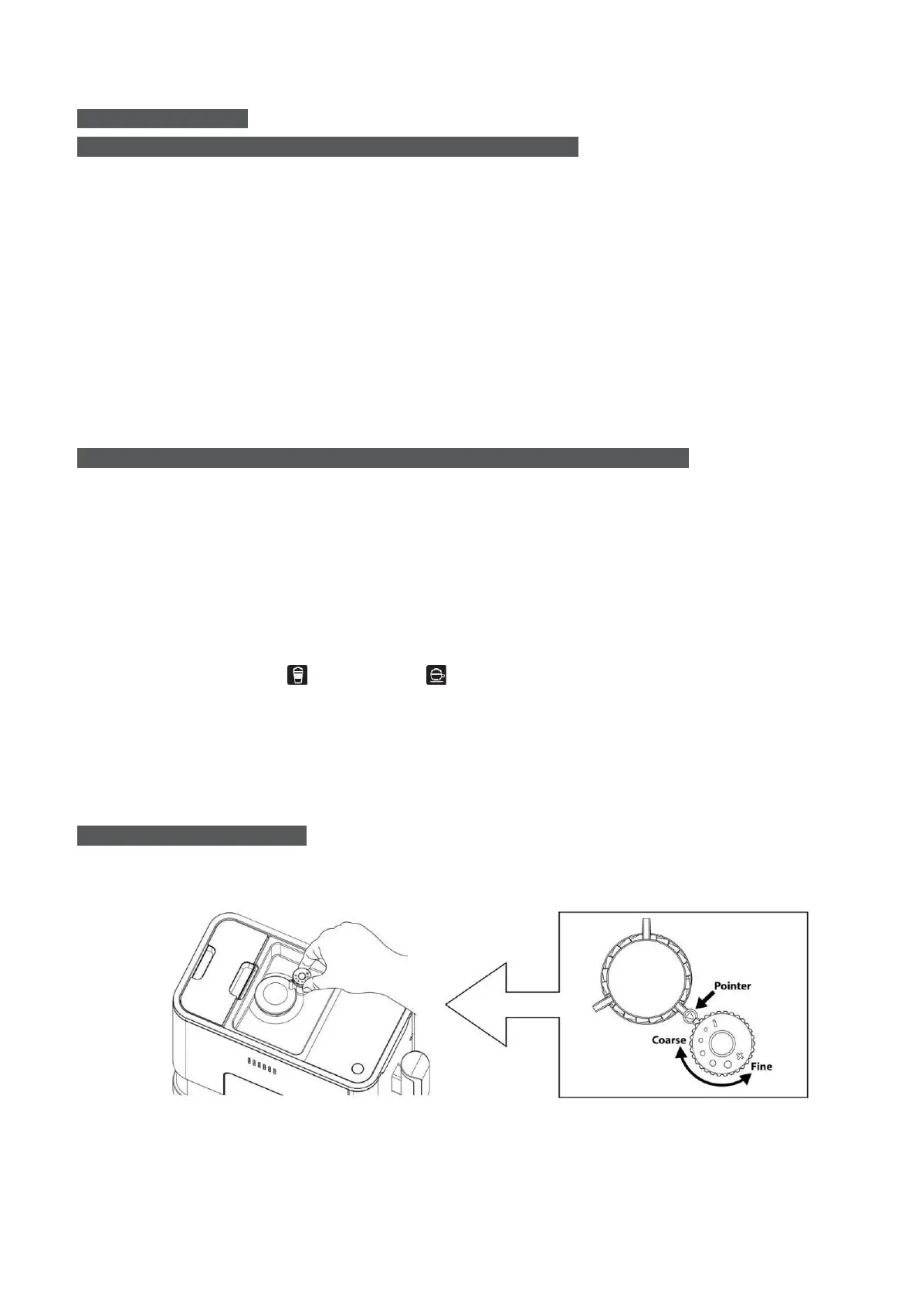
III. GRINDING ADJUSTMENT
You can adjust the grind size to suit your coffee taste by turning the knob in the coffee beans
container:
1. Only turn the knob for adjustment when the grinder is in operation.
Caution: Never adjust the grinding when the grinder is not operating. It can damage the
grinder.


 To Next Page