GB–9
REMOTE CONTROL
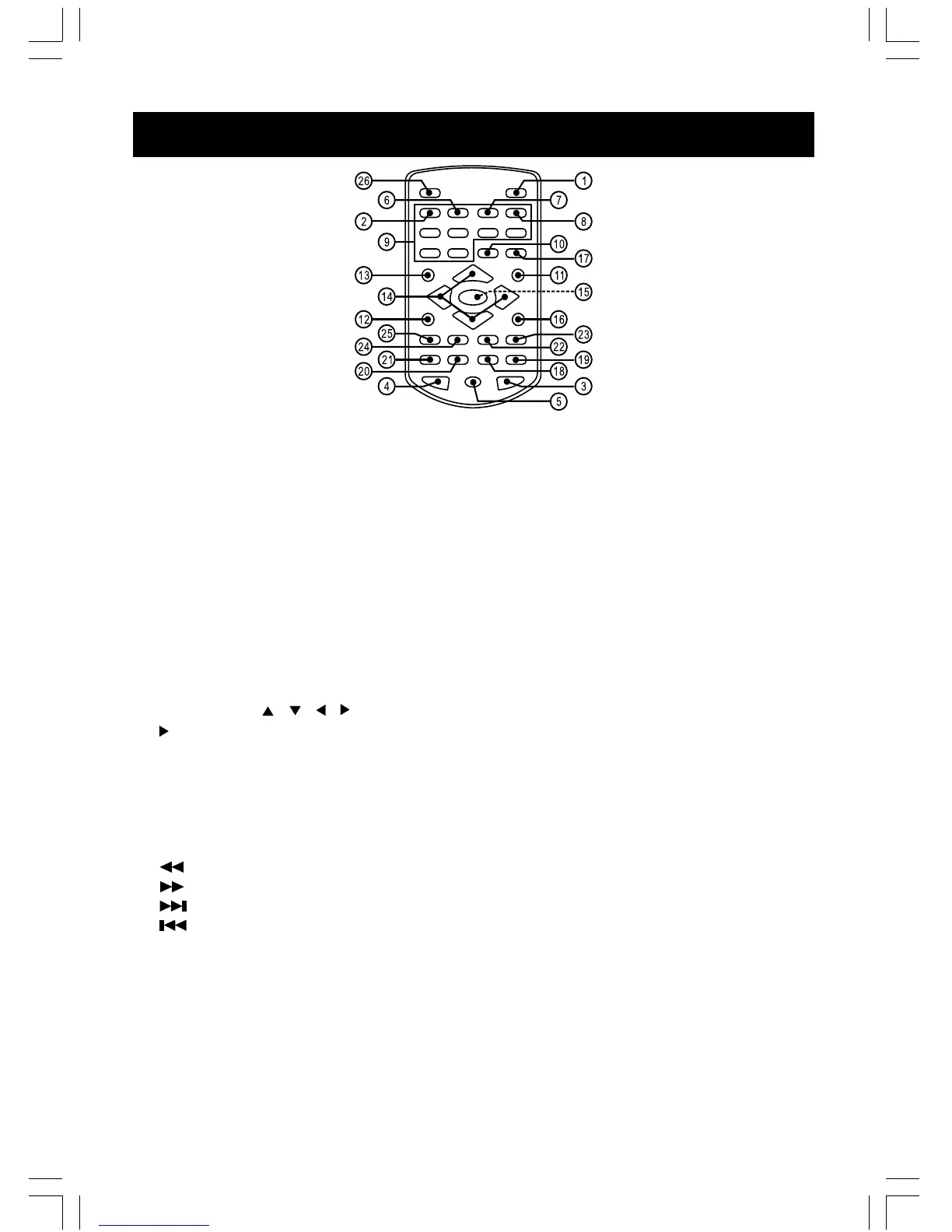
1. SETUP – Enters the DVD player setup menu.
2. TITLE – Displays DVD title menu (Only for DVD if available).
3. SUBTITLE – Selects a subtitle language or turn the subtitle off (For DVD / SVCD if available).
4. AUDIO – Selects sound track (For VCD). Press to select audio language for DVD / SVCD if
available.
5. ANGLE – Changes angle selection (For DVD if available).
6. SLOW – Enters slow motion playback mode (For DVD / SVCD / VCD / MPEG-4 / DivX).
7. ZOOM – Selects zoom ratio (For DVD / SVCD / VCD / MPEG-4 / DivX / JPEG).
8. BOOKMARK – Enters the BOOKMARK mode (For DVD / SVCD / VCD).
9. DIGIT (1,2,3,......0) – For direct digit entry.
10. CLEAR – Clears unwanted digital no. on the screen.
11. MENU/PBC – Displays DVD menu on the screen. (For DVD), Switch PBC on or off (For VCD /
SVCD).
12. PAUSE/FRAME – Pauses the disc playback.
13. DISPLAY – Displays detail information when the disc is playing.
14. NAVIGATION ( / / / ) – Uses the arrow buttons to select menu on the screen.
15. /OK – Confirms the highlighted items, Starts the disc playback.
16. STOP – Stops the disc playback.
17. GOTO – Selects the desired title, chapter or search time.
18. PROG – Programs the track.
19. RANDOM – Random playback.
20. A-B – Marks a segment to repeat A and B.
21. REPEAT – Repeats track, chapter, title or disc once.
22. – Searches the track fast backward.
23. – Searches the track fast forward.
24. – Skips to the next chapter, track, title.
25. – Skips to the previous chapter, track, title.
26. MODE – Select disc or media (USB or SD / MMC card)
Remarks:
The DIGIT buttons (0~9) will be used in following conditions:
– CD / MP3 / WMA / playback;
– Program / Goto;
– VCD / SVCD / PBC menu;
– DVD menu;
– DVD title menu;
– Password setting.



 To Next Page