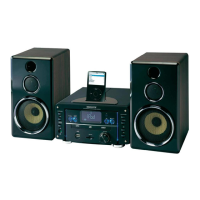
This document describes the SCOTT MDX i65, a multi-format audio/video system designed for home entertainment.
Function Description
The MDX i65 is a versatile audio/video system capable of playing various media formats. It features a DVD player, USB and SD/MMC/MS card playback, and an AM/FM tuner. The system supports multiple audio and video output options, including component video, SCART, and composite video, allowing for flexible connection to different display devices. It also offers a 3.1 channel surround sound output for an immersive audio experience. The device can be controlled via a main unit interface or a comprehensive remote control.
Important Technical Specifications
- Laser Type: Semiconductor laser GaAlAs
- Wave Length: 650nm
- Output Power: 7mW
- Beam Divergence: 60 degrees
- Supported Disc Formats: DVD, DivX, Xvid, MPEG4, VCD, SVCD, MP3, WMA, CD, CD-R/RW, JPEG.
- Supported USB/Card Formats: MP3, WMA, JPEG.
- Video Output: Component (Y, Pb, Pr), SCART, Composite Video.
- Audio Output: Analog stereo, Coaxial digital, Optical digital, 3.1 channel surround.
- Tuner: AM/FM stereo with RDS functionality.
- Power Supply: AC 100-240V, 50/60Hz.
- Power Consumption: Not specified, but designed for energy efficiency.
- Dimensions: Not specified, but appears to be a compact shelf system.
- Weight: Not specified.
Usage Features
The MDX i65 offers a user-friendly interface with both front panel controls and a full-function remote control.
Main Unit Controls:
The front panel includes essential controls such as power on/standby, open/close disc tray, play/pause, stop, volume adjustment, track/chapter skip, station tuning, infrared sensor for remote control, headphone jack, USB connector, and card connector.
Remote Control Features:
The remote control provides extensive functionality, including direct access to various input sources (Disc, USB, Card, AUX), numerical buttons for track/chapter selection, and dedicated buttons for program, memory, OSD/info, time, timer, sleep, setup, and tuning. It also features controls for video playback (play, pause, stop, skip, fast forward/rewind), audio adjustments (volume, mute, bass, EQ), and display settings (zoom, angle, subtitle). Specific buttons for repeat modes (repeat, repeat all, bookmark/PBC), intro, RDS/A-B, rand, P-scan, ST/mono, angle, zoom, and demo are also available.
The system features a comprehensive setup menu accessible via the remote control. This menu allows users to configure various aspects of the system:
- System Setup: TV system (NTSC, PAL, PAL-M, AUTO, multi-system), screen saver (on/off), video type (interlace-YUV, P-SCAN YPBPR, TV-RGB), password for parental control, rating for content restriction, and default settings.
- Audio Setup: Downmix mode (LT/RT, stereo, VSS), bass mode (all LG SPK, all SM SPK, mixed SPK), OP mode (line out, RF remod), dynamic range (full, 1/8, 2/8, off), and dual mono (stereo, mono L, mono R, mix mono).
- Video Setup: Brightness, contrast, hue, saturation, sharpness, and angle switch (on/off).
- Digital Audio Out: SPDIF/OFF, SPDIF/RAW, SPDIF/PCM.
- Key: Adjusts the audio key for karaoke.
Clock/Timer Functionality:
The MDX i65 includes a clock and timer function. Users can set the current time (24 or 12-hour format) and configure a sleep timer to automatically turn off the system after a set period. The system also supports RDS function for automatic time synchronization.
Tuner Operation:
The AM/FM tuner allows for manual and automatic station tuning. Users can store up to 20 stations for FM and 20 for AM in memory. The system supports RDS (Radio Data System) for displaying station information like RDS name, radio text, PTY (program type), and time.
CD/DVD/VCD/MP3-CD Playback:
The system supports playback of various disc formats.
- Loading a Disc: Discs are loaded into a tray that opens and closes via a button on the main unit or remote.
- Playing a DVD Disc: Standard playback controls (play, pause, stop, skip, fast forward/rewind) are available. The system supports various speed selections (x2, x4, x8, x20) for fast forward/rewind.
- DivX/Xvid Playback: The MDX i65 supports DivX and Xvid files with stereo audio output. It handles various DivX filename conventions and subtitles.
- Playing a VCD Disc: Supports standard VCD playback with PBC (Play Back Control) functionality.
- Playing an MP3 or WMA Music CD: Allows selection of albums and tracks from a list displayed on the TV screen. Supports various speed selections for fast forward/rewind.
- JPEG Picture CD Playback: Displays JPEG images on the TV screen, with zoom functionality and rotation options.
- DVD Bookmark: Allows users to set up to 5 bookmarks for easy return to specific points in a movie.
- Sound Features: Includes EQ (equalizer) and Bass Boost functions for audio enhancement.
USB Playback:
The USB storage device input allows playback of MP3, WMA, and JPEG files. Users can navigate through directories and select files for playback. The system supports various display modes for music and video files, and image rotation for JPEG files.
Card Playback:
Similar to USB playback, the SD/MMC/MS card slot allows playback of MP3, WMA, and JPEG files from compatible memory cards. Navigation, file selection, and display options are consistent with USB playback.
Maintenance Features
The manual emphasizes safety precautions and provides troubleshooting tips.
Safety Warnings:
- Important: Read all warnings and instructions before operating the device.
- Risk of Electric Shock: Do not open the cabinet; refer servicing to qualified personnel.
- Laser Safety: This product contains a Class 1 laser. Do not stare into the beam.
- Moisture/Fire Hazard: Do not expose the appliance to rain or moisture.
- Installation: Ensure proper ventilation (at least 20 cm clearance from the rear and top, 10 cm from each side).
- Power Cord: Do not place heavy objects on the power cord.
- Cleaning: Clean only with a damp cloth.
- Ventilation: Do not block ventilation openings.
- Heat Sources: Do not install near heat sources.
- Power Cord Protection: Protect the power cord from being walked on or pinched.
- Attachments/Accessories: Use only attachments/accessories specified by the manufacturer.
- Cart/Stand: Use only with a cart, stand, tripod, bracket, or table specified by the manufacturer.
- Lightning Storms: Unplug the apparatus during lightning storms or when unused for long periods.
- Damage: Refer servicing to qualified service personnel if the apparatus is damaged (e.g., liquid spilled, objects fallen into, dropped).
- Servicing: Do not attempt to service the product yourself. Refer all servicing to qualified service personnel.
- Replacement Parts: Use only specified replacement parts.
- Safety Check: Perform safety checks after any service or repairs.
Troubleshooting:
The manual includes a "Problems" section to help users diagnose and resolve common issues:
- No Power: Check power plug and AC outlet.
- No Picture: Check TV connection, input selection, and channel selector.
- Distorted Picture: Clean disc, check for fingerprints, and ensure no small amounts of picture distortion.
- Completely Distorted Picture: Check if the disc is formatted to the TV-set used (PAL/NTSC).
- No Color in Picture: Check if the disc is not formatted to the TV-set used (PAL/NTSC) and if DVD player is connected through VCR.
- Disc Can't Be Played: Ensure disc is label side up, clean disc, and check for defects.
- No Sound: Check audio connections and amplifier.
- No Return to Start-up Screen When Disc is Removed: Check if the program requires another disc to be loaded.
- The Player Does Not Respond to the Remote Control: Aim remote at sensor, check batteries, and remove obstacles.
- No Audio at Digital Output: Check digital connections and menu settings for digital output.
- Buttons Do Not Work: Unplug and reconnect the player.
- You Have Forgotten the Password: Follow the steps to reset the password (enter 7,6,4,1,5, then press play/enter).
- The Disc is Stuck Inside the Player: Disconnect power, wait 2 minutes, then plug back in and press disc tray open button.
The symbol of a crossed-out wheeled bin indicates that the product should not be disposed of with household waste. It should be taken to a separate collection system for recycling in the EU. Contact local authorities or the dealer for more information.

 Need help?
 General

 To Next Page