GB–13
BASIC SETUP
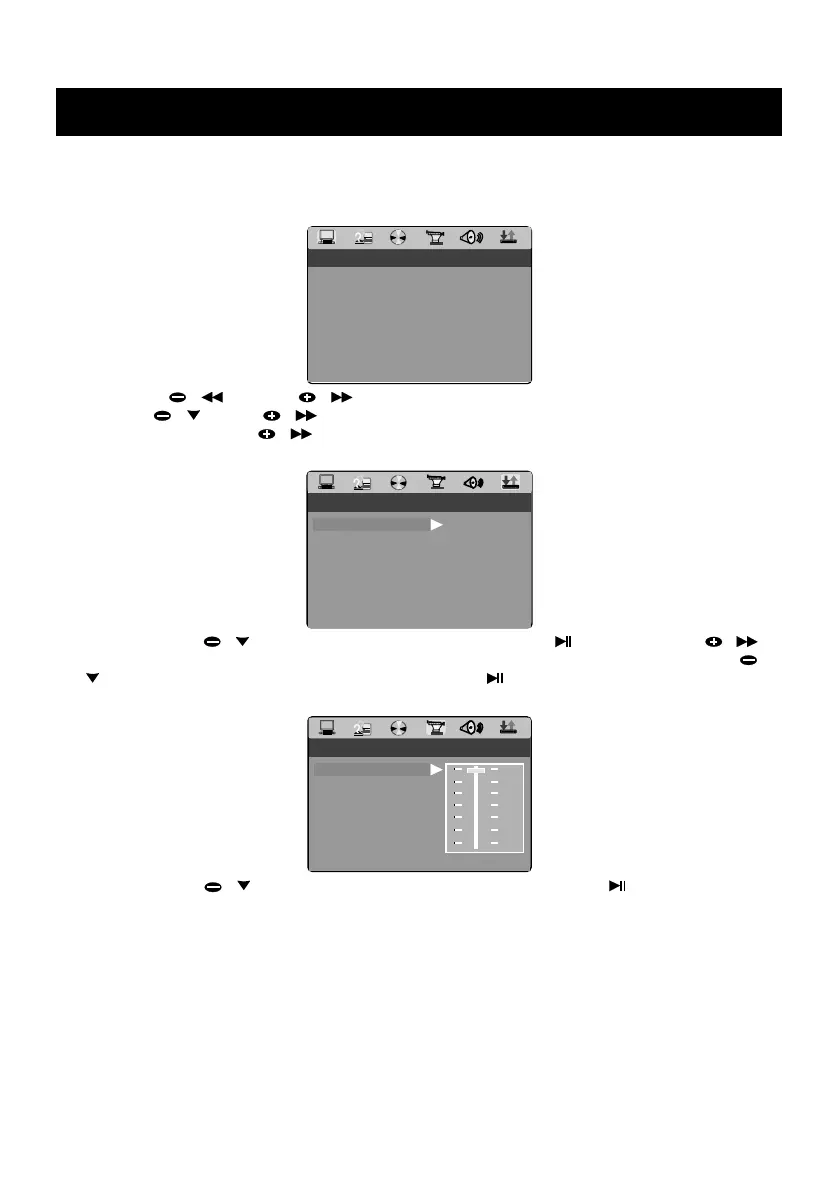
1. General Steps of Setup Menu
a.) In DISC, USB or CARD mode, press the SETUP key on the remote control , the main setup
menu appears as below. When the main menu displayed, the DVD system will auto pause.
RATING
DEFAULT
EXIT SETUP
SYSTEM SETUP
SCREEN SAVER
VIDEO
TV TYPE
PASSWORD
TV SYSTEM
b.) Press TUN / and TUN / key to highlight the icon of the desired page, then press
PRESET / or TUN / key to activate that page; For example, if you want to setup the
audio page, press TUN / key to highlight the audio icon, the audio page will be displayed
on the screen.
AUDIO SETUP
EXIT SETUP
OP MODE
DYNAMIC RANGE
LINE OUT
RF REMOD
DUAL MONO
c.) Press PRESET / key to highlight the desired option. Press / ENTER or TUN /
key to select, the choices of that option appear on the right; For example, press PRESET /
key to highlight the BRIGHTNESS option, then press / ENTER key to select, the
brightness choices appear on the right.
VIDEO SETUP
EXIT SETUP
BRIGHTNESS
CONTRAST
HUE
SATURATION
SHARPNESS
12
10
8
6
4
2
0
ANGLE SWITCH
d.) Press PRESET / key to highlight the Exit Setup option, then press / ENTER key or
SETUP key again to exit Setup Menu.


 To Next Page