GB–19
BASIC SETUP
–SPDIF / PCM: Choose this setting if your DVD player is connected to a 2-channel digital stereo
amplifier; When playing a disc recorded with Dolby Digital and MPEG audio formats, audio signals
will be modulated into a 2-channel PCM signal, and it will be output from the Coaxial Output jack
or Optical Output jack.
DIGITAL SETUP
EXIT SETUP
AUDIO OUT
KEY
SPDIF/OFF
SPDIF/RAW
SPDIF/PCM
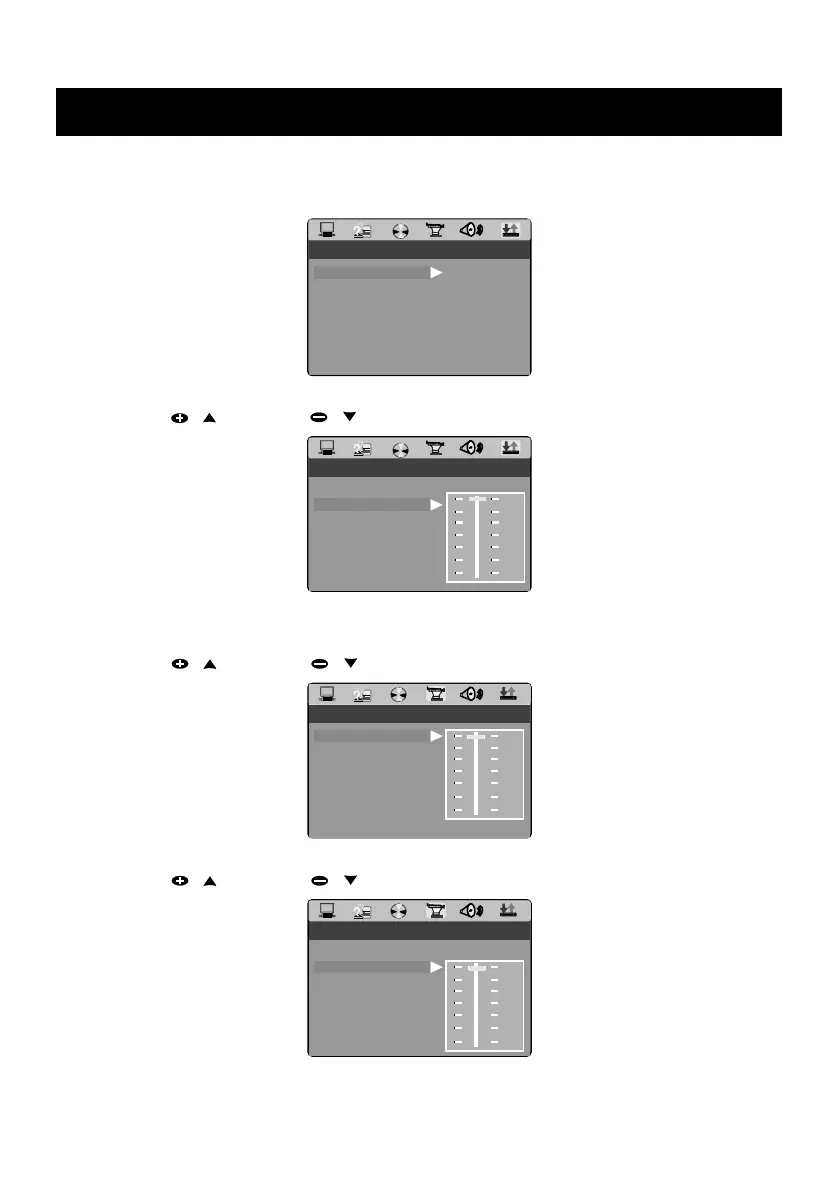
• KEY
Press PRESET / or PRESET / key to move the scroll and adjust the key.
DIGITAL SETUP
EXIT SETUP
KEY
AUDIO OUT
#
+4
+2
0
-2
-4
b
VIDEO SETUP
• BRIGHTNESS
Press PRESET / or PRESET / key to move the scroll and adjust the brightness.
VIDEO SETUP
EXIT SETUP
BRIGHTNESS
CONTRAST
HUE
SATURATION
SHARPNESS
12
10
8
6
4
2
0
ANGLE SWITCH
• CONTRAST
Press PRESET / or PRESET / key to move the scroll and adjust the contrast.
VIDEO SETUP
EXIT SETUP
SATURATION
SHARPNESS
12
10
8
6
4
2
0
BRIGHTNESS
CONTRAST
HUE
ANGLE SWITCH


 To Next Page