GB–5
INSTALLATION
Install your DVD player on a stable flat surface. The unit should be situated with enough space
around it so that proper heat ventilation is assured. Allow 20 cm clearance from the rear and the
top of the unit, and 10 cm from each side.
Caution :
Do not install this equipment in confined space with poor ventilation.
This product incorporates copyright protection technology that is protected by method claims of certain
U.S. patents and other intellectual property rights owned by Macrovision Corporation and other rights
owners. Use of this copyright protection technology must be authorized by Macrovision Corporation,and
is intended for home and other limited viewing uses only unless otherwise authorized by Macrovision
Corporation. Reverse engineering or disassembly is prohibited
.
This product incorporates copyright protection technology that is protected by method claims of certain
U.S.
patents and other intellectual property rights owned by Macrovision Corporation and other rights
owners.
Use of this copyright protection technology must be authorized by Macrovision Corporation,and
is
intended for home and other limited viewing uses only unless otherwise authorized by Macrovision
Corporation.
Reverse engineering or disassembly is prohibited
.
Apparatus Claims of U.S. Patent Nos.4,631,603;
4,819,098; 4,907,093;5,315,448;and 6,516,132
licensed for limited viewing uses only.
Apparatus Claims of U.S. Patent Nos.4,631,603;
4,819,098;
4,907,093;5,315,448;and 6,516,132
licensed
for limited viewing uses only.
Consumers should note that not all high definition televison sets are fully compatible with this product and
may cause artifacts to be displayed in the picture. In case of 525 or 625 progressive scan picture problems,
it is recommended that the user switch the connection to the standard definition output. If there are
questions regarding our TV set compatibility with this model 525p and 625p DVD player, please contact
our customer service center.
Consumers should note that not all high definition televison sets are fully compatible with this product and
may
cause artifacts to be displayed in the picture. In case of 525 or 625 progressive scan picture problems,
it
is recommended that the user switch the connection to the standard definition output. If there are
questions
regarding our TV set compatibility with this model 525p and 625p DVD player, please contact
our
customer service center.
Manufactured under license from Dolby Laboratories.
Dolby and the double-D symbol are trademarks of
Dolby Laboratories.
Manufactured under license from Dolby Laboratories.
Dolby and
the double-D symbol are trademarks of
Dolby
Laboratories.
CONNECTIONS
1) Connecting to TV
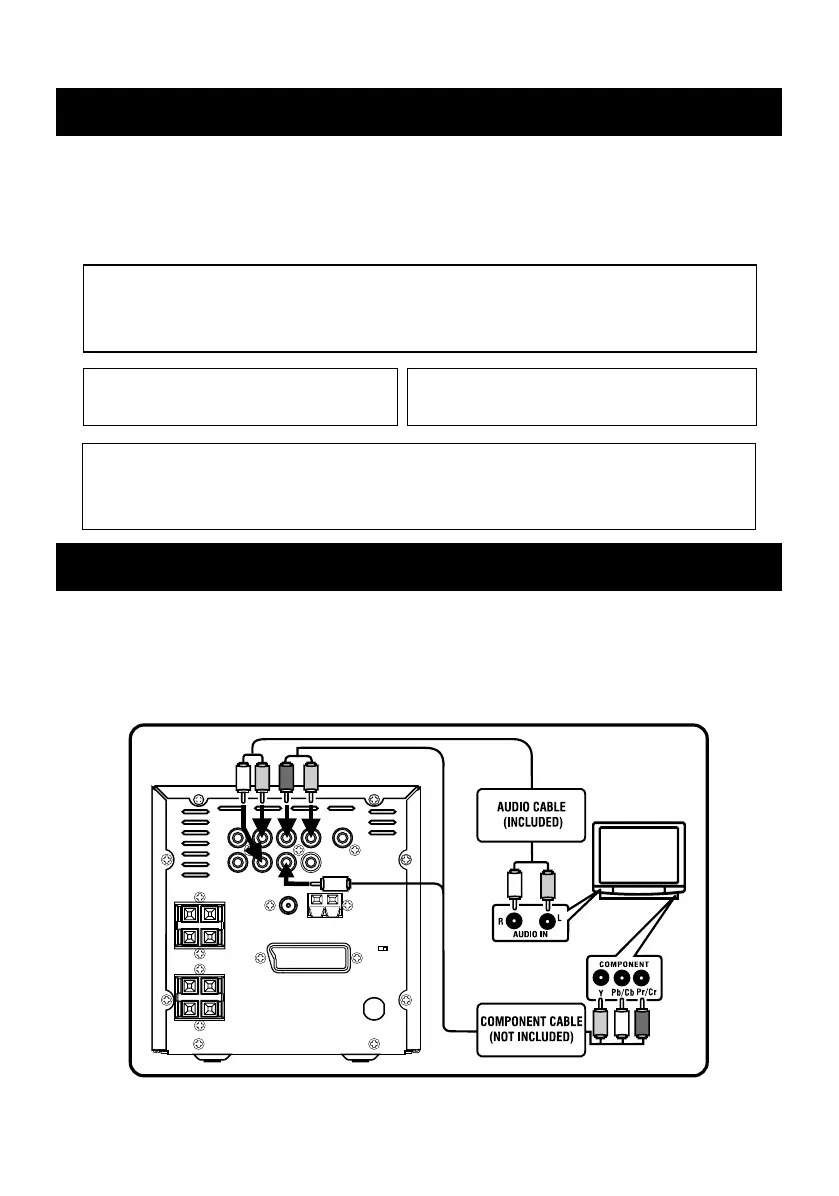
Only the component cable and the audio cable need be connected if your TV has COMPONENT
input as this will give a higher quality picture. Otherwise use the SCART or Video input of the TV.
COMPONENT CABLE CONNECTING


 To Next Page