GB–9
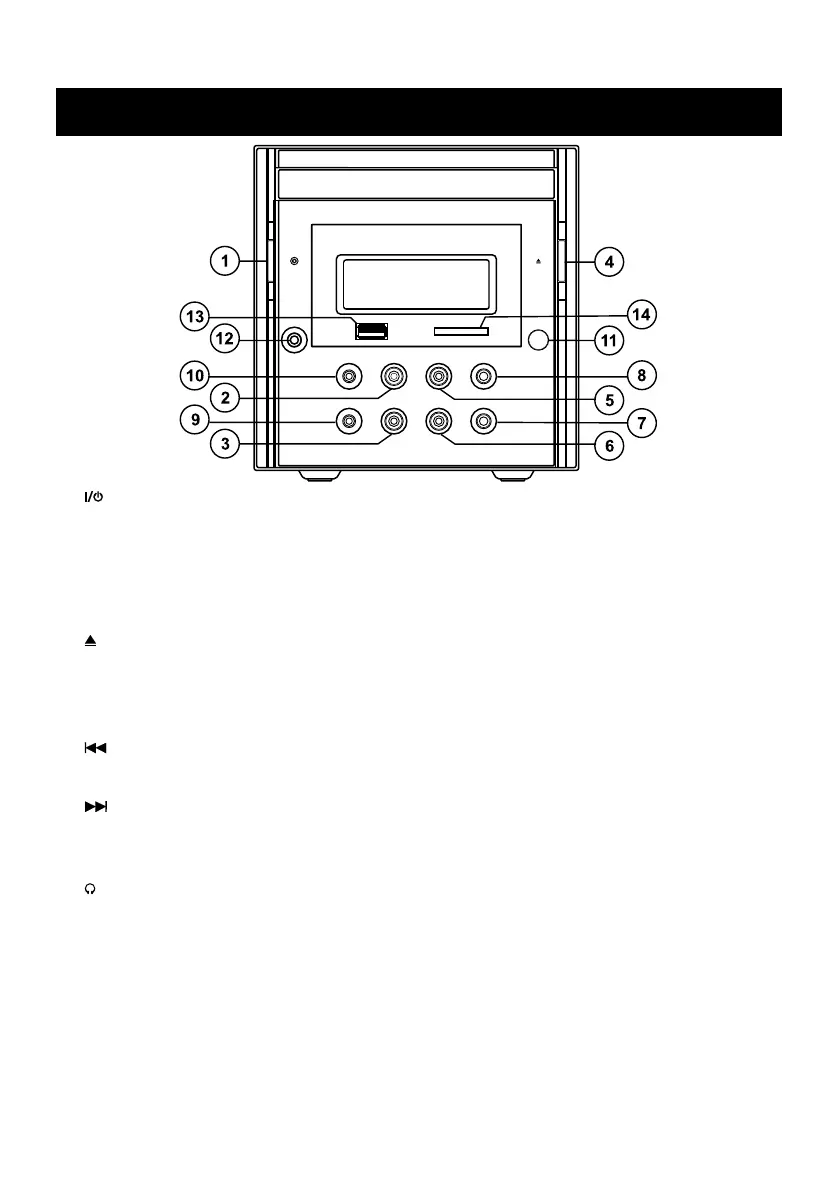
MAIN UNIT
1. – Turns the system on or standby. Remember to remove the power of the system, if you
are not going to use the system for a period of time.
2. FM/AM – Selects TUNER as input source, switches the DVD Micro System on from standby
with TUNER selects as the input source. Switches between the FM and AM frequency bands.
3. SOURCE – Switches the DVD Micro System on from standby with DISC, USB, CARD, AUX IN
select as the input source.
Switches among the DISC, USB, CARD , AUX IN as input source.
4. – To open or close the disc tray.
5. PLAY/PAUSE – In DISC , USB or CARD mode: starts disc playback; pauses playback.
6. STOP - Ends DISC , USB or CARD playback.
7. VOLUME – – Adjusts Volume down.
8. VOLUME + – Adjusts Volume up.
9. / PRESET – – In Disc playback mode, press to skip backward to the other track/chapter; In
Tuner mode, press briefly to select a preset station down. Press and hold down to start the
station search mode backwards.
10. / PRESET + – In Disc playback mode, press to skip forward to the other track/chapter; In
Tuner mode, press briefly to select a preset station up. Press and hold down to start the
station search mode forwards.
11. IR – Infrared sensor for remote control.
12. – Headphones jack for connecting a stereo head phone set with a jack plug (no including).
The loudspeakers are switched off automatically.
13. USB – USB connector.
14. CARD – CARD connector.


 To Next Page