GB–10
REMOTE CONTROLS
10
2
8
15
13
24
28
21
14
9
1
27
16
12
7
3
6
18
23
25
31
33
34
37
38
41
42
5
11
20
17
26
19
29
30
32
35
36
39
40
43
44
22
4
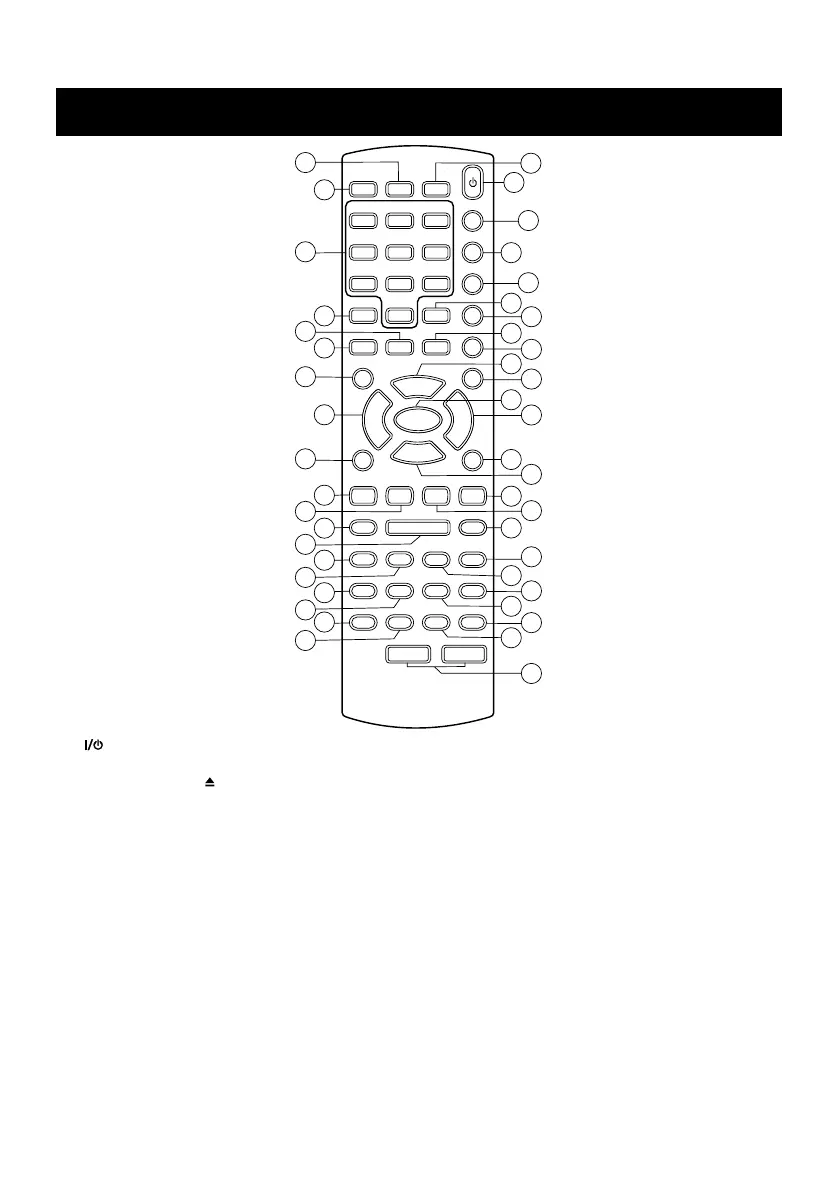
1. – Turns the system on or standby. Remember to remove the power, if you are not going to
use the system for a long time.
2. OPEN / CLOSE – To open / close the disc tray.
3. DVD – Selects Disc mode from other source modes; In Standby mode, turns the system on at
Disc mode directly.
4. TUNER – Selects Tuner AM, FM band from other source modes; In Standby mode, turns the
system on at turn AM or FM band directly.
5. AUX – Selects AUX mode from other source modes; In Standby mode, turns the system on at
AUX mode directly.
6. USB – Selects USB mode from other source modes; In Standby mode, turns the system on at
USB mode directly.
7. CARD – Selects CARD mode from other source modes; In Standby mode, turns the system on
at CARD mode directly.
8. DIGITS (0~9) – Numerical buttons for various inputs. In DISC, USB, CARD mode, selects
tracks or files directly. In TUNER mode, selects preset station position directly.
9. +10 – If the number of track of files is over 10, press >>+10 << to set ten digit, then
press numerical key to select primacy number.


 To Next Page