Rev.2
53
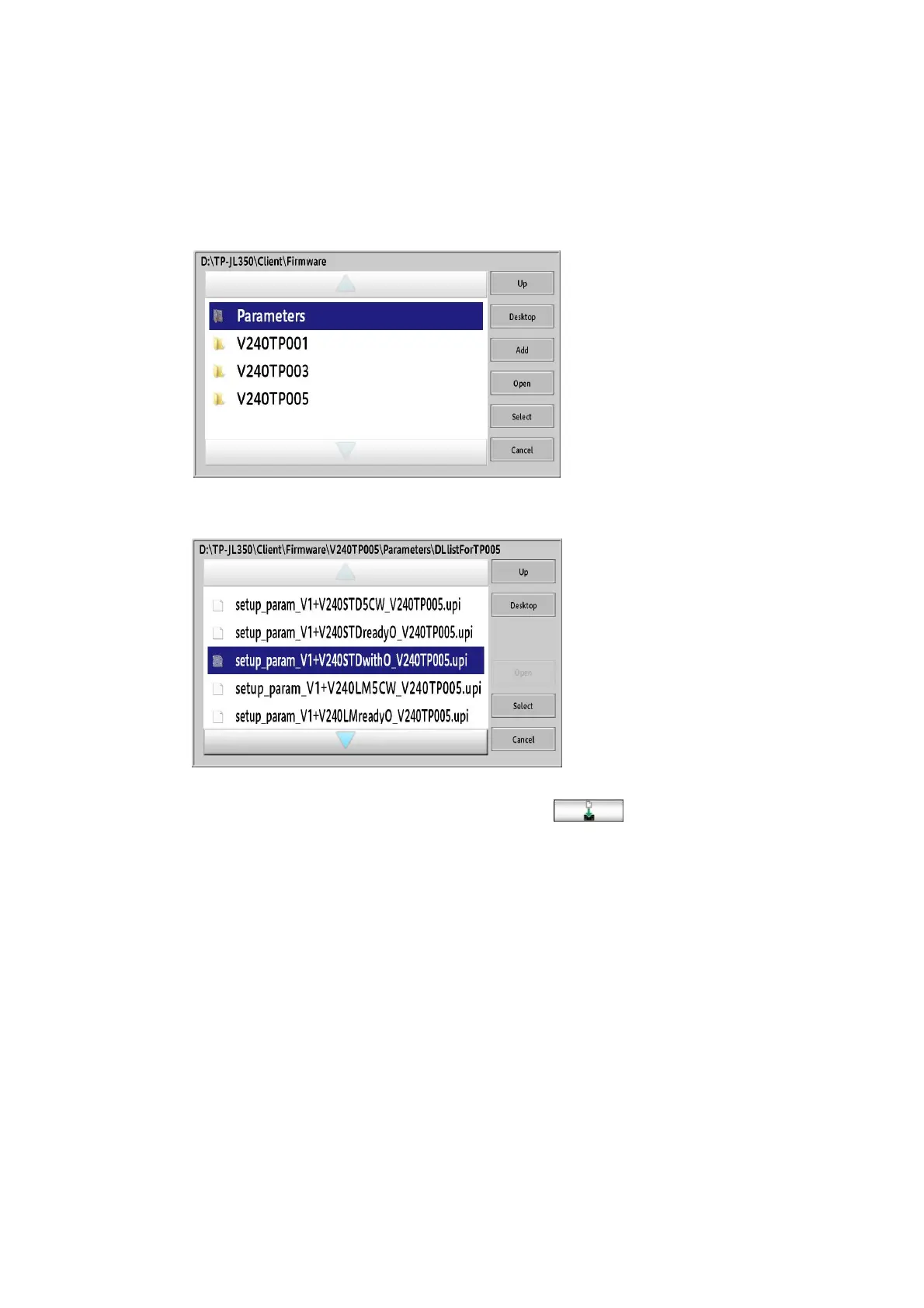
25. Access the layer of the target folder using “Up” and “Open”.
→D:\TP-JL350\Client\FirmWare\V240TP005\Parameters\DLlistForTP005
26. The Batch download file is displayed.
27. Select “
setup_param_V1+V240xxxx.upi
”, and then click.
*When upgrading a machine with Standard ink of 6C, select
“
setup_param_V1+V240STDwithO_V240TP005.upi
”.
*When upgrading a machine with Standard ink of 5CW, select
“
setup_param_V1+V240STD5CW_V240TP005.upi
”.
*When upgrading a machine with Standard ink of 6C(Orange ready), select
“
setup_param_V1+V240STDreadyO_V240TP005.upi
”.
*When upgrading a machine with LM ink of 6C, select
“
setup_param_V1+V240LMwithO_V240TP005.upi
”.
*When upgrading a machine with LM ink of 5CW, select
“
setup_param_V1+V240LM5CW_V240TP005.upi
”.
*When upgrading a machine with LM ink of 6C(Orange ready), select
“
setup_param_V1+V240LMreadyO_V240TP005.upi
”.



 To Next Page