31
EN
Appuyer
1~3 Sec
Appuyer
3 Sec
Appuyer
1 2 3
4 5 6
Appuyer
1~3 Sec
Appuyer
3 Sec
Appuyer
1 2 3
4 5 6
Appuyer
3 secondes
1
2
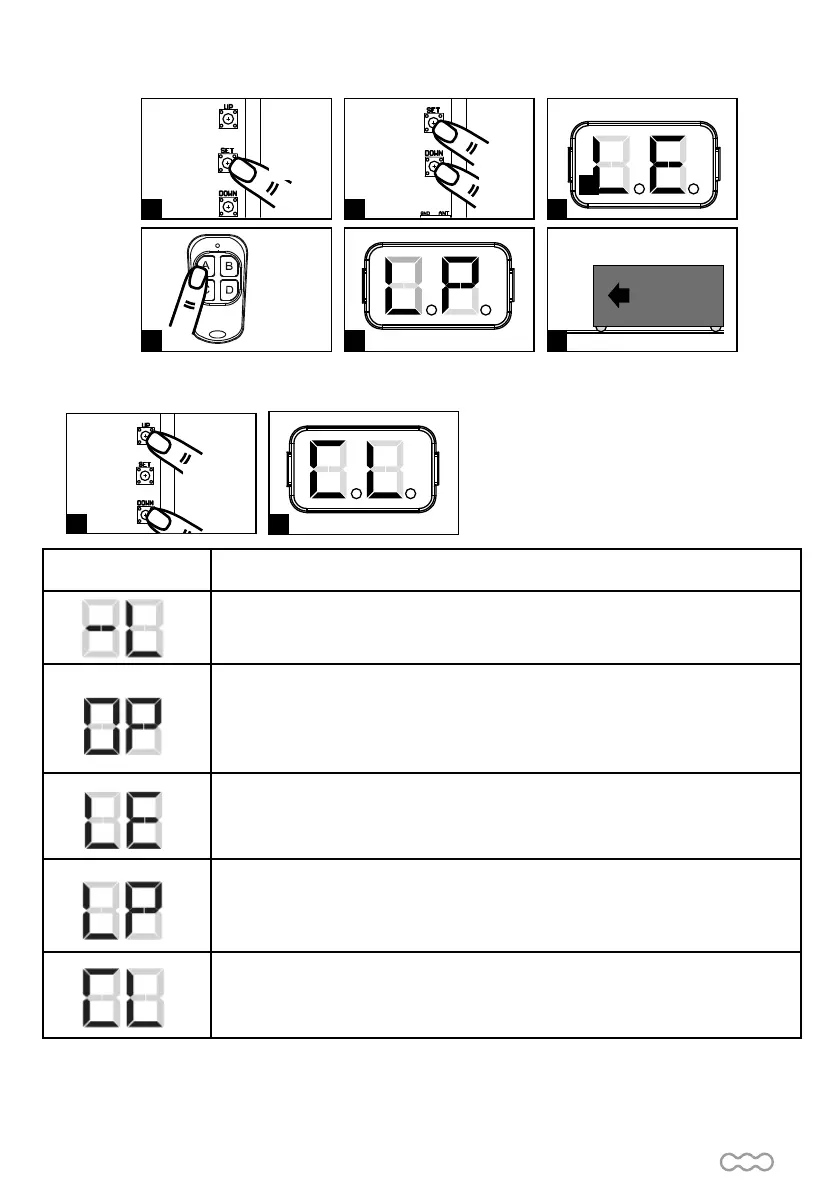
(2)To reset factory settings.
Press UP and DOWN for 3 seconds, and the LED display shows « CL ».
If your gate is opening when you start the programmation, stop the program to push on SET. L» appears on the
display, wait for it to turn off then go on the program 1 to reverse the rotation direction of your gate (see following
page).
LED Display Programmable functions
« -L » : the system learning is not done
« OP » : the system is in normal operation
To program, press SET button for 3 seconds. When the LED display changes from «
OP » to « 1 », press UP or DOWN to change the function settings (1 to P). Then press
SET to enter the sub function within each group, press UP or DOWN to select sub
functions and press SET to valid
« LE » : Enter the learning mode and then wait for learning instructions.
« LP » : the system learning is in process.
The auto-learning process of gate moving :
«Gate open to the end - stop close to the end - stop»
« CL » : Reset factory setting.
Push
Push 3
sec
Push 1-3
sec
Push 1-3
sec


 To Next Page