32 EN
LED
viewer
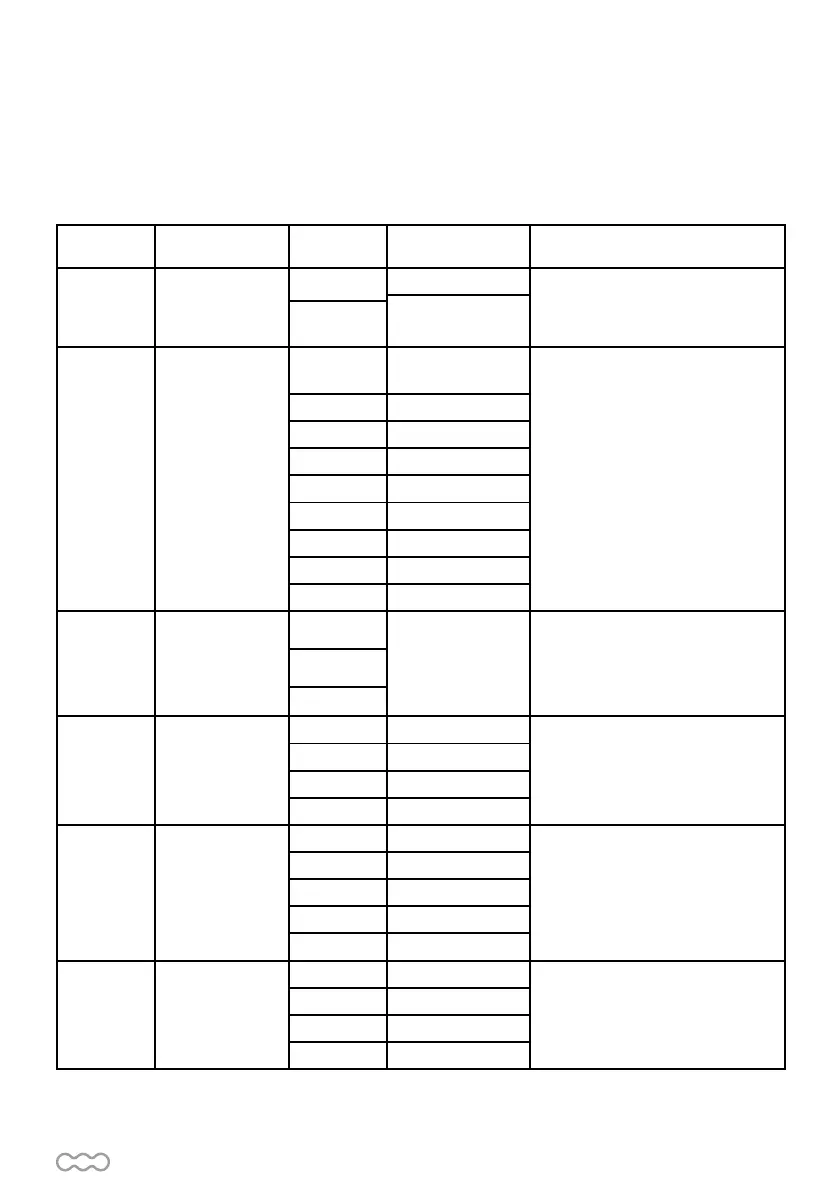
Definition Function Value Description
1
Options of Gate
opening direction
1-1
Clockwise opening
The function can adjust the direction
of gate opening. The factory setting
is « 1-1 ».
CounterClockwise
opening
1-2
2 Automatic closing
2-0
No automatic
closing
This function allows to adjust the
gate closing automatic after the
paused time.
The factory setting is « 2-0 » : no
automatic closing
2-1 5 seconds
2-2 15 seconds
2-3 30 seconds
2-4 45 seconds
2-5 60 seconds
2-6 80 seconds
2-7 120 seconds
2-8 180 seconds
3
There actions
of photocell/
safety edge/ loop
detector when
they detecting
3-1
Do not modify The factory setting is « 3-1 »
3-2
3-3
4 Motor speed
4-1 Slow
The factory setting is « 4-3 »
4-2 Middle
4-3 Fast
4-4 Very fast
5
The deceleration
setting for gate
moving
5-1 75% of full distance
The factory setting is « 5-1 »
5-2 80%
5-3 85%
5-4 90%
5-5 95%
6
Deceleration
speed
(% full speed)
6-1 80%
The factory setting is « 6-3 »
6-2 60%
6-3 40%
6-4 25%
D3- Programmable function settings
To enter in the settings, maintain the button SET 5 seconds. A «1» appears. Scroll with UP or DOWN until the
wanted function, then SET to enter in this function. Then, modify the value with UP or DOWN (Be carefull, if no
button is pressed for 5 seconds, the display goes out of the automatic settings mode).


 To Next Page