EasyManua.ls Logo

SEA USER 1 - 24V DG MAXI - User Manual

SEA USER 1 - 24V DG MAXI
40 pages
Print Icon
To Next Page IconTo Next Page
Loading...
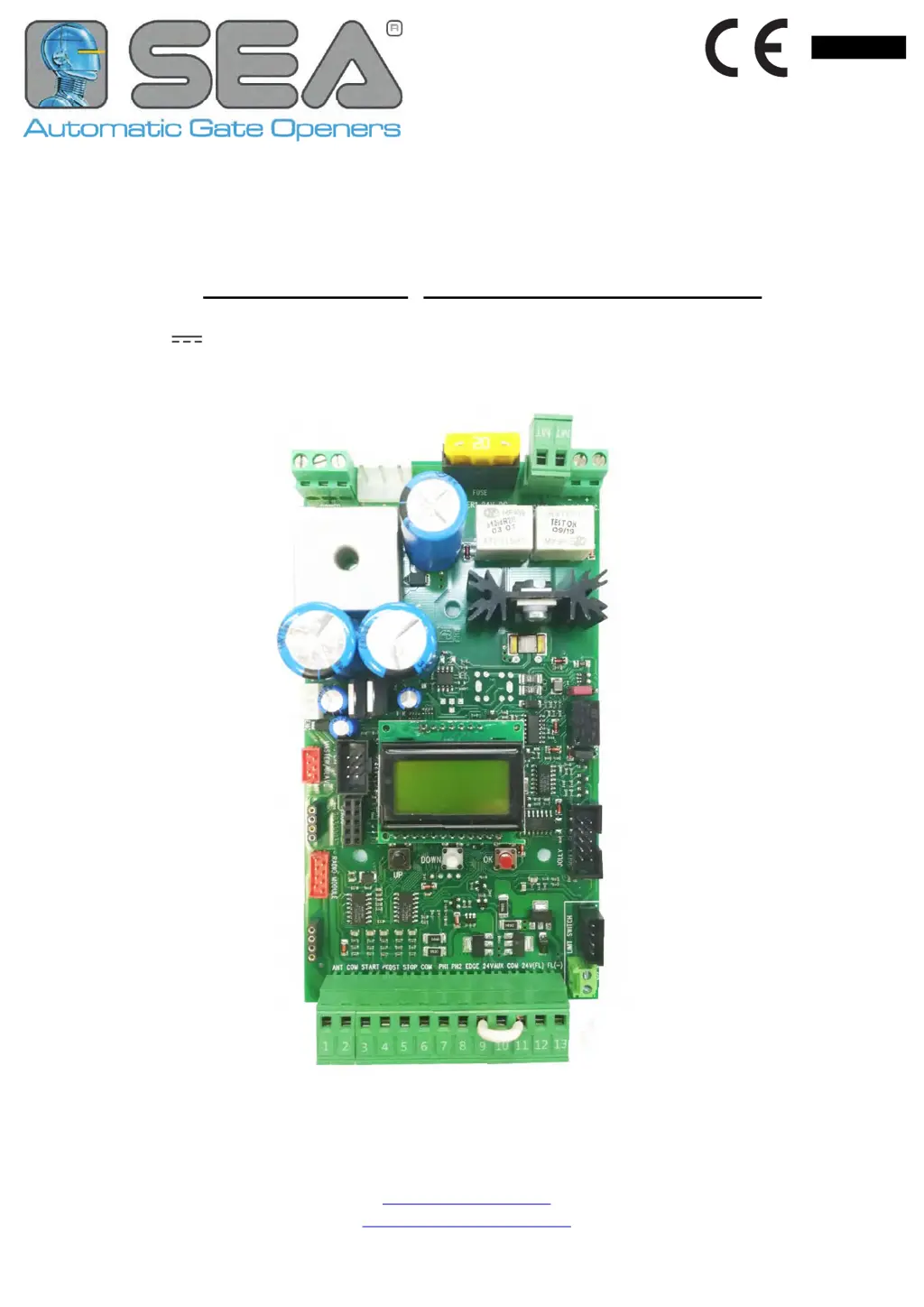
USER 1 24V DG MAXI
41121 REV.   1/21
 CTC CT T  D T D 
nlis
International registered trademark n. 804888
SEA S.p.A.
ona Indstriale Sant Atto  42  eramo  IA
elephone   1 41  a   1 44
.seateam.com
seacomseateam.com

Questions and Answers

  • B
    Bailey BatesSep 14, 2025
    What to do if SEA USER 1 - 24V DG MAXI Control Unit gate opens but doesn’t close?
    • A
      allen03Sep 14, 2025
      If the SEA Control Unit gate opens but doesn’t close, check the jumpers or connected devices of the photocells, stop contact, and edge contact, and observe the signals on the warning lamp. Also, check if the ammeter alarm has activated and increase the torque parameter if needed.
  • B
    Bonnie TranAug 25, 2025
    What to do if SEA USER 1 - 24V DG MAXI gate stops during travel and reverses immediately?
    • L
      Laura GreenAug 25, 2025
      If your SEA Control Unit gate stops and reverses immediately, it could be due to several reasons. First, check the Open and Close inputs for any active signals. Next, evaluate the obstacle sensitivity and increase it if necessary. Lastly, ensure the battery voltage is at least 23.0 Vdc, charging or replacing the batteries if needed.
  • W
    William OrtizAug 25, 2025
    Why SEA USER 1 - 24V DG MAXI Control Unit does not run and diagnostic display not on?
    • M
      Michael BerryAug 26, 2025
      If your SEA Control Unit doesn't run and the diagnostic display is off, start by checking the AC power supply. Then, inspect the fuses. If those are fine, the control board might be defective and need replacement. If running on battery, ensure they are charged via AC or solar power, or replace them if necessary.
  • J
    Justin RhodesAug 26, 2025
    What to do if SEA USER 1 - 24V DG MAXI operator does not respond to a wired control/command?
    • S
      sanchezjamieAug 26, 2025
      If the operator of your SEA Control Unit isn't responding to wired commands like Open or Close, start by checking the Open and Close inputs for any stuck signals. Ensure the Stop button isn't stuck, and verify the Reset button's functionality. Also, inspect all Entrapment Protection Device inputs for stuck sensors. If operating on battery power, ensure the batteries are adequately charged or replace them.
  • V
    Victoria PhillipsSep 14, 2025
    How to set correct limits if SEA USER 1 - 24V DG MAXI gate moves, but cannot set correct limits?
    • M
      Matthew GordonSep 15, 2025
      To address the issue of the SEA Control Unit gate moving but not allowing you to set correct limits, first use the manual disconnect, manually move the gate, and ensure it moves easily from limit to limit, repairing the gate as needed. The gate must move freely throughout its entire range.
  • M
    Michael RichSep 23, 2025
    Why SEA USER 1 - 24V DG MAXI gate doesn’t move when motor is running?
    • D
      Daniel WestSep 23, 2025
      If the SEA Control Unit gate doesn’t move while the motor is running, make sure the motor is not in the released position; if it is, re-lock the motor. Additionally, check for and remove any obstacles blocking the gate's movement.
  • J
    Jessica StanleySep 7, 2025
    Why photoelectric sensor of SEA USER 1 - 24V DG MAXI does not stop or reverse gate?
    • J
      Justin Blake PhDSep 7, 2025
      If the photoelectric sensor of your SEA Control Unit does not stop or reverse the gate, check the photoelectric sensor wiring and retest to ensure obstructing the sensor stops the gate. Replace the sensor if defective and retest. If sensors are too far apart, move them closer or use edge sensors instead.
  • T
    Thomas WilsonSep 7, 2025
    Why edge sensor of SEA Control Unit does not stop or reverse gate?
    • M
      Melissa KnoxSep 8, 2025
      If the Edge Sensor of your SEA Control Unit does not stop or reverse the gate, check the edge sensor wiring and retest that activating the edge sensor causes the gate to stop and reverse. If that doesn't work, replace the defective edge sensor and retest.
  • K
    Karen BarkerSep 23, 2025
    How to fix SEA USER 1 - 24V DG MAXI motor that turns only one way?
    • D
      Darlene HarperSep 23, 2025
      If the SEA Control Unit motor turns only one way, try inverting the motor phase to see if the motor changes direction. If the motor is blocked, change the cable. If the motor only goes in one direction, the motor relay direction is damaged.
  • R
    rebecca52Aug 31, 2025
    What to do if SEA USER 1 - 24V DG MAXI Control Unit gate doesn’t move while the motor is running?
    • M
      Monica SmithAug 31, 2025
      If your SEA Control Unit gate doesn’t move while the motor is running, first, ensure the motor is not in the released position and re-lock it. Then, check for any obstacles blocking the gate's path and remove them.

Summary

1 - COMPONENTS

2 - CONNECTIONS

4 - CONNECTIONS ON CN1

Details on connecting devices to the CN1 terminal block for various inputs.

5 - CONNECTIONS ON CN2 and CN3

Explains connections for pre-wired and non-pre-wired limit switches.

6 - CONNECTIONS ON CN4

6.1 - MASTER;SLAVE CIRCUITS

Information on configuring two operators in a Master/Slave setup.

10 - CONNECTIONS ON CN8

11.1 - SEM 2 MANAGEMENT UNIT CONNECTIONS

Details on connecting the SEM 2 management unit via the EXP connector.

12 - CONNECTIONS ON CNE

12.1 - ENCODER CONNECTION

How to connect the encoder to the CNE terminal for precise movement control.

13.1 - I;O SURGE PROTECTOR CIRCUIT CONNECTION

Connecting the surge protector to safeguard inputs and power supply.

14 - PRELIMINARY

14.1 - BASIC PROGRAMMING MENU AND SPECIAL MENU

Overview of accessing basic and special menus for configuration.

15 - BASIC MENU FUNCTIONS

1 - LANGUAGE

Allows selection of the user interface language for the control unit.

2 - TRANSMITTERS

Manages radio transmitter programming and functions.

3 - MOTOR

Configuration of motor type and related parameters.

16 - WORKING TIMES SELF-LEARNING

16.1 - QUICK SELF-LEARNING PROCEDURE

Expedited procedure to learn gate operational times without full setup.

17 - OPERATING LOGICS

AUTOMATIC LOGIC

Gate opens with first start, reverses on closing with start.

SAFETY LOGIC

Gate opens with first start, reverses on opening/closing with start.

DEAD MAN LOGIC

Gate operates only while the start button is held pressed.

18 - PASSWORD MANAGEMENT

PASSWORD MANAGEMENT

Process for setting and managing a 4-digit access password.

19 - INPUT STATUS CHECK AND MANAGEMENT

19.1 - ACCESS TO THE INPUTS STATUS MENU AND MANAGEMENT

How to access and view the status of all control unit inputs.

19.2 - USER 1 24 V DG MAXI INPUT MANAGEMENT MENU

Detailed menu for enabling/disabling specific input functions.

20 - RECEIVERS AND REMOTE CONTROLS

20.1 - REMOTE CONTROLS PROGRAMMING

Instructions for programming rolling code and fix code radio transmitters.

20.2 - START COMMAND QUICK SELF-LEARNING

Simplified procedure to store the START command via remote control.

ALARMS

FAULT BLOCKED MOTOR

Indicates a motor blockage or power supply issue requiring immediate attention.

FAULT MOTOR

Signifies a motor short circuit or control unit damage requiring replacement.

FAULT SELF-TEST

Indicates a failure during the photocell self-test sequence.

TROUBLESHOOTING

Operator doesnt respond to any START impulse

Common issue where the gate does not react to start commands.

Gate doesnt move while the motor is running

Problem where the motor runs but the gate remains stationary.

Gate doesnt close automatically

Issue where the automatic closing function fails or is improperly set.

SEA USER 1 - 24V DG MAXI Specifications

General IconGeneral
BrandSEA
ModelUSER 1 - 24V DG MAXI
CategoryControl Unit
LanguageEnglish

Related product manuals