EasyManua.ls Logo

SEA GATE 2 - User Manual

SEA GATE 2
24 pages
Print Icon
To Next Page IconTo Next Page
Loading...
GATE 2
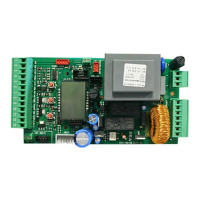
CONTROL UNIT
67410191
International registered trademark n. 2.777.971

Other manuals for SEA GATE 2

Questions and Answers

  • T
    Tracy GuerreroAug 16, 2025
    Why doesn't my SEA Control Unit gate close automatically?
    • J
      Jordan DayAug 16, 2025
      If your SEA Control Unit gate doesn't close automatically, it might be because the pause time is set too high. You can adjust the pause time using the trimmer Rv4.
  • M
    mbrownAug 18, 2025
    What to do if SEA GATE 2 gate opens but doesn't close?
    • B
      Bryan WilliamsAug 19, 2025
      If the SEA Control Unit gate opens but doesn't close, it could be due to the photocell contacts 2/10 and 5/10 not being closed. Check the LED and links to resolve this.
  • M
    Mary CarterAug 22, 2025
    Why doesn't SEA Control Unit gate fully open or close?
    • J
      Justin MckenzieAug 22, 2025
      If the gate doesn't reach the complete open or closed position, here are a few possible causes: * The limit switches may be set incorrectly; adjust them accordingly. * There might be an obstacle blocking the gate; remove it. * The fitting geometry could be inadequate; check the fitting geometry following the operator installation manual.
  • L
    lcraigAug 25, 2025
    What to do if SEA GATE 2 gate doesn't move when the motor is running?
    • Q
      qgarrettAug 26, 2025
      If the SEA Control Unit gate doesn't move while the motor is running, consider these possibilities: 1. The motor may be in the released position; re-lock it. 2. The electronic clutches may not be set; adjust the electronic clutch using trimmer Rv1 and Rv2. 3. There might be an obstacle; remove it.
  • R
    Raymond AndersonAug 28, 2025
    How to troubleshoot a SEA GATE 2 motor that doesn't respond to start?
    • J
      jessicalunaAug 28, 2025
      If the motor doesn't respond to any start impulse, it could be due to: * Missing links on one of the N.C. contacts. Check connections or links on contacts 2/10 on the CN2, 5/10 on the CN1 Cn1. * A burnt fuse. Replace the burnt fuse on the board.
  • C
    clementsjamesAug 31, 2025
    What to do if the SEA GATE 2 motor doesn't respond to the START command?
    • W
      walter23Aug 31, 2025
      If the SEA Control Unit motor isn't responding to the START command, there could be several reasons: * A jumper might be missing on one of the N.C. Contacts. Check connections or jumpers on Contacts 9/11 - 10/11 on the Cn2 and 2/6 on Cn1. * The receiver might not be working (LED 3 is not turned ON). Check the connection, polarity, and fuse of the receiver. * A fuse might be burnt. Replace the burnt fuse on the Board. * The Auxiliary contact is set as a N. C. Contact. Set the Auxiliary contact as a N.O. setting Dip Switches 3 in ON position.
  • J
    jennifer79Sep 3, 2025
    Why doesn't the SEA GATE 2 Control Unit gate reach the complete open/closed position?
    • H
      Henry VelezSep 3, 2025
      If the SEA Control Unit gate doesn't reach the complete open or closed position, consider the following possibilities: * The limit switches might be set incorrectly. Set Limit Switches. * There could be an error in programming. Repeat Programming. * An obstacle might be stopping the gate. Remove the obstacle. * The fitting geometry might be inadequate. Check the fitting geometry following the operator installation manual.
  • K
    kyoungSep 6, 2025
    What to do if the SEA GATE 2 Control Unit gate doesn't move while the motor is running?
    • M
      Matthew ToddSep 6, 2025
      If the SEA Control Unit gate isn't moving while the motor is running, consider these potential causes: * The motor might be in the Released position. Re-lock the motor. * The electronic/mechanic Clutch or By-pass Valve might not be set correctly. Adjust the Electronic clutch using Trimmer Rv1 or Motor Clutch / By- pass Valve. * There might be an obstacle, or the motor has reached a limit switch. Remove the obstacle or switch the operating direction using Dip Switch 12.
  • N
    Nathan OneillSep 9, 2025
    Why does the SEA GATE 2 Control Unit gate open but not close?
    • G
      gperezSep 9, 2025
      If the SEA Control Unit gate opens but does not close, it could be due to these reasons: * The photocell Contacts 9/11 and 10/11 are not closed. Check LED or jumpers. * The auxiliary contact is set as a N.C. Set the Auxiliary contact as a N.O. setting Dip Switch 3 in ON.
  • A
    Ashley WoodardSep 12, 2025
    How to fix a SEA GATE 2 Control Unit gate that doesn't close automatically?
    • J
      Joyce JenkinsSep 12, 2025
      If the SEA Control Unit gate isn't closing automatically, here's what you can check: * The Automatic Closing might be OFF. Activate Automatic Closing by Dip Switch 6. * The pause time might be set too high. Adjust Pause time using Trimmer Rv3.

Summary

IMPORTANT SAFETY INSTRUCTIONS

General Safety Warnings

Essential safety precautions for gate operator use, covering user behavior and system monitoring.

Electrical Safety Responsibilities

Outlines installer's duties regarding grounding and compliance with electrical codes.

Save Instructions

Directive to retain the safety instructions for future reference.

GROUNDING

Grounding Basics and Scenarios

Explains the importance of grounding and surge suppression for gate operators.

Isolated Ground Zone (IGZ) and Wiring Guidelines

Details creating an IGZ and proper ground wire connection practices.

Grounding Practices References

Lists external documents and standards for grounding information.

PARTS SPECIFICATION

Component Identification and Key Features

Identifies main components, LEDs, connectors, and controls on the control unit.

Electrical Components

Lists relays, integrated circuits, and receiver modules used in the system.

Adjustments and Controls

Details trimmers, DIP switches, fuses, and buttons for system configuration.

CONNECTIONS

CN2 Terminal Block Connections

Maps terminal functions for auxiliary inputs, limit switches, photocells, and outputs.

CN3 Motor and Power Connections

Details wiring for motors, capacitors, and main power supply.

CN1 and CN4 Auxiliary Connections

Describes connections for aerial, sensors, and photocell power supply.

DIP Switch Function Mapping

Explains the specific functions assigned to each DIP switch.

LOGIC PROGRAMMING AND MODES

Slow-Down Mode Configuration

Explains how to set the slow-down mode using DIP 10 or jumpers.

Logic Operation Modes (Manual, Safety, Auto)

Describes different operating logics selectable via DIP switches 1 and 2.

DIP SWITCH FUNCTIONS

Auxiliary Inputs and Timing Settings (DIP 3-5)

Configures safety edge, timer, leaf delay, and pre-flashing functions.

Operation Control Settings (DIP 6-10)

Sets automatic closing, photocell autotest, encoder, soft start, and braking.

Leaf Locking and Reversing Stroke (DIP 11-12)

Configures leaf locking for hydraulic locks and reversing stroke for electric locks.

TRIMMER ADJUSTMENTS AND LED INDICATORS

Operating Torque Adjustment (Rv1)

Adjusts motor force to prevent crushing hazards, complying with regulations.

Brake and Pause Time Adjustments (Rv2, Rv3)

Sets slow-down length and automatic closing pause duration.

LED Status Descriptions

Explains the meaning of various LED indicators on the control unit.

Alarm Indication Codes

Details LED flashing patterns to diagnose safety events or malfunctions.

RADIO AND START BUTTON CONNECTIONS

Radio Receiver Connection

Connects a radio receiver for total opening/closing commands.

Partial Start Button Connection

Connects a button for a 7-second partial gate opening.

General Start Button Connection

Connects various devices for opening/closing automation commands.

PHOTOCELL AND BUZZER CONNECTIONS

Buzzer (24 Vdc) Audible Alarm Connection

Connects a buzzer for audible alarms triggered by safety events.

Photocells 2 Connection Details

Wires photocells for safety in closing or stop in opening.

Photocells 1 Connection Details

Wires photocells for safety and includes self-testing configuration.

LOCK CONNECTIONS

Electric Lock Exit Connection

Connects an electric lock that activates during opening cycles.

Magnetic Lock Wiring

Details wiring for a magnetic lock, requiring external power.

Solenoid Lock Wiring

Details wiring for a solenoid lock, requiring external power.

ACCESSORY CONNECTIONS

Safety Edge Input Connection

Connects a safety edge for reversing the gate movement upon contact.

Timer Connection

Connects a timer to schedule gate opening times.

Courtesy Light Connection

Connects a courtesy light that stays on during operation.

Flashing Lamp Connection

Connects a flashing lamp to warn of gate operation, with pre-flashing option.

HYDRAULIC MOTOR CONNECTIONS

Motor 2 Connection Details

Explains wiring for hydraulic Motor 2, including common and output terminals.

Motor 1 Connection Details

Explains wiring for hydraulic Motor 1, including common and output terminals.

Capacitor Connections

Details the wiring of capacitors for motor operation.

Power Input Wiring

Shows how to connect the main power supply (Phase, Neutral, Ground).

ALPHA MOTOR CONNECTIONS

Motor 2 Connection for ALPHA

Explains wiring for ALPHA Motor 2, including specific terminal mapping.

Motor 1 Connection for ALPHA

Explains wiring for ALPHA Motor 1, including specific terminal mapping.

Capacitor and Power Supply for ALPHA

Details capacitor and power input connections for ALPHA models.

ANTENNA AND SENSOR CONNECTIONS

Antenna Connection

Connects the antenna to the control unit for radio communication.

Encoder Adjustment Procedure

Details how to adjust encoder sensitivity for safety gate functions.

Safety Gate (Encoder) Functionality

Explains the role of the encoder as a safety gate for obstacle detection.

Stop Button Connection

Connects a button to immediately stop the motors in any condition.

SELF-LEARNING PROCEDURE

Step 1: Initial Connections and Torque Setting

Covers electrical connections and setting torque for self-learning.

Safety Warning for Self-Learning

Emphasizes the dangerous nature of the self-learning procedure.

Step 2: Disconnecting Power and Positioning Leaves

Details disconnecting power and positioning gate leaves for learning.

Encoder Activation for Self-Learning

Explains how to set DIP 8 for encoder activation during self-learning.

SELF-LEARNING PROCEDURE CONTINUED

Step 3: Closing and Opening Sequence

Details the sequence of motor operations during self-learning.

Leaf Delay Setting

Explains how to set the delay between gate leaves during opening.

SELF-LEARNING AND ADVANCED FUNCTIONS

Step 4: Finalizing Self-Learning and Adjustments

Covers the final steps of self-learning and torque/slow-down adjustments.

Single Motor Configuration

Explains how to configure the unit for operating a single gate leaf.

Double Sliding Gate Configuration

Explains how to configure the unit for operating a double sliding gate.

PALM Remote Control Functions

Lists parameters adjustable via the PALM remote control device.

TRANSMITTER PROGRAMMING

Transmitter Compatibility Warning

Warns about compatible rolling code transmitter types for the default card.

Programming Transmitter on Start

Guides on programming transmitters for full gate opening/closing.

Programming Transmitter on Partial Start

Guides on programming transmitters for partial gate opening.

Cancelling All Transmitters

Explains the procedure to erase all programmed radio transmitters.

SAFETY LOOP CONNECTIONS

Magnetic Loop Connection Overview

Provides a general diagram for connecting magnetic loops to the control unit.

Security Exit Loop Wiring

Details the wiring scheme for a loop detector reader for security exit.

Security Loop Wiring

Details the wiring scheme for a loop detector reader for security loop.

Free Exit Loop Wiring

Details the wiring scheme for a loop detector reader for free exit.

SAFETY LOOP SYSTEM DIAGRAMS

Safety Loop System Layout

Illustrates the physical arrangement of safety loops in a gate system.

Exit Loop System Layout

Illustrates the physical arrangement of exit loops in a gate system.

TROUBLESHOOTING GUIDE

General Troubleshooting Advises

Provides initial steps and checks before diagnosing specific problems.

Motor Response Issues

Addresses problems where the motor does not respond to start commands.

Gate Movement Problems

Covers issues with gate not moving or not reaching full open/closed positions.

Gate Closing and Opening Faults

Addresses problems with the gate opening but not closing or not closing automatically.

SALES CONDITIONS AND WARRANTY

General Installation and Safety Warnings

Covers warnings regarding approved parts and safe installation practices.

Sales Policies and Procedures

Details terms for orders, pricing, payment, delivery, and claims.

Repair Services and Warranty Terms

Explains the process for repairs and the warranty periods for components.

Technical Information Disclaimer

States that the manufacturer is not responsible for errors in printed technical information.

SEA GATE 2 Specifications

General IconGeneral
BrandSEA
ModelGATE 2
CategoryControl Unit
LanguageEnglish

Related product manuals