16
RECOVERY icon will flash in the middle of the display.
session
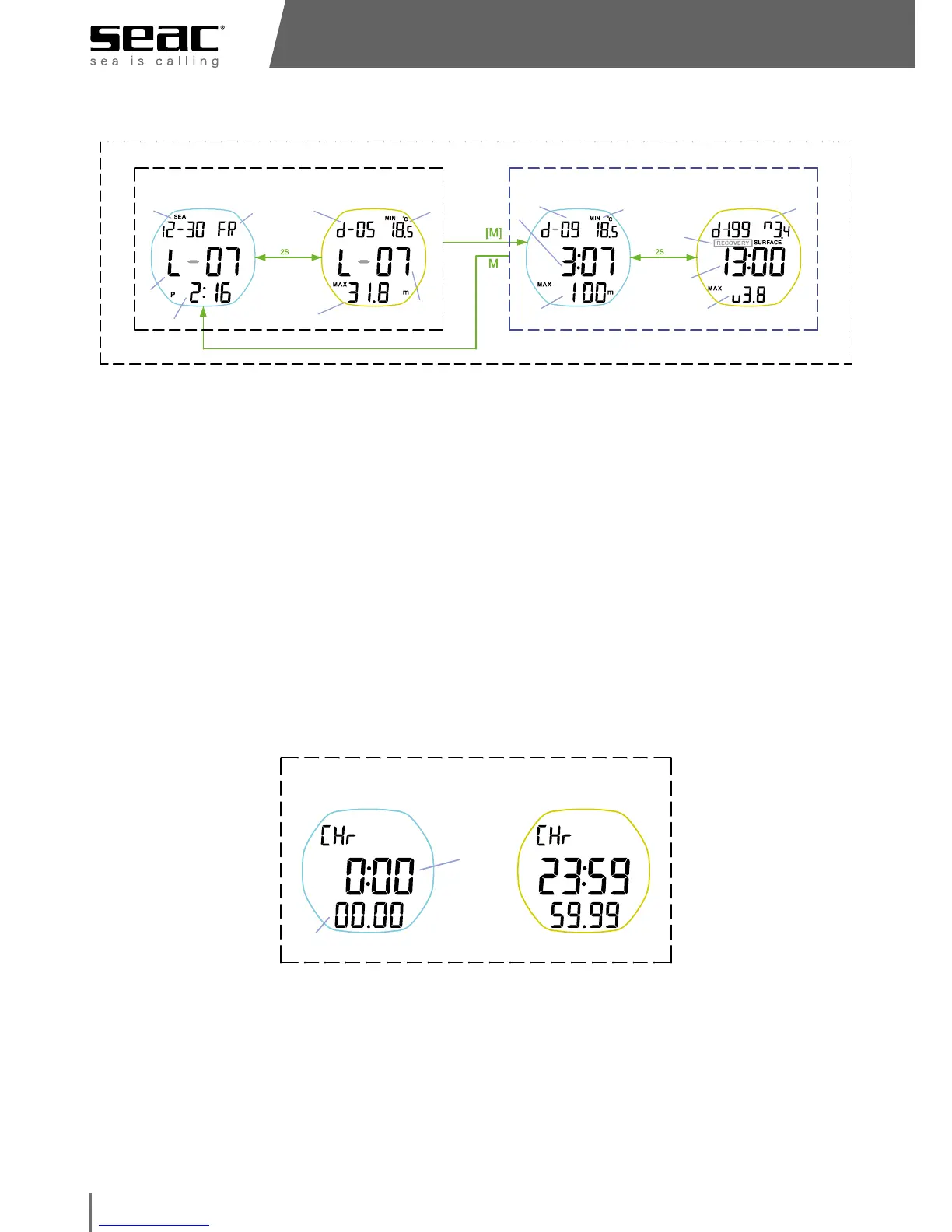
session time stamp
session #
maximum depth
Total # of dives
min temp
date stamp
DOW
dive# in session
maximum depth maximum descend
speed
surface time before
this dive
maximum ascendminimum temperature
pre-mature surface
recovery if icon
appear
dive time
SESSION summary Dive detail
(screen 1/2)
session time & date
(screen 2/2)
session depth & temp
(screen 1/2)
temp/dive time/depth
(screen 2/2)
max asc/surface/max des
NOTE
The Driver can store data for up to 500 dives. Naturally, this depends on the
save frequency you have set (1 or 2 seconds) and the length of your dives.
It can save up to 99 sessions, and each session can contain up to 199 dives.
STOPWATCH
• The minutes and hours (max 23 hours, 59 minutes) will be shown in the
middle of the display, and the seconds and hundredths of a second will
display at the bottom.
• Start, stop, and restart the stopwatch with the U button. The D button resets
the counter.
Default: 0:00:00.00
standby
HH:MM
running
SECOND
Chronograph mode
max 23:59:59.99



 To Next Page