DRIVER
11
T1 (WATCH) AND T2 (SECOND TIME ZONE) MODES
month-day
day of week / temp
current time
(hh:mm)
second
TIME mode
TIME (T1) mode
DOW screen
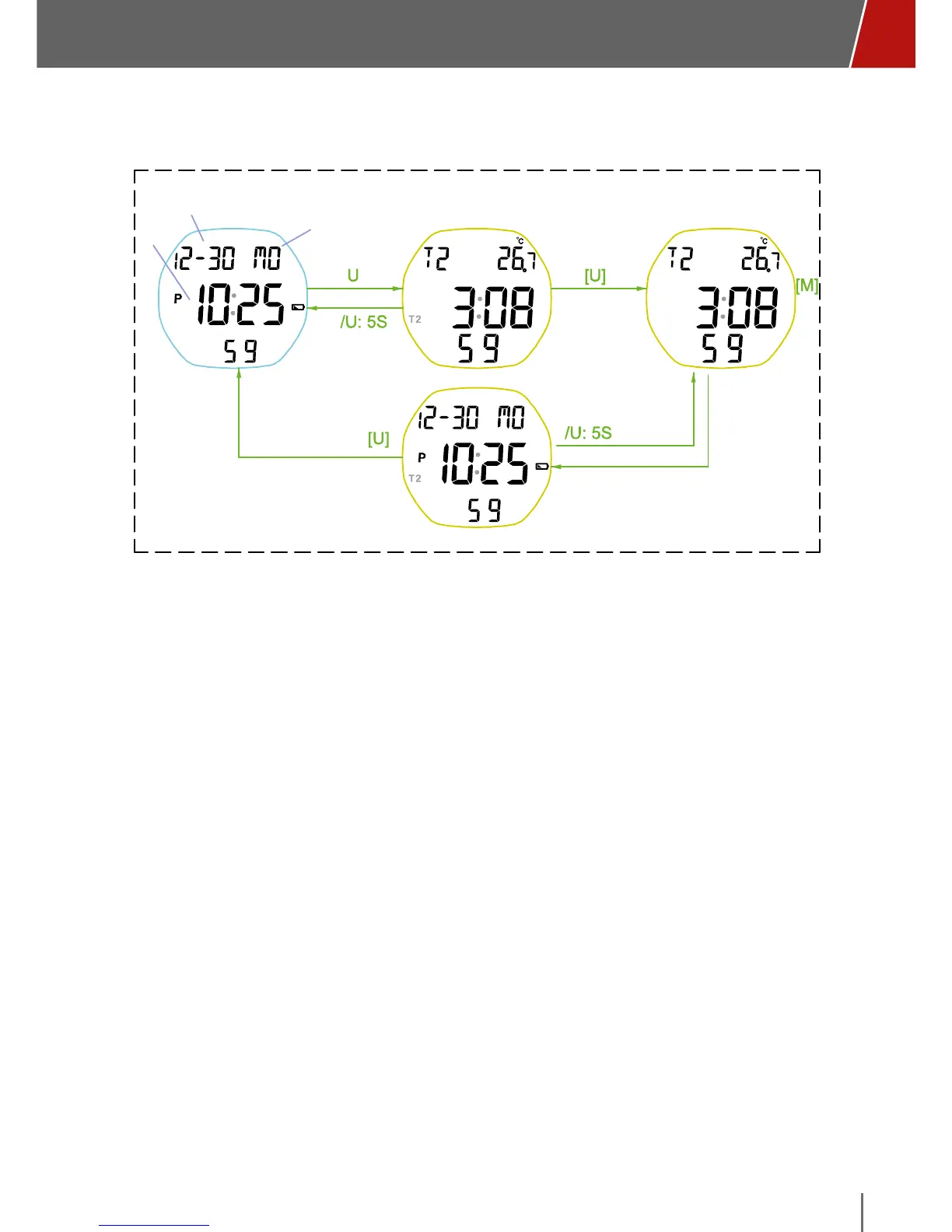
T1<->T2 Transition T2 TIME mode
TEM screen
• In T1 mode (current time), the month-day and day of the week are shown at
the top, with the current time in the middle and the seconds at the bottom.
• From T1 mode (watch), press the “U” button to enter T2 mode (Time zone).
After five seconds displaying the second time zone and temperature, during
which time the T2 icon is shown on the upper left and the small T2 icon
flashes alongside time, the display will return to T1 main watch mode
(current primary time).
• To keep display of the second time zone fixed on your screen, when viewing
T2 press the “U” button for 5 seconds (until it beeps). To return to T1 as the
main display, press the “U” button for 5 seconds until it beeps.



 To Next Page