DRIVER
7
SEQUENCE OF FUNCTIONS
• Watch mode T1 and T2, calendar, temperature
• DIVE: dive and surface time data
• LOG: Logbook
• CHR: Stopwatch
• CDT: Countdown
• ALM: Alarm
• Backlighting: press the “E” button on the upper left to turn on display
backlighting for five seconds.
OPERATING MODES
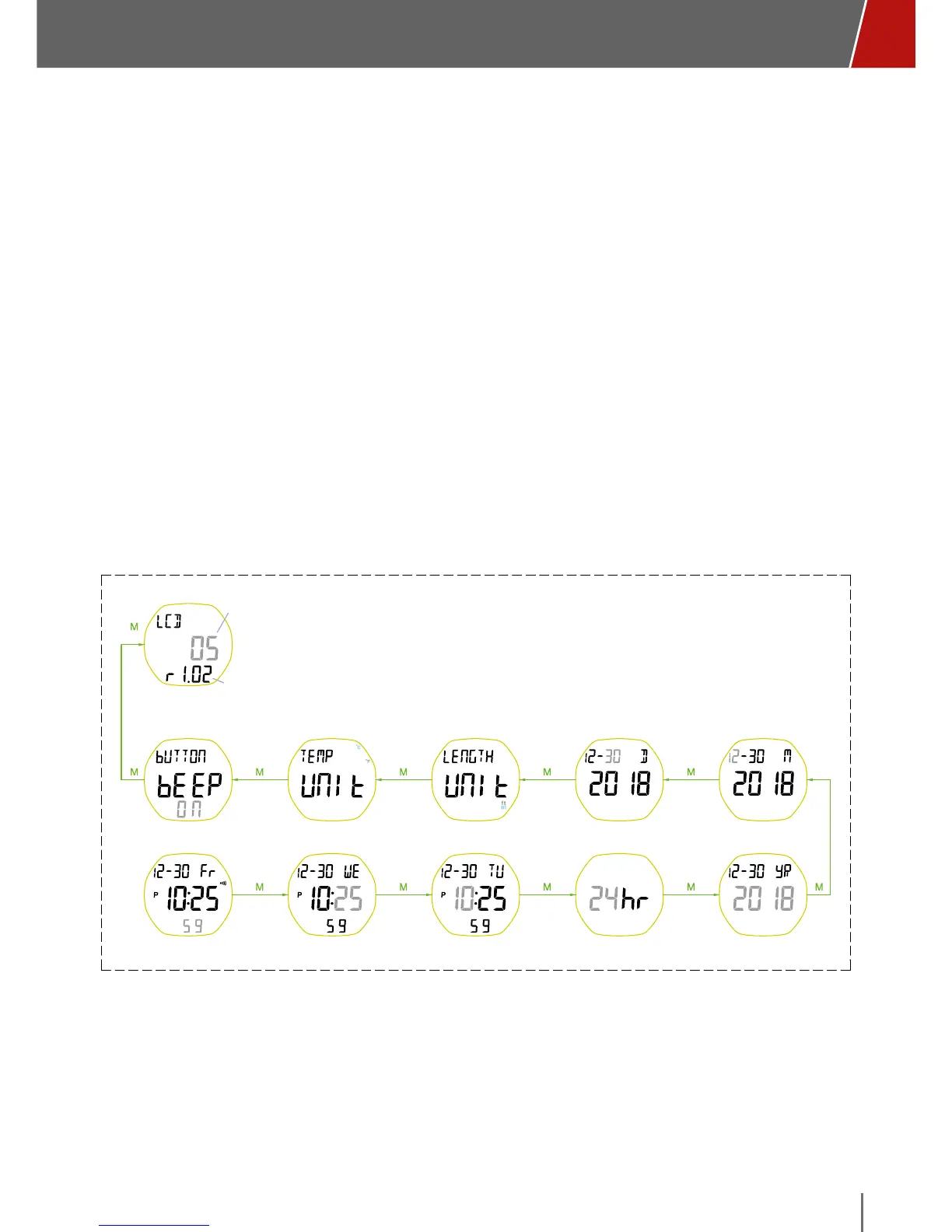
SET T1 MODE (WATCH, CALENDAR, MEASUREMENT, TEMPERATURE,
AND DISPLAY CONTRAST)
Default: level 6
Range: 1~10 level
Default: off Default: Celsius Default: meter
Default: 24 hourDefault time: 12:00:00
Default: July 1, 2018
Range: Jan 1 2000 - 31 Dec 2099
LCD contrast
1~10
Firmware version
set LCD contrast
set pushbutton beep
tone
set
temperature unit
set
length unit
set day set month
set second set minute set hour set 12/24 hour format set year
• To enter SET “T1”, press and hold the “M” button on the main screen until
you hear a beep.
• The seconds digits flash: increase the value with the “U” button or decrease
with the “D”. Briefly press the “M” button to confirm.
• The minutes digits flash: increase the value with the “U” button or decrease
with the “D”. Briefly press the “M” button to confirm.



 To Next Page