DRIVER
17
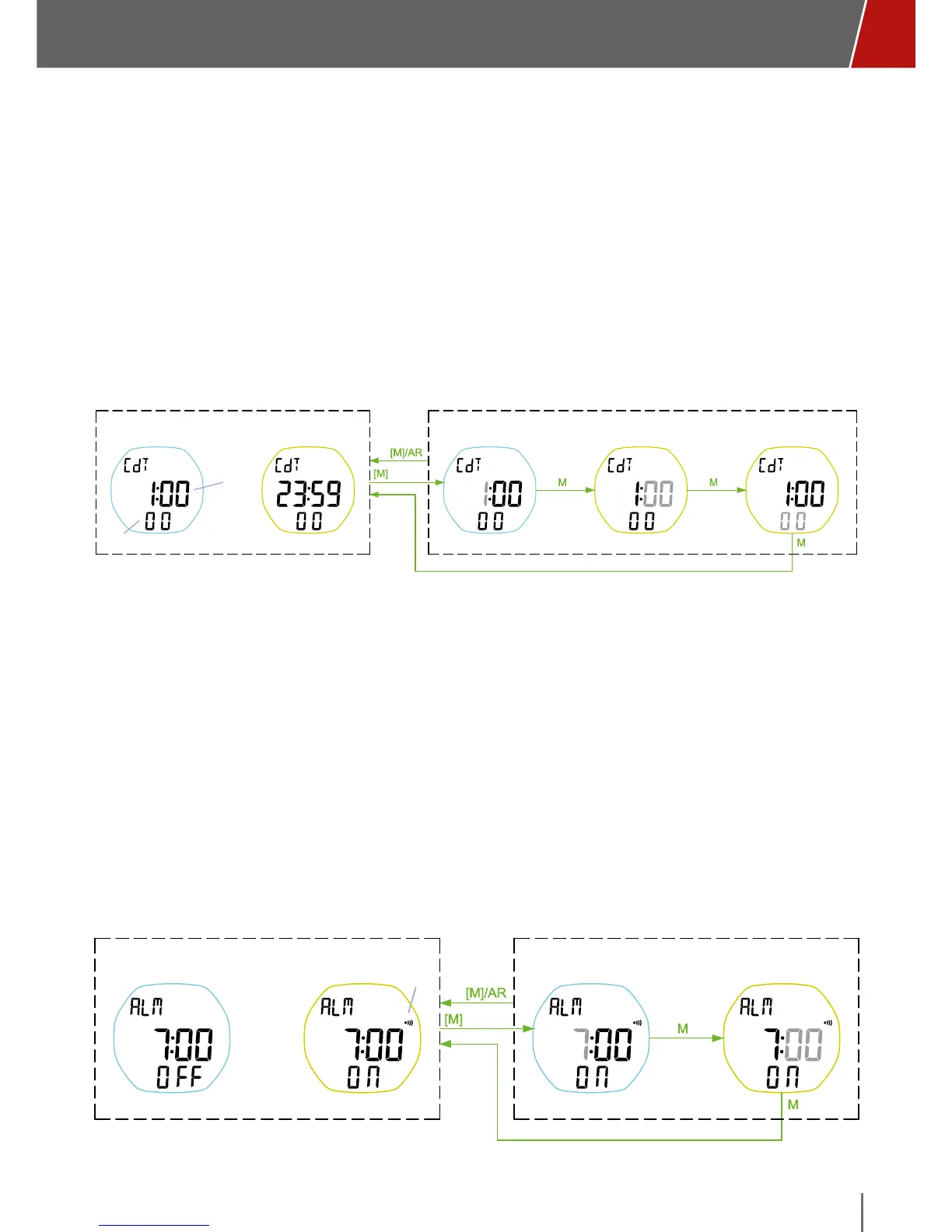
COUNTDOWN
• The minutes and hours (max 23 hours, 59 minutes) will be shown in the
middle of the display, and the seconds at the bottom.
• Start, stop, and restart the countdown with the U button. The D button resets
the counter.
• Setting the countdown time: from the CdT menu, press the M button for two
seconds. The hours digits will flash. Confirm by briefly pressing the M button,
and then select the value of the minutes followed by the seconds the same
way. When you're done, briefly press the M button.
Default: 0:05:00
standby
SECOND
countdown
HH:MM
set hour set minute set second
COUNTDOWN TIMER mode COUNTDOWN TIMER SETTING mode
max 23:59:59.99
ALARM
• The center of the display will show the time set for the alarm, and ON or
OFF at the bottom to show if the alarm is on or not. Select ON or OFF with
the U button. Selecting ON will turn on the alarm icon to the right above
the minutes.
• To set the alarm, press the M button for at least 3 seconds (until it beeps).
The hour will flash. Scroll to the desired time with the U and D buttons, and
confirm by briefly pressing the M button. The minute digits will flash. Repeat
the operation as you did for the hours, and confirm by briefly pressing the
M button.
Default: 7:00, off
daily alarm icon
Alarm mode Alarm Setting mode
set hour set minute
Alarm period: 30s



 To Next Page