EasyManua.ls Logo

Seada SDCP6 - 3 System Connection

Default Icon
26 pages
Print Icon
To Next Page IconTo Next Page
To Previous Page IconTo Previous Page
Loading...
Website: www.seada.co.uk 4/23 E-mail: sales@seada.co.uk
3. System Connection
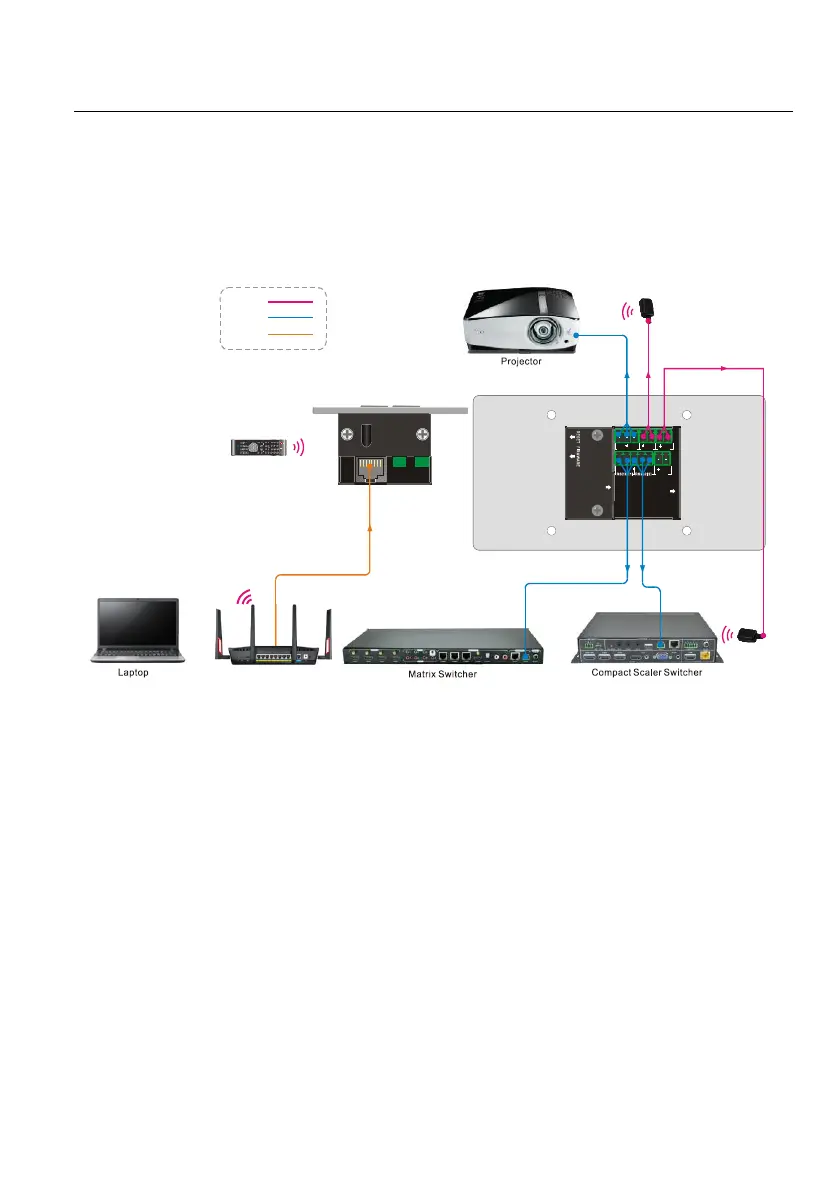
The SDCP6 can activate different ports at one time. It means every button can send the RS232
commands, IR code at the same time.
The demo system diagram as below:
TX RX
RS2 32(3)
IR( 1) IR(2 )
TX RX
12V
PWR
TX RX
ETHERNET
IR
IR
IR
IR Remote
IR Emitter
IR Emitter
IR:
TCP/IP:
RS232 :
1
Wireless Route
System Diagram
Connect the SDCP6 to the LAN port of Wireless Router, or control device (such as PC) to
ETHERNET port.
Connect the third-party devices (such as Matrix Switcher, Compact Scaler Switcher or Projector)
that need to be controlled to RS232 (1) ~RS232 (3) ports.
Connect the IR Emitters to IR (1) ~ IR (2) ports.