5. Click Finish.
The Personal Cloud Welcome tour opens. Take a moment to complete the tour to learn about Personal
Cloud features.
The Personal Cloud management page opens.
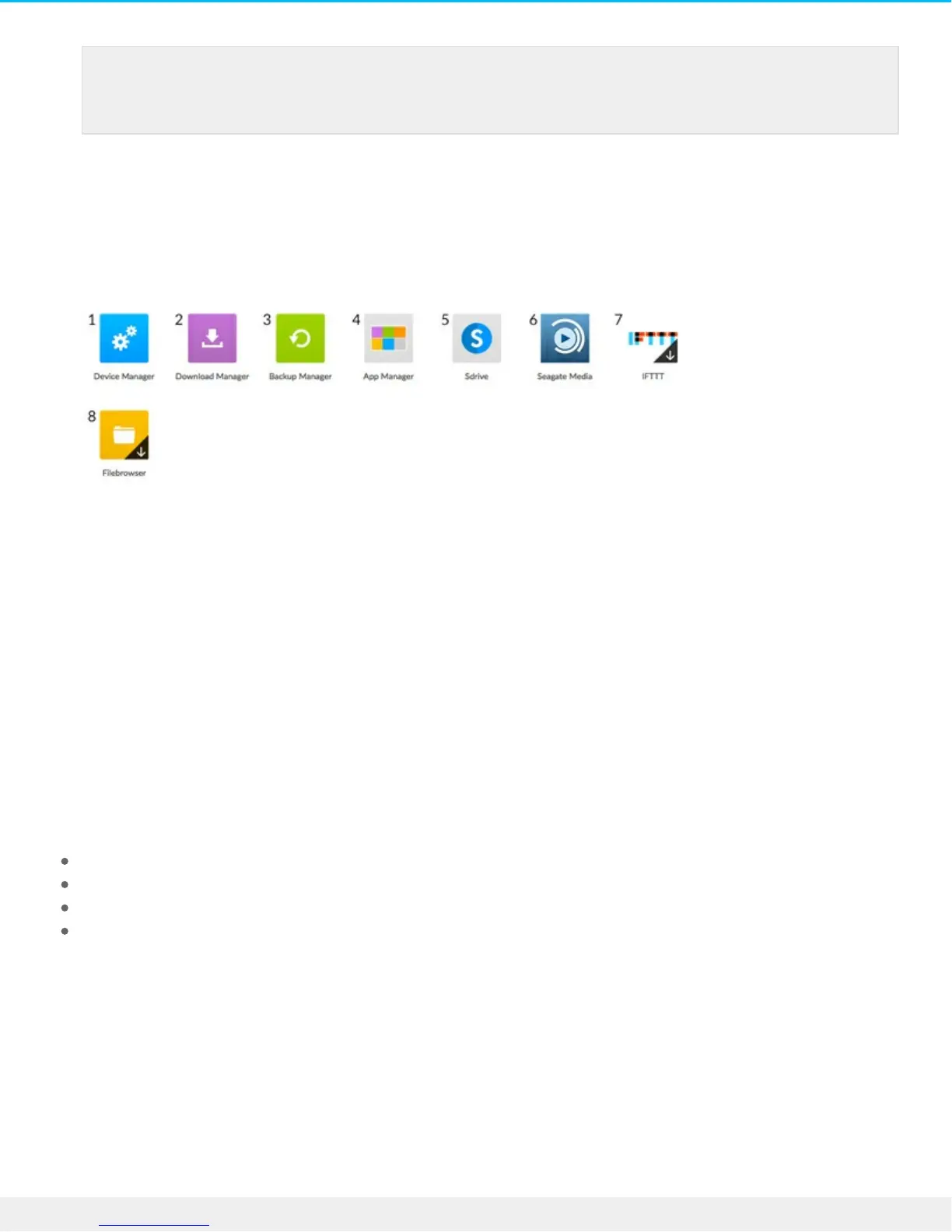
1. Device Manager. Manage users and manage your device.
2. Download Manager. Download files from your computer or the Internet to your device.
3. Backup Manager. Manage your backups from your computer, cloud service, and device.
4. App Manager. Install apps onto your device.
5. Sdrive. Access your content remotely.
6. Seagate Media. Enjoy your media library on your mobile devices.
7. IFTTT. Connect your Personal Cloud to your IFTTT account. For details, see the IFTTT for Seagate Storage
User Manual.
8. Filebrowser. Access your files in your web browser.
Apps with arrow overlays are not installed. Click the app to install it.
You are now ready to:
Add user accounts.
Begin building your media library
Protect your important documents
Manage your Personal Cloud
Note: You also need to confirm your Seagate Access account before you can give other users
remote access.





 To Next Page