22 User Manual 62Pro
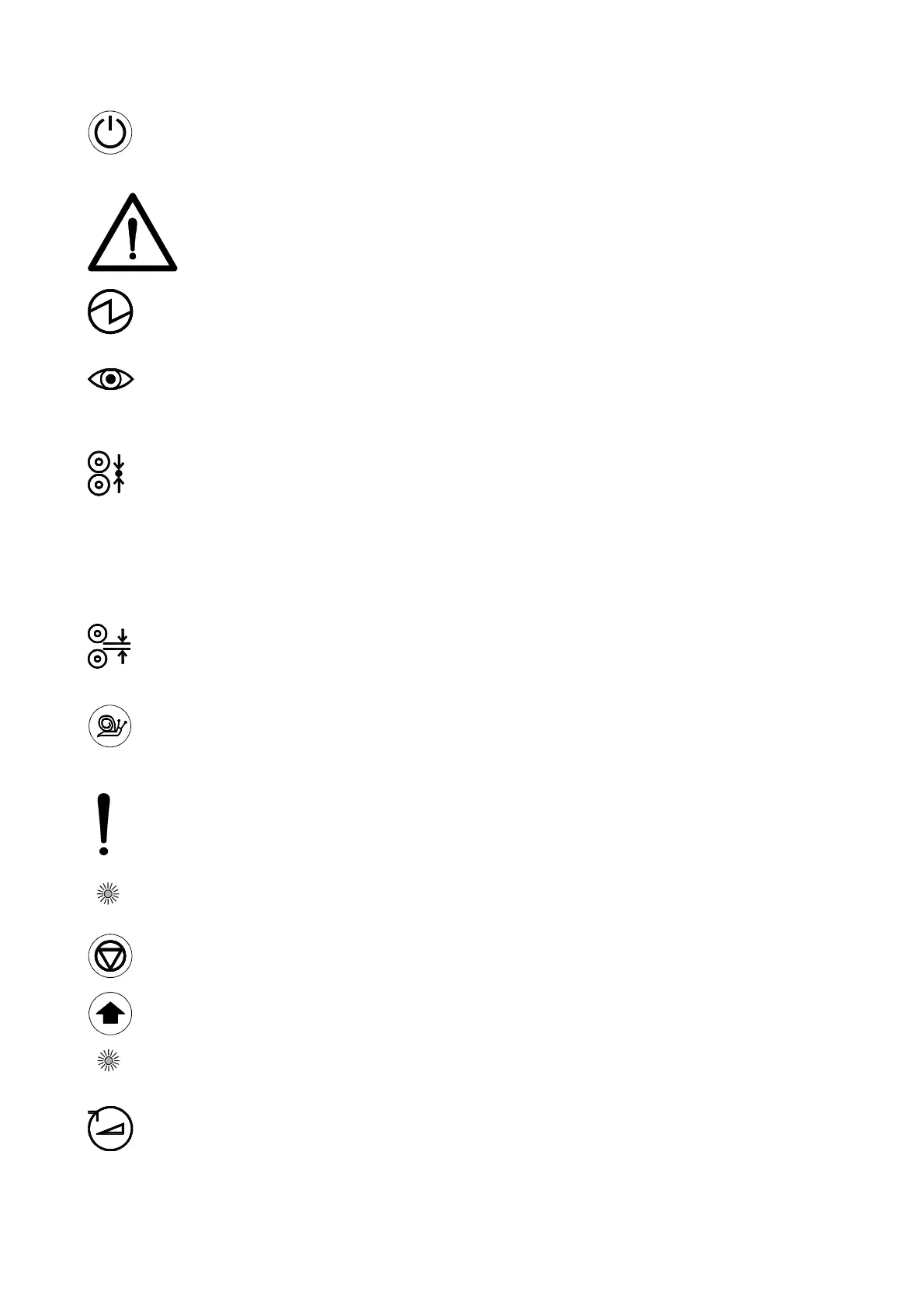
Control ON/OFF (1), toggle pushbutton;
Press 1 second to switch the machine from stand-by to active and back.
WARNING:
THE MACHINE IS CONSTANTLY POWERED WHEN THE POWER CORD
IS PLUGGED IN AND THE MAIN POWER SWITCH IS TURNED TO ON.
Power indicator (2), LED;
The LED will light up when the machine is powered. It flashes when the machine is
in stand-by mode.
Safety indicator (3), LED;
The LED will light up when the beam of the optical safety device at the input side of
the nip is not interrupted.
Pressure indication (4), 4 LED’s;
The LED’s indicate the pressure setting of the main rollers. When 2 LED’s light at
the same time, they indicate the tens in between. See specifications for actual
pressure range.
All four LED’s flashing indicates a pressure or nip setting error.
The LED’s start flashing at 10% overload. When the pressure exceeds a 20%
overload an audible signal is generated. Increase the nip to lower the pressure.
NIP setting indication (5), Pointer;
This mechanism is directly coupled with the nip control and indicates the distance
(nip) between the main rollers, set by the hand wheel.
Slow mode (6), toggle pushbutton;
Press 1 second to switch slow mode ON or OFF.
To run at the fixed slow mode speed the footswitch must be pressed.
CAUTION:
When slow mode is active the machine can still run at high speed.
Slow mode indication is NOT a speed indication. It is a working method.
Slow mode indicator (7), LED
The LED will light when slow mode is selected.
Stop (8), pushbutton;
Press to stop the rotation of the rollers.
Forward (9), pushbutton;
Press to start the rotation of the rollers in the forward direction.
Forward indicator (10), LED;
The LED will light when the forward mode is selected.
Speed control (11), control knob;
Sets the speed anywhere in a range between 0 and 10 (See specifications for
actual speed range).


 To Next Page