4-13
© 2013 SeaStar Solutions i6800 Installation Supplement, Rev. C
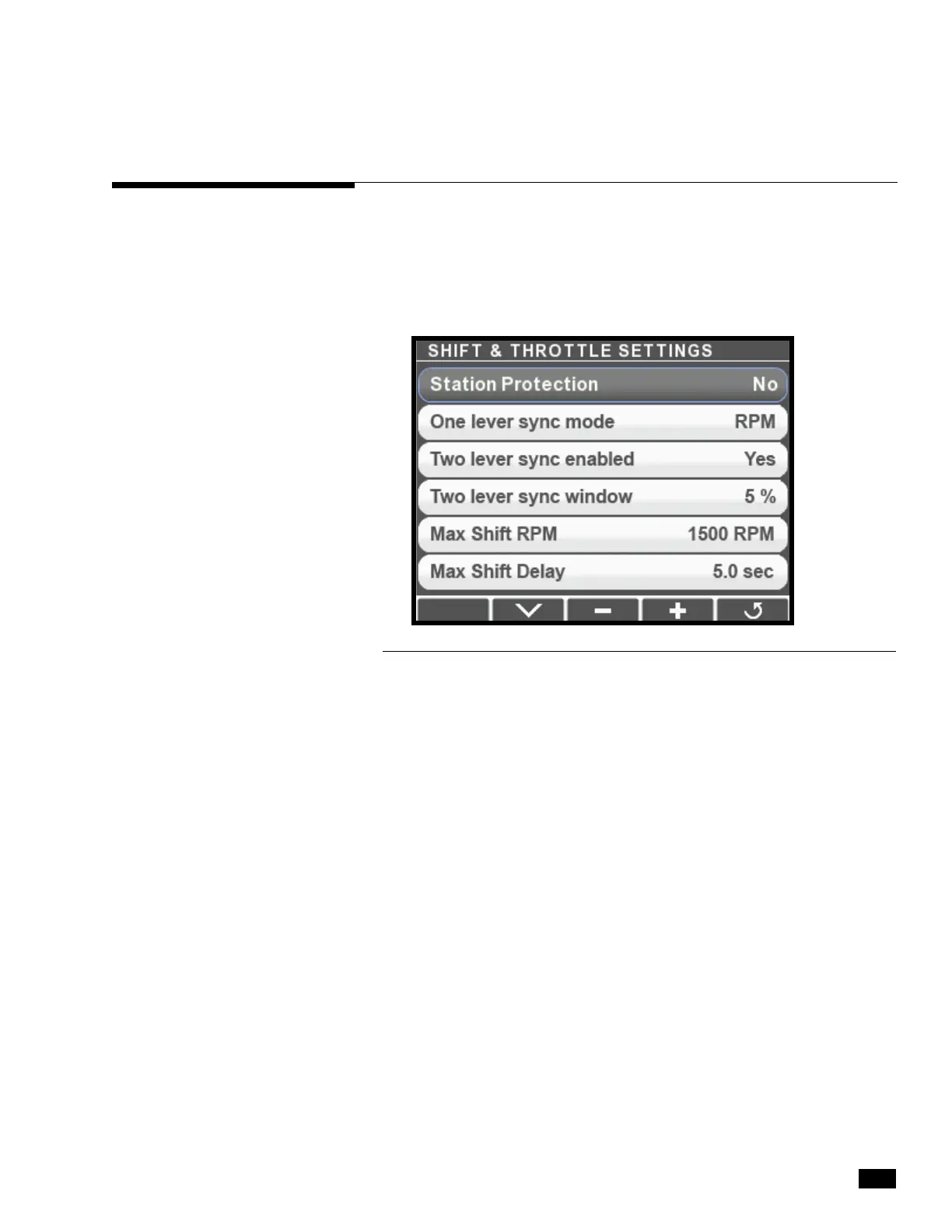
The control head has several configurable parameters, as shown in
figure 4-16 below. The default settings will generally provide excellent
performance for most boats.
To Access the parameters, navigate to Dealer Menu > Settings >
Shift & Throttle on your CANtrak display.
4.3 Control Head Setup
Figure 4-16.
Station Protection This feature prevents accidental switching between control stations
on multi-station boats by requiring a specific sequence of button
presses on the control head. The i6800 User’s Manual (Book 70)
has more information about this feature.
One Lever Sync
Controls the throttle behavior when the Power Train Sync (PTS
Mode feature is engaged. When set to RPM the control system will use
engine RPM feedback to match engine speeds. (An engine RPM
source is required – see section 3.5.) When set to Throttle the
control system will simply match the throttle command.
Two Lever Sync When Two Lever Sync is enabled the control system will synchronize
Enabled engine speeds when both levers are in close to the same position.
This feature requires an engine RPM source (see section 3.5).
Two Lever Sync This parameter sets the maximum throttle difference for which Two
Window Lever Sync will function.
Max Shift RPM Sets the maximum RPM at which a gear shift will be attempted by
the control head. It is designed to delay a shift until engine RPM
reaches a safe shifting speed.
Max Shift Delay When there is no engine RPM source present the control software
uses a time delay to prevent shifting while engine speed is too high.
The Max parameter represents the shift delay (in seconds) if the


 To Next Page