4-1
© 2013 SeaStar Solutions i6800 Installation Supplement, Rev. C
Before you proceed you need to have all i6800 components installed,
harnesses connected, and power wiring completed. The actuator
cables should not be connected yet.
This section will describe the system setup using the color CANtrak
display as a setup tool (P/N EPSK1207). If you prefer to use Datalink
you can find instructions in Appendix C.
4.1 Initial Setup
4.0 SYSTEM SETUP
The system setup is performed easily with the color CANtrak display.
It is designed to walk you through the following tasks:
• Configure the system type
• Choose the number of devices in your system
• Update system software
• Select device locations
You will need access to the CANtrak Dealer Menu for all setup
tasks. See Appendix B for instructions on how to navigate the
CANtrak display and access the Dealer Menu.
Procedure:
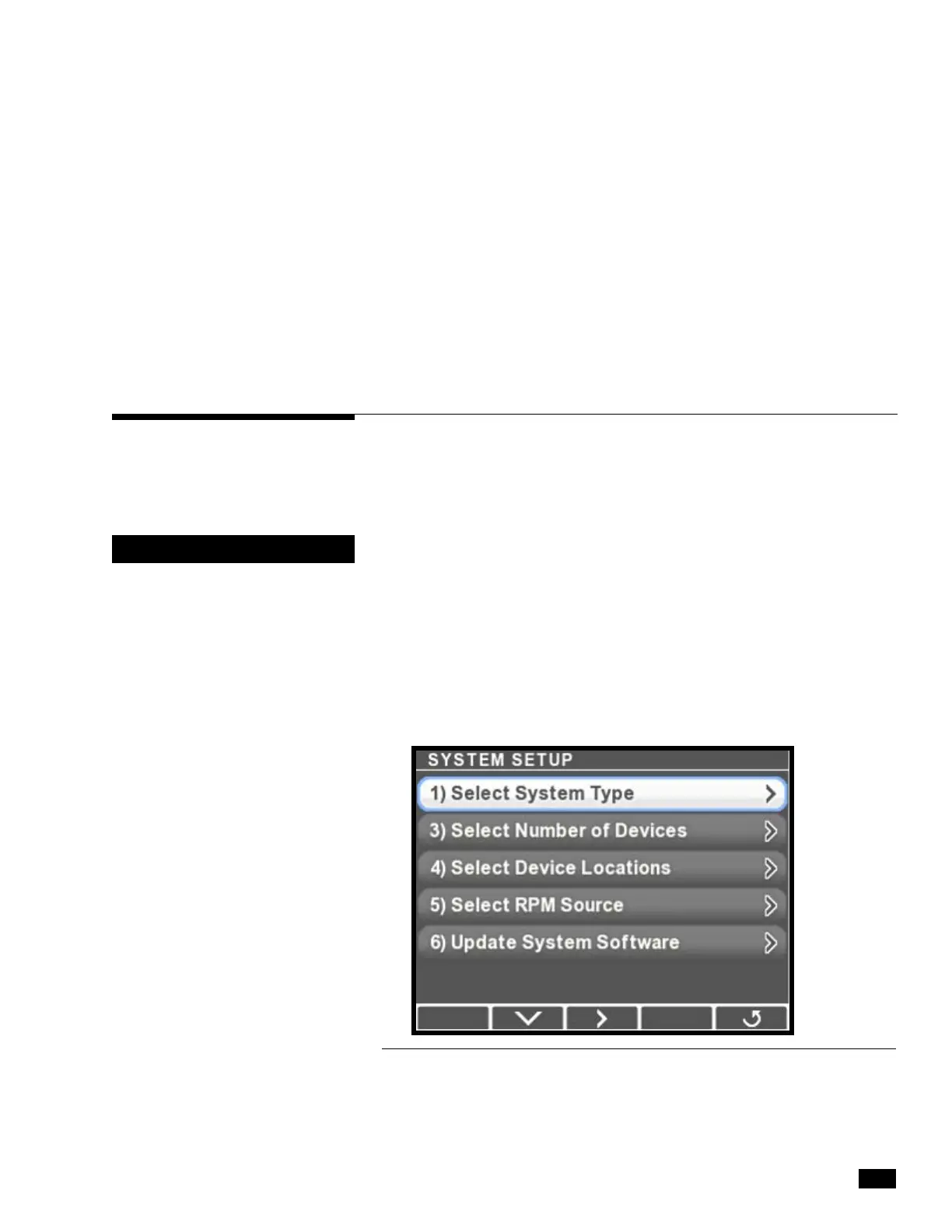
1. On the display, navigate to Dealer Menu > Initial Setup > System
to access the System Setup menu.
Figure 4-1.
NOTICE
The CANtrak display is used only
as a setup tool, and is not
intended to be installed on the
vessel.



 To Next Page