Seats and storage compartments140
Assigning remote control keys
The key must be assigned to a memory button so that the
positions stored in the memory can also be recalled using the
remote control key.
Assigning the remote control key to a memory button
– Using the memory button, recall the settings that are to be
programmed onto the key.
– Keeping the memory button pressed down, press the unlock
button on the remote control key within 10 seconds.
– Wait for about 2 seconds before releasing the memory button.
Deleting assignment of the remote control key to the memory
button
– Press and hold the button and press the unlock button on
the remote control key within 10 seconds.
– Wait for about 2 seconds before releasing the button.
The previous settings are automatically cancelled when the keys are re-
assigned to different memory buttons.
Head restraints
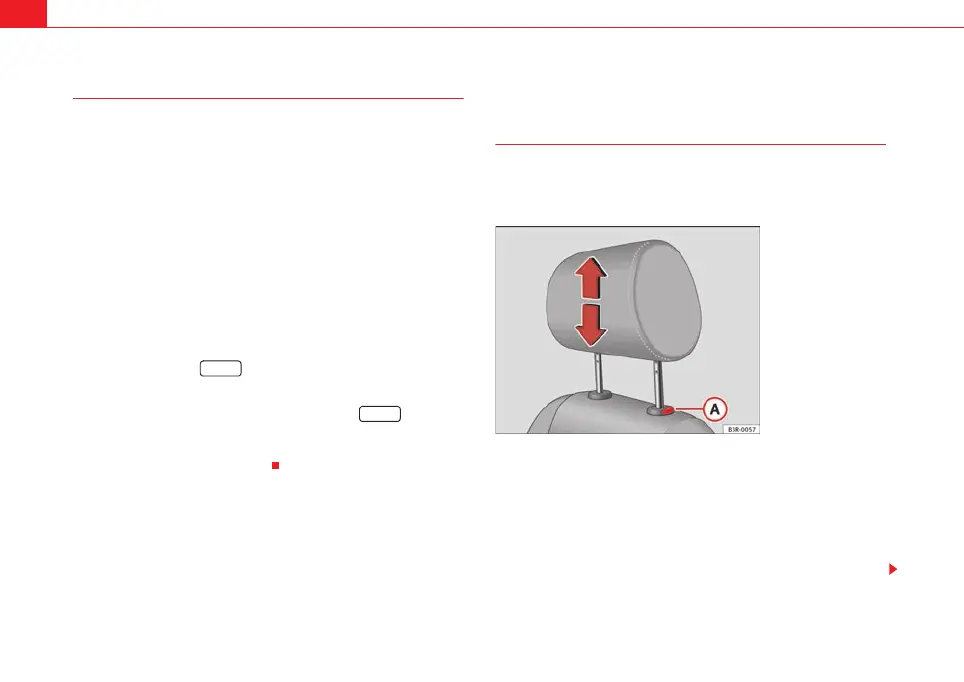
Front head restraints
In combination with properly worn seat belts, the head
restraints offer effective protection, provided they are prop-
erly adjusted to suit the height of the occupant.
Raising the head restraint
– Take hold of the sides of the head restraint with both hands.
– Pull up the head restraint.
Lowering the head restraint
– Press button and lower the head restraint.
MEMO
MEMO
Fig. 112 Front seats:
Head restraints
A
ExeoST_EN.book Seite 140 Freitag, 3. September 2010 11:41 11



 To Next Page