Cockpit 71
Safety First Operating Instructions Practical Tips Technical Specifications
Driver information system
General notes
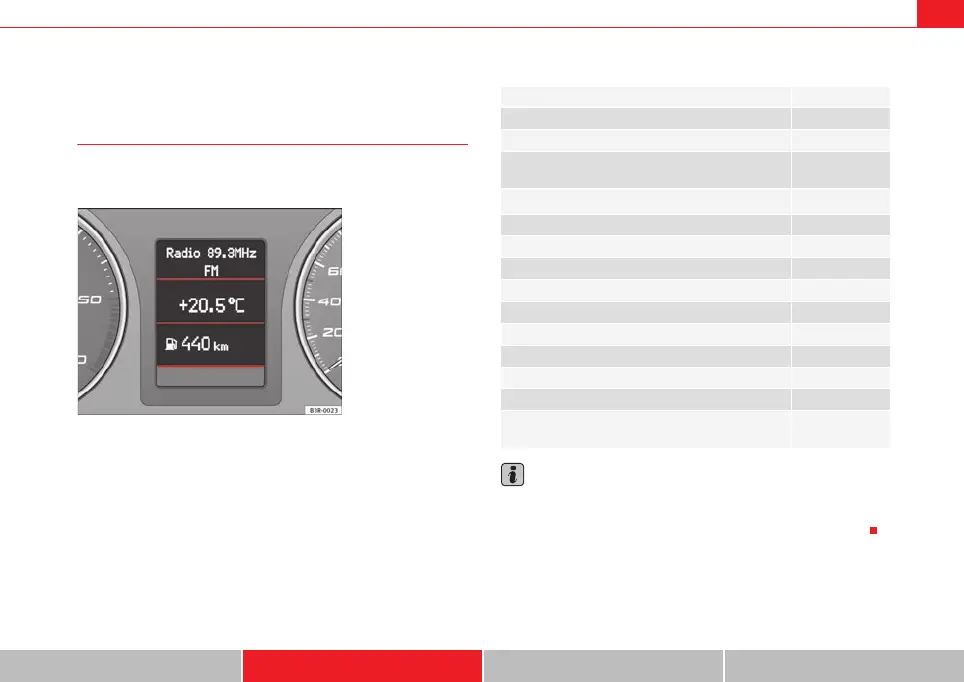
The driver information system in the instrument panel shows
the status of various on-board systems at a glance.
The display for the driver information system is in the centre of the instrument
panel.
The system runs a check on certain components and functions when the igni-
tion is switched on and while the vehicle is moving. The DIS system gives an
audible warning if a fault should occur or if servicing is required, and a red or
yellow warning symbol (in some cases with a corresponding driver message)
appears in the instrument panel display.
The driver is informed on the audio system.
The driver information system includes the following functions:
Note
• If a fault should occur, the display will show a red or yellow warning
symbol. A red warning symbol indicates a serious malfunction ⇒ page 77. A
yellow warning symbol indicates a less serious malfunction ⇒ page 79.
Fig. 47 Cockpit: Digital
instrument panel display
CD player, radio and telephone display* ⇒ page 72
Outside temperature display ⇒ page 72
Gear indicator* ⇒ page 73
Selector lever positions for the 7-speed automatic gear-
box*
⇒ page 189
Selector lever positions with multitronic
®
*
⇒ page 185
Distance to empty ⇒ page 73
Door and tailgate warning ⇒ page 74
Service indicator ⇒ page 74
auto-check control ⇒ page 75
Driving tips ⇒ page 76
Handbrake warning ⇒ page 76
Bulb monitor* ⇒ page 82
Onboard computer* ⇒ page 85
Tyre pressure monitoring* ⇒ page 89
Navigation information* Separate Instruc-
tion Manual
ExeoST_EN.book Seite 71 Freitag, 3. September 2010 11:41 11



 To Next Page