Cockpit 85
Safety First Operating Instructions Practical Tips Technical Specifications
Onboard computer
Introduction
The onboard computer provides you with useful information
during a journey, including average and current fuel
consumption, average speed, distance to empty, driving time
and distance covered.
Press RESET button ⇒ page 86, fig. 60 to switch back and forward
between onboard computer functions 1 and 2.
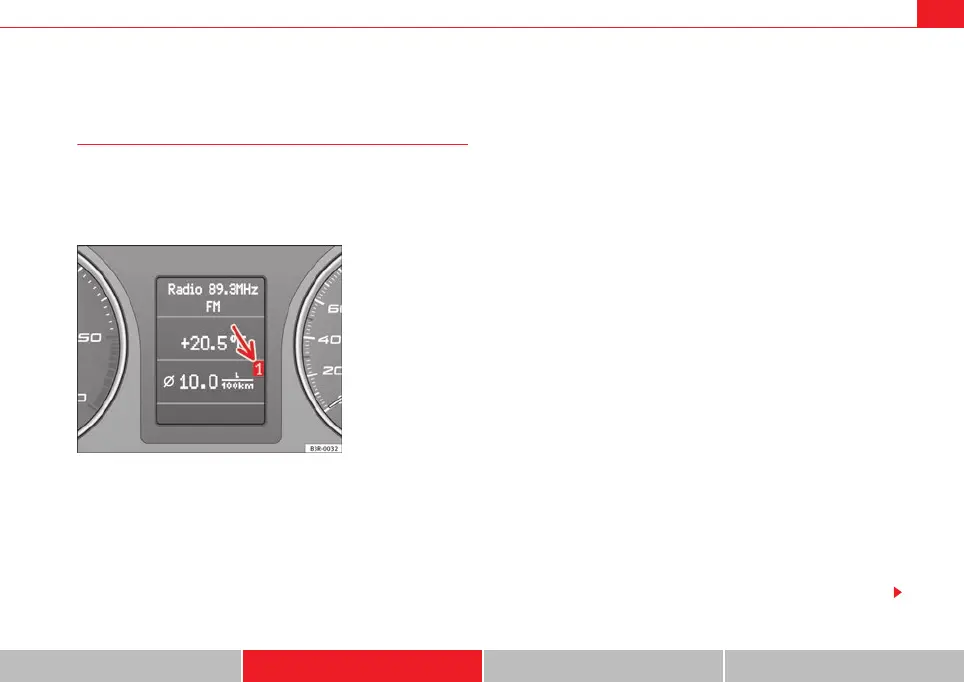
The numbers in the display ⇒ fig. 59 indicate which of the two memories is
currently in use. A 1 means that the display is showing the information in the
single journey memory (onboard computer 1). A 2 means that the display is
showing the information in the total journey memory (onboard computer 2).
Single-journey memory (onboard computer 1)
The single-journey memory processes the information on a journey from the
time the ignition is switched on until it is switched off. If the journey is
resumed within two hours after the ignition is switched off, the new figures
are automatically included in the calculation. If the journey is interrupted for
more than two hours the stored information is automatically erased when you
resume your journey.
Total-journey memory (onboard computer 2)
Unlike the single-journey memory, the total-journey memory is not erased
automatically. Hence, you can determine the period for which you wish the
onboard computer to supply figures.
Distance to empty
The estimated distance to empty is displayed in km. The distance to empty is
displayed in increments of 10 km.
Average fuel consumption
This mode shows the average fuel consumption since the memory was last
cancelled in litres/100 km.
Instantaneous fuel consumption
The display shows the instantaneous fuel consumption in litres/100 km.
When the vehicle is stationary, the computer will display the last value in the
memory.
Average speed
This mode shows the average speed driven since the memory was last
cancelled (in km/h).
Driving time
This display shows the period of time which has elapsed since the memory
was last cancelled. The longest possible period it can cover is 999 hours and
59 minutes.
Fig. 59 Onboard
computer: memory 1
B
ExeoST_EN.book Seite 85 Freitag, 3. September 2010 11:41 11



 To Next Page