Cockpit84
Clearing the speed limit
– Drive the vehicle at a minimum of 5 km/h.
– Press the CHECK button for at least two seconds.
The speed warning symbol lights up briefly in the display when the button
is released to confirm that the selected speed has been stored. The speed
limit that has been selected remains stored until another speed is selected
with a brief push of the button, or until the memory is cleared with a long
push of the button.
Setting speed limit warning 2
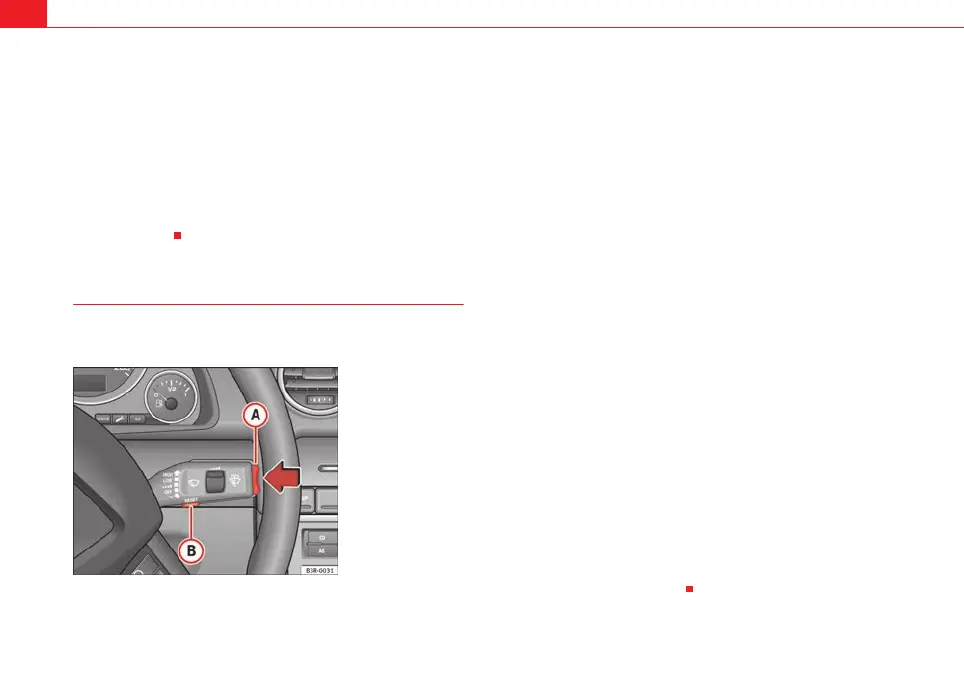
Speed limit warning 2 is set using the switches on the wind-
screen wiper lever.
Setting the speed limit
– Switch the ignition off.
– Briefly press the CHECK button in the instrument panel
⇒ page 83, fig. 57. The odometer and the digital clock will light
up.
– Press the CHECK button for at least two seconds. The display will
show the speed limit which is currently set or, if no speed limit
has been set, the crossed out warning symbol for speed limit 2.
– To change the speed limit, press the top or bottom of the function
selector switch on the windscreen wiper lever ⇒ fig. 58. The
speed limit displayed will then increase or decrease by 10 km/h
at a time.
Clearing the speed limit
– Switch the ignition off.
– Briefly press the CHECK button in the instrument panel
⇒ page 83, fig. 57. The odometer and the digital clock will light
up.
– Press the CHECK button for at least two seconds. The display will
show the speed limit which is currently set.
– Now press and hold the Reset button on the windscreen wiper
lever ⇒ fig. 58 until the crossed out warning symbol for
speed limit 2 appears on the display.
The display lighting for the odometer and digital clock goes off again a few
seconds after the button is released.
Fig. 58 Windscreen wiper
lever: Function selector
switch
A
B
ExeoST_EN.book Seite 84 Freitag, 3. September 2010 11:41 11



 To Next Page