Driving 181
Safety First Operating Instructions Practical Tips Technical Specifications
Setting the speed
The desired cruising speed has to be stored in the memory.
– Drive at the desired speed.
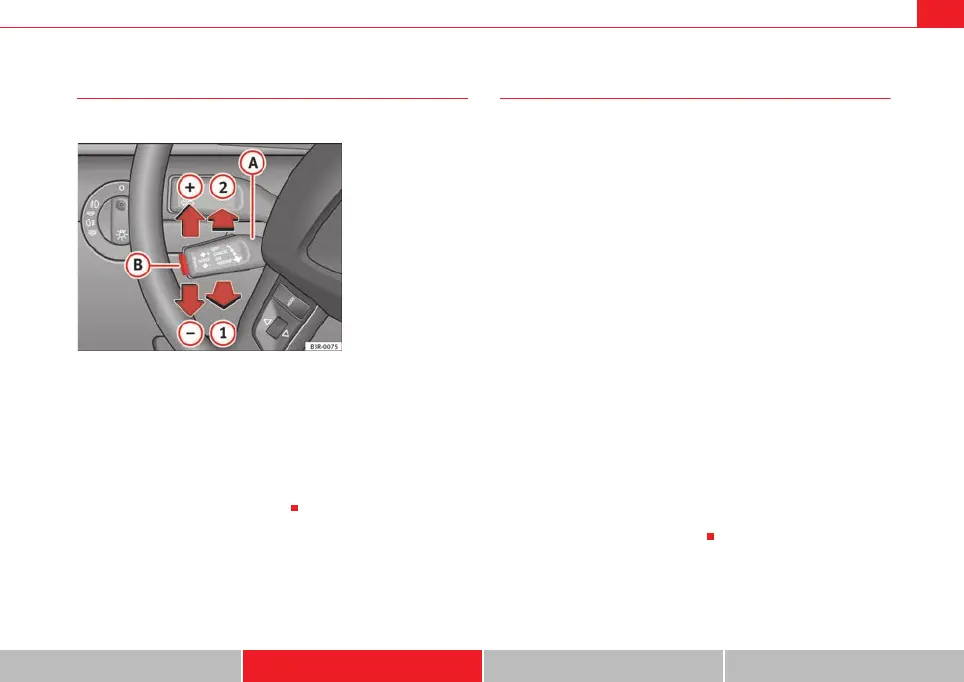
– Pull the lever to position ⇒ fig. 151 to activate the
system.
– Briefly press button .
When button is released, the current speed is stored in the memory and
the vehicle will then maintain this speed.
Adjusting the stored speed
The desired cruising speed can be adjusted up or down as
required.
Acceleration
–Move the lever up towards ⇒ fig. 151 .
– Release the lever to store the current cruising speed.
Deceleration
–Move the lever down towards ⇒ fig. 151 .
– Release the lever to store the current cruising speed.
Pressing lever briefly
– You can increase the set speed in steps of 2 km/h by briefly
pressing the lever up towards ⇒ fig. 151 .
– You can decrease the set speed in steps of 2 km/h by briefly
pressing the lever down towards ⇒ fig. 151 .
You can also use the accelerator pedal momentarily to increase speed. The
previously programmed speed will be automatically resumed when the accel-
erator pedal is released.
However, if the vehicle exceeds the programmed speed by more than 10
km/h for more than 5 minutes, the programmed speed will be deleted. You
will then need to enter the speed again.
Fig. 151 Controls for the
cruise control system
A
1
A
B
B
A
+
A
-
A
A
+
A
-
ExeoST_EN.book Seite 181 Freitag, 3. September 2010 11:41 11



 To Next Page