Driving184
If desired, you can also select the gears manually (tiptronic mode)
⇒ page 189.
Please note that in vehicles with a multitronic® gearbox, torque is trans-
mitted via a multi-plate clutch, and not via a torque converter as on conven-
tional automatics. This means that the vehicle will not “creep” as much as
conventional automatics when the engine is idling if you stop temporarily
with the selector lever in position D, S or R.
Vehicles with tiptronic gearbox
The vehicle is equipped with an electronically controlled 7-speed automatic
gearbox. The gearbox changes up and down automatically.
If desired, you can also select the gears manually (tiptronic mode)
⇒ page 189.
Driving instructions
The gears are changed automatically.
Starting the vehicle
–Press and hold the brake pedal.
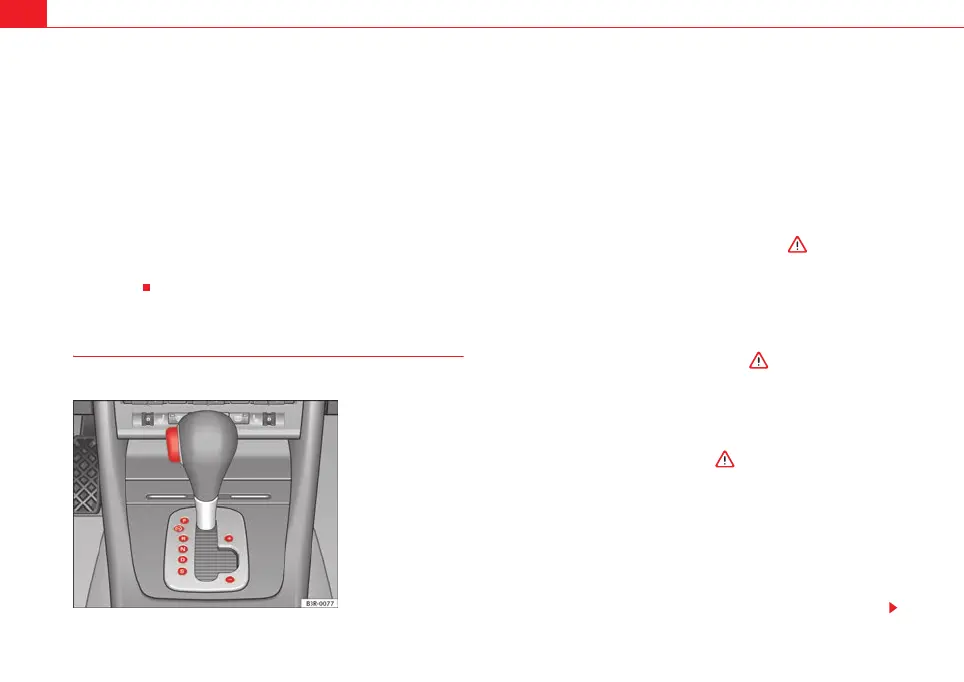
– Press and hold the interlock button (the button on the selector
lever handle), move the selector lever to the desired position, for
instance D, and release the interlock button.
– Wait for the gearbox to engage the gear (a slight movement can
be felt).
– Release the brake and press the accelerator ⇒ .
Stopping briefly
– Apply the foot brake to hold the vehicle when stationary (for
instance at traffic lights).
– To prevent the vehicle from rolling away, apply the parking brake
before moving off on steep gradients ⇒ .
– As soon as you accelerate as normal, the parking brake will auto-
matically be released and the vehicle will start moving.
Parking the vehicle
–Press and hold the brake pedal ⇒ .
– Apply the parking brake.
– Press and hold the interlock button, move the selector lever to P
and release the interlock button.
The engine can only be started when the selector lever is at P or N.
On level ground it is sufficient to move the selector lever to P. On slopes, first
engage the parking brake and then put the selection lever into the P position.
Fig. 154 Detailed view of
the centre console:
Selector lever with lock
button
ExeoST_EN.book Seite 184 Freitag, 3. September 2010 11:41 11



 To Next Page