Cockpit76
Driver messages
Additional messages for the driver are displayed together
with the warning symbols on the instrument panel.
Driver messages and red symbols
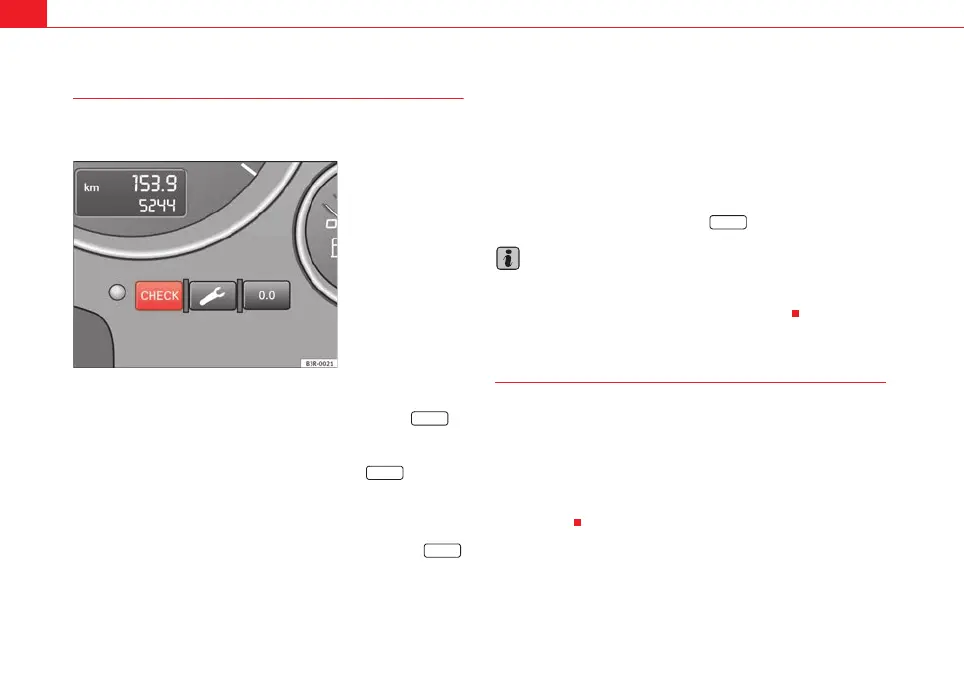
If a red warning symbol appears on the display, you can press the
button ⇒ fig. 53 to call up an additional driver message.
For example: in the event of an oil pressure malfunction, the oil pressure
symbol
E will appear in the display. If you now press the button, the
following message will appear in the display:
Switch off engine, check oil level
The message will disappear from the display after about 5 seconds. If
required, the message can be called up again by briefly pressing the
button.
Driver messages and yellow symbols
If a yellow warning symbol appears in the display, it will automatically be
accompanied by the corresponding driver message.
For example, the symbol
is displayed to indicate that the windscreen
washer fluid level is low. In addition, the following message will appear:
Top up washer fluid
The message will disappear after a few seconds. If required, the message can
be called up again by briefly pressing the button.
Note
• The messages handbrake on and when stationary apply footbrake to
select gear cannot be called up a second time. They will remain in the display
until the handbrake is released or until a gear is selected.
Handbrake warning
– Release the handbrake.
If you drive by mistake with the handbrake still applied, you will hear a
warning buzzer and the display will show the message:
Handbrake on
The handbrake warning switches on after driving for 3 seconds at speeds
above 5 km/h.
Fig. 53 Instrument panel:
CHECK button
CHECK
CHECK
CHECK
CHECK
ExeoST_EN.book Seite 76 Freitag, 3. September 2010 11:41 11



 To Next Page