208 •
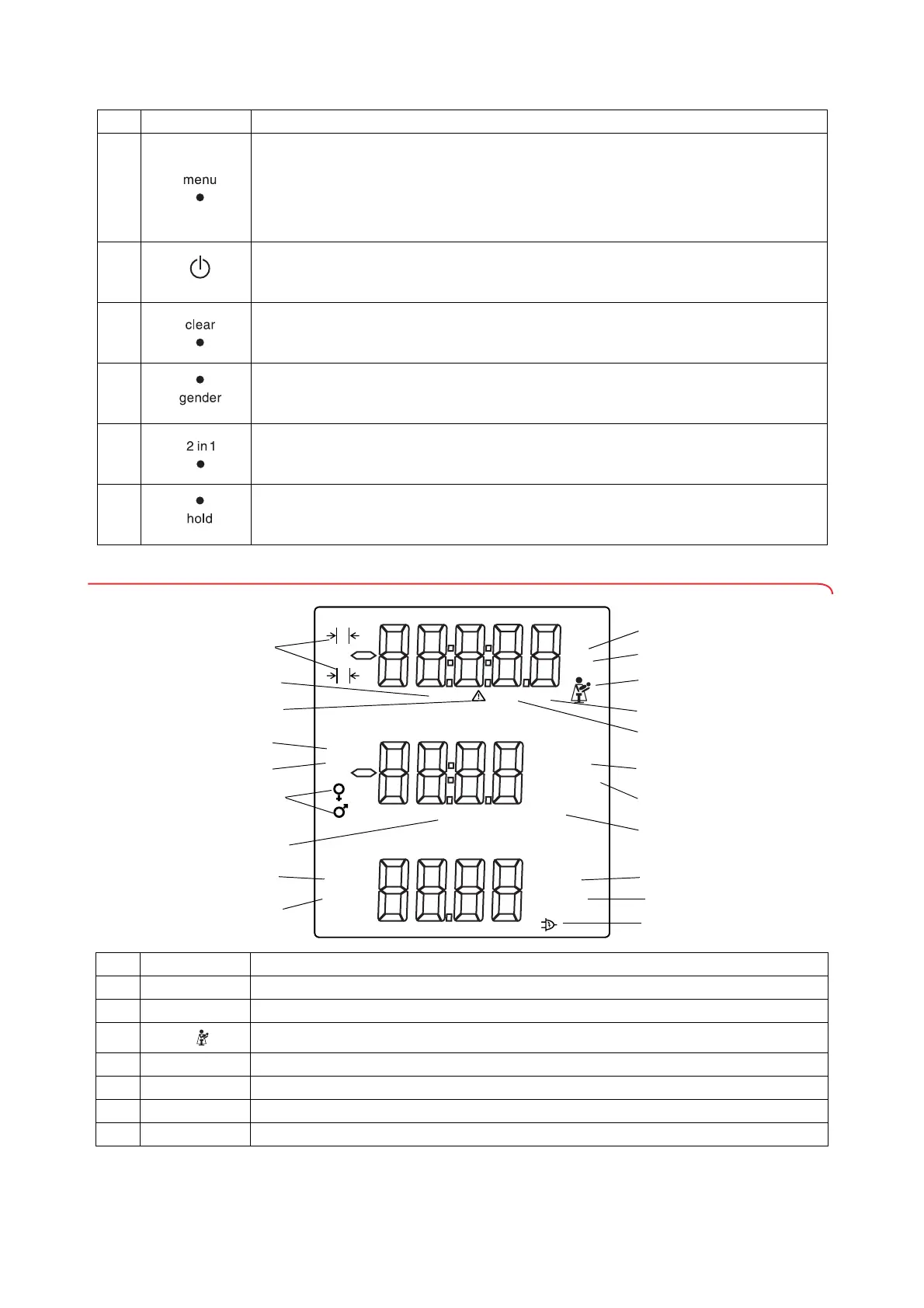
3.3 Symbols in the display
4
menu key:
• During weighing:
- call up control unit menu.
•In the menu:
- press briefly: go back one menu level
- press and hold: exit menu
5
Start key, multifunctional display:
switch multifunctional display and scale on and off
6
clear key:
for deleting data (patient data, height, BMI, BFR) entered manually or received wirelessly
7
gender key:
for entering patient's gender
8
2 in 1 key:
for starting the 2 in 1 function to weigh babies and toddlers
9
hold key:
for activating the hold function
No. Control Function
YEARS
PAL
AGE
BMI
BFR
HOLD
HOLD NET PT
kg
lbs
ZERO
ft:in
cm
MONTH
%
1
2
kg/m
²
1
/
8
1
/
4
1
/
2
5
/
8
3
/
4
7
/
8
3
/
8
Symbol Meaning
A
kg / g Weight value in kilograms/grams
B
lb / lbs Weight value in pounds (on non-verified models)
C
Mother-and child symbol (
2 in 1 function active) to weigh babies and toddlers
D
PT Pre-tare function active
E
NET Tare function active
F
cm Height in centimeters
G
ft:in Height in feet and inches (on non-verified models)


 To Next Page