Secure Power Ltd
User Manual
12
Numerical value section-display the corresponding numerical value of inquiring items(output, load,
temperature, input, battery), for example, as the graphics shows above, the output voltage is 220v,
the output frequency is 50Hz.
Capacity graphics section-display the capacity of the battery and load. Every pane represents
20%capacity. As graphics showed above, the capacity of the battery is 80%-100%( 5 panes), the
load reaches 40%-60%(3 panes). When UPS is overload, the icon will flash, when capacity of battery
is too low or disconnected, the icon will also flash.
Fan-status graphics section-display if the fan works normally. When the fan works normally, it will
show the dynamic fan blades rotating; when the fan works abnormally, the icon will keep on
flashing with the warning.
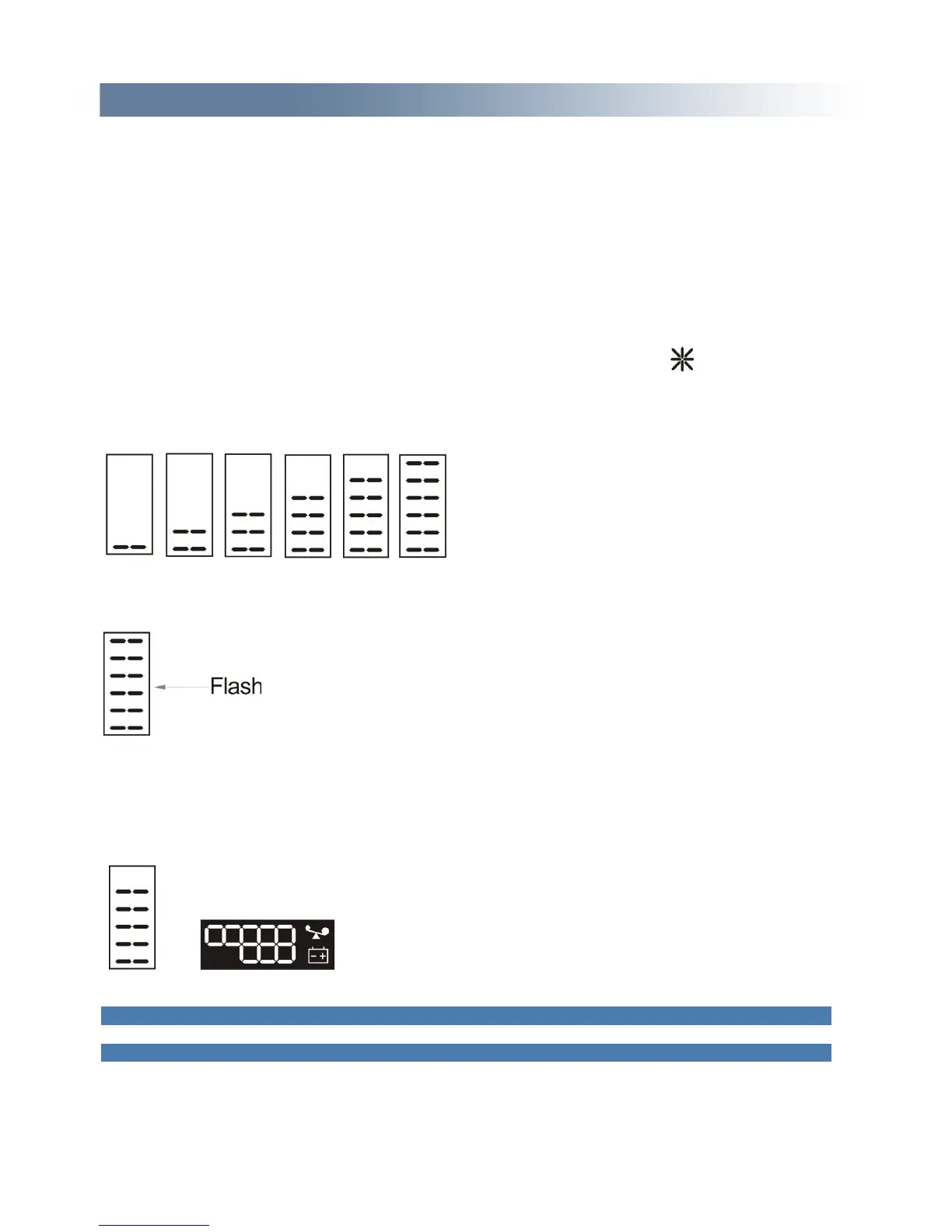
Charger-status graphics section-display the status of the charger. When charger works normally, the
corresponding icon will vary dynamically and orderly, just as Graphics (1);
(1)
When charger works abnormally, the icon will flash in a whole, as Graphics (2):
(2)
When UPS is in battery mode, the number of the icons of the charger-state section will vary according
to the changeable capacity of the battery (pane). For example, there are five panes in Fig. A, (as the
right picture of the Graphics (3) shows), so the corresponding number of icons is five rows (as the left
picture of the Graphics (3) shows), followed by this rule,
(3)
4.2 Operation
4.2.1 Start up operation
Turn on the UPS in line mode


 To Next Page