Secure Power Ltd
User Manual
16
Exit from the setting interface. Press and hold function setting key for more than 2 seconds, exit
from the setting interface and return to main interface.
After setting bPS as ON, when mains power plugged in without turning on the UPS or no mains power
plugged in, there is bypass output but no power down backup function.
4.3.3 Output voltage setting
Enter the setting interface. Press and hold the function setting key for more than 2 seconds, then
come to setting interface, Press and hold the inquiring key for more than half a second(less than
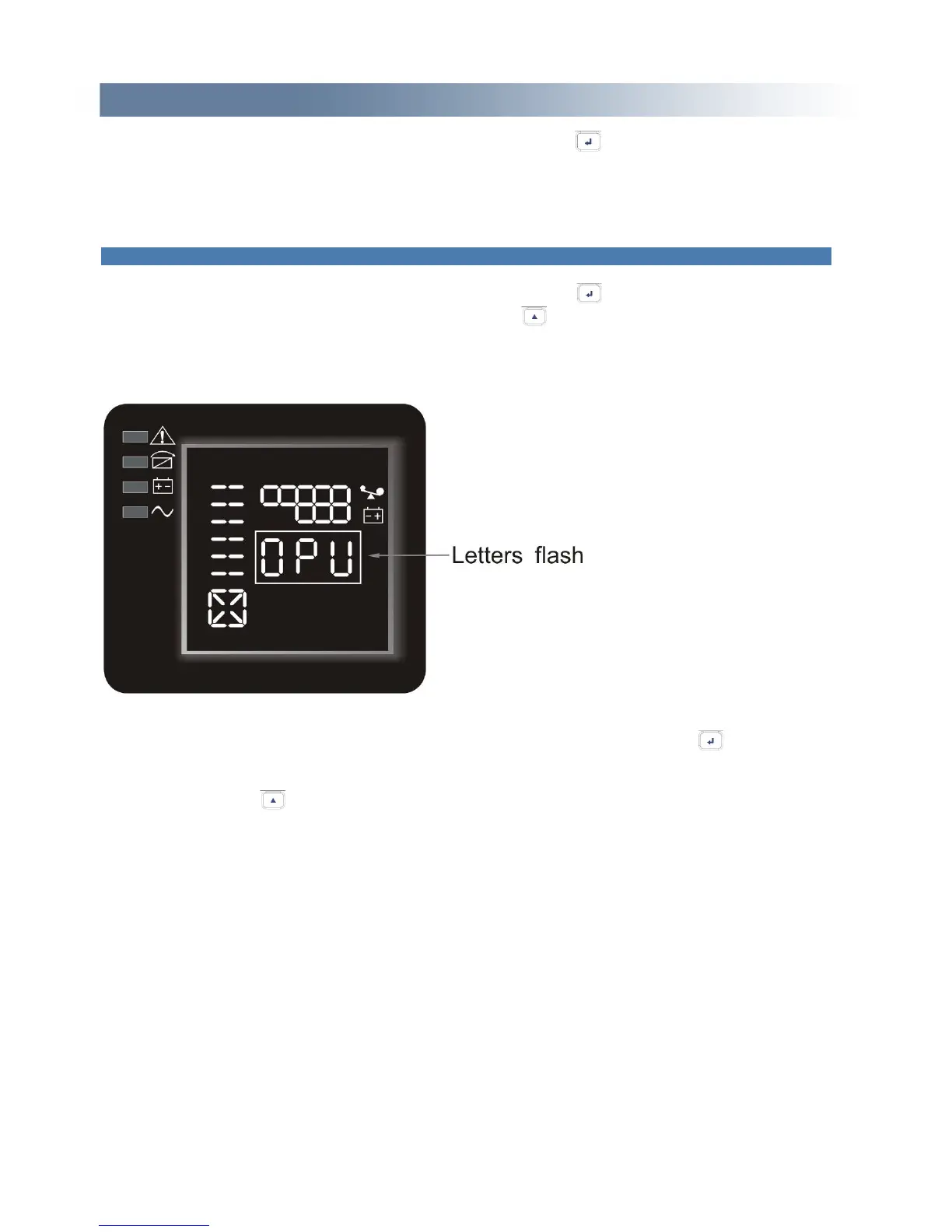
2 seconds), select the function setting, choose output voltage setting interface, at the moment, the
letters “OPU” will flash as following:
Enter the output voltage selecting interface. Press and hold the function setting key for more than
half a second(less than 2 seconds), then come to setting interface of output voltage OPU, at this time,
the letters “OPU” will light for a long time. The numerical value below the OPU will flash. Press and
hold the inquiring key for more than half a second (less than 2 seconds), select the numerical
value in accordance with “OPU” function. The provided voltages are 208v, 220v, 230v, 240, you can
choose anyone by yourself (The default is 220v).


 To Next Page