8
socket, and another one into the CH_B socket. Make sure that the probe switches are set to 1X.
Scroll Navigate to Menu G. Scroll to select a square wave output. Press to
navigate to Menus H and I, and scroll
to select 1KHz frequency, and 50% duty cycle.
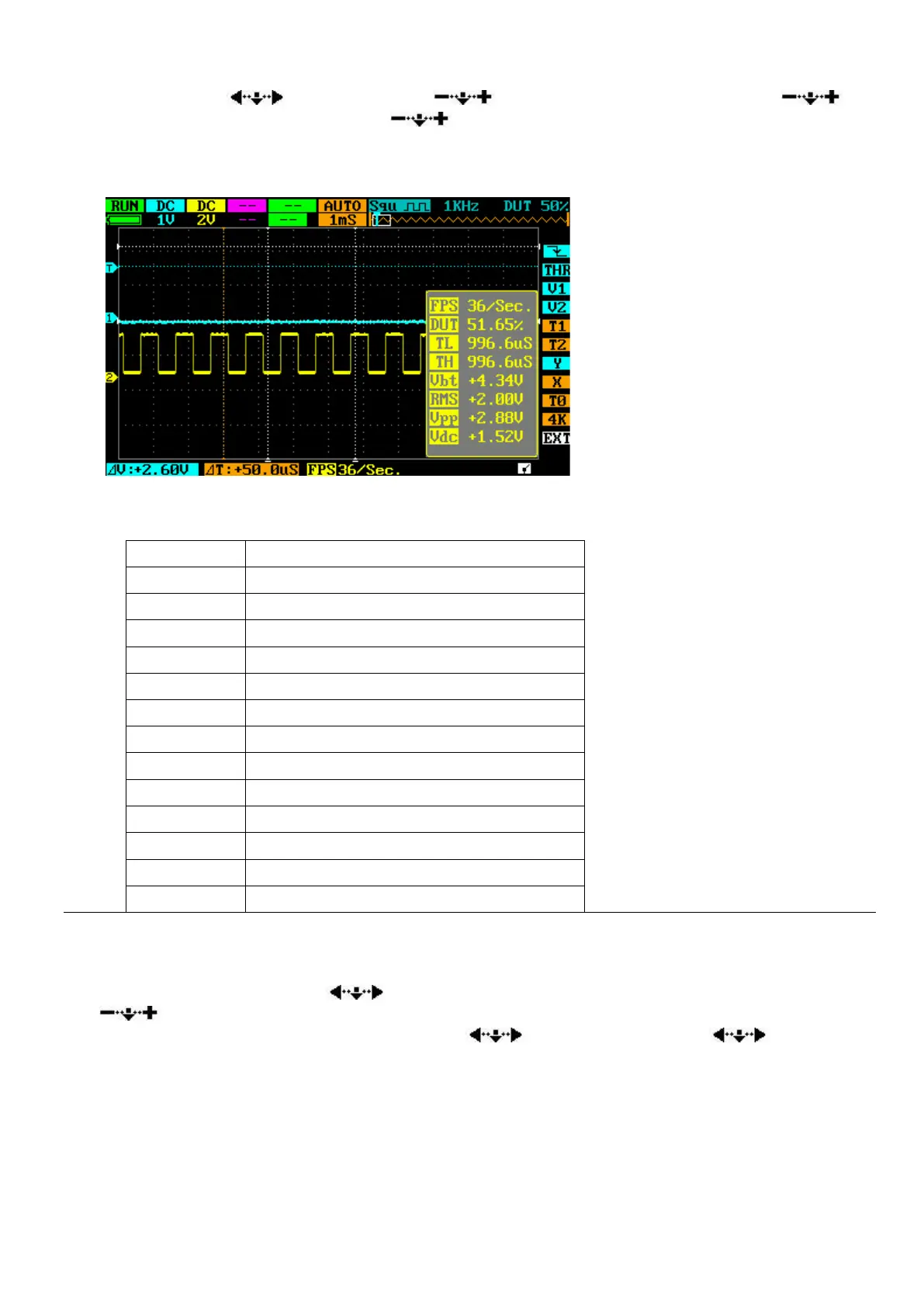
Now, press ● button shortly to display current parameter list, as shown in this figure:
The Parameter List contains the following items and their current values:
Single cycle Low Level Time
Single cycle High Level Time
Root-Mean-Square average of voltage
There are 12 parameters. Only 9 parameters can be displayed at a time. Short press ● button shows
only the current 9 parameters. To see other parameters, hold down ● for 2 seconds and a narrower
parameter list appears. Scroll to select a parameter you no longer need, and then press
to choose a parameter you want to see. You can therefore select another set of 9 parameters
to view. Make sure that EXT is selected. Scroll
to EXT, and hold down . The
narrow parameter list will disappear. Next time you short press ● button, the parameter list you
chose will appear.


 To Next Page