English-58
Operation with the
Remote Control
Press the Menu button on your remote
control to display the main menu screen.
Use the Left or Right button to select a
menu tab and press the OK to enter. Use
Left / Right / Up / Down buttons to select
or set an item. Press Return/Back or Menu
button to quit a menu screen.
Input Selection
Once you have connected external systems
to your TV, you can switch to dierent input
sources. Press the Source button on your
remote control consecutively to select the
dierent inputs.
Changing Channels and Volume
You can change the channel and adjust
the volume by using the Volume +/- and
Programme +/- buttons on the remote.
Inserting the Batteries into the
Remote
Lift the cover on the back of the remote
upward gently. Install two AAA batteries.
Make sure to match the + and - ends of
the batteries in the battery compartment
(observe the correct polarity) Replace the
cover.
Connect Power
IMPORTANT: The TV set is designed to
operate on 220-240V AC, 50 Hz socket.
After unpacking, allow the TV set to reach
the ambient room temperature before you
connect the set to the mains. Plug the power
cable to the mains socket outlet.
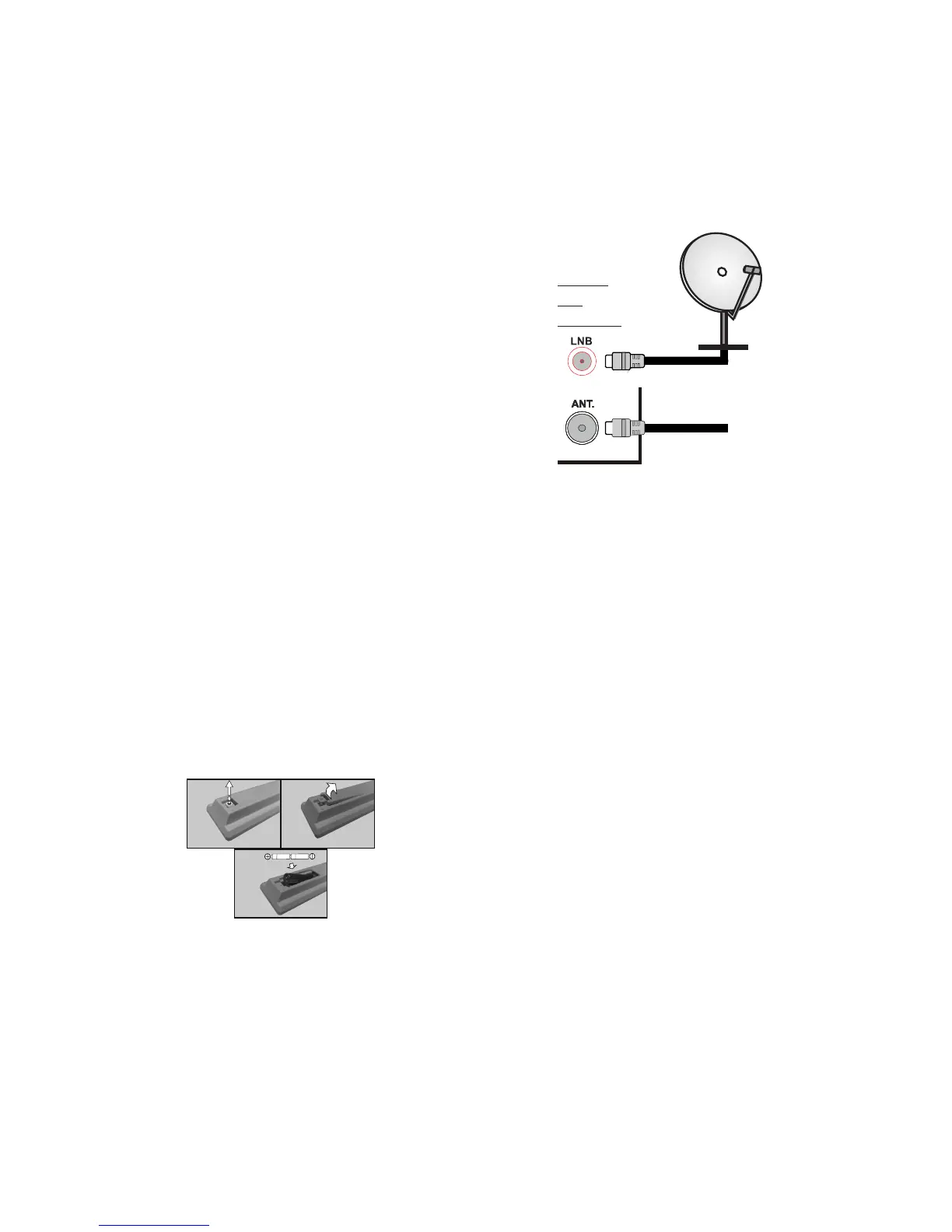
Antenna Connection
Connect the aerial or cable TV plug to the
AERIAL INPUT (ANT) socket or satellite
plug to SATELLITE INPUT (LNB) socket
located on the back of the TV.


 To Next Page