English-77
No sound
• Has the TV been set to mute? To cancel
mute, press the “ ” button, or increase the
volume level.
• Sound is coming from only one speaker. Is
the balance set to one extreme? See Sound
Menu section.
Remote control -
does not operate
• The batteries may be exhausted.
Replace the bateries.
Input sources - can
not be selected
• If you cannot select an input source, it is
possible that no device is connected. if not
• Check the AV cables and connections if
you have tried to connect a device.
JJ CONNECTIVITY
FUNCTIONS
Wired Connectivity
To Connect to a Wired Network
• You must have a modem/router connec-
ted to an active broadband connection.
• Ensure that Nero Media Home soft-
ware is installed to your PC.(for DLNA
function). See Nero Media Home Ins-
tallation” section.
• Connect your PC to your modem/
router. This can be a wired or wireless
connection.
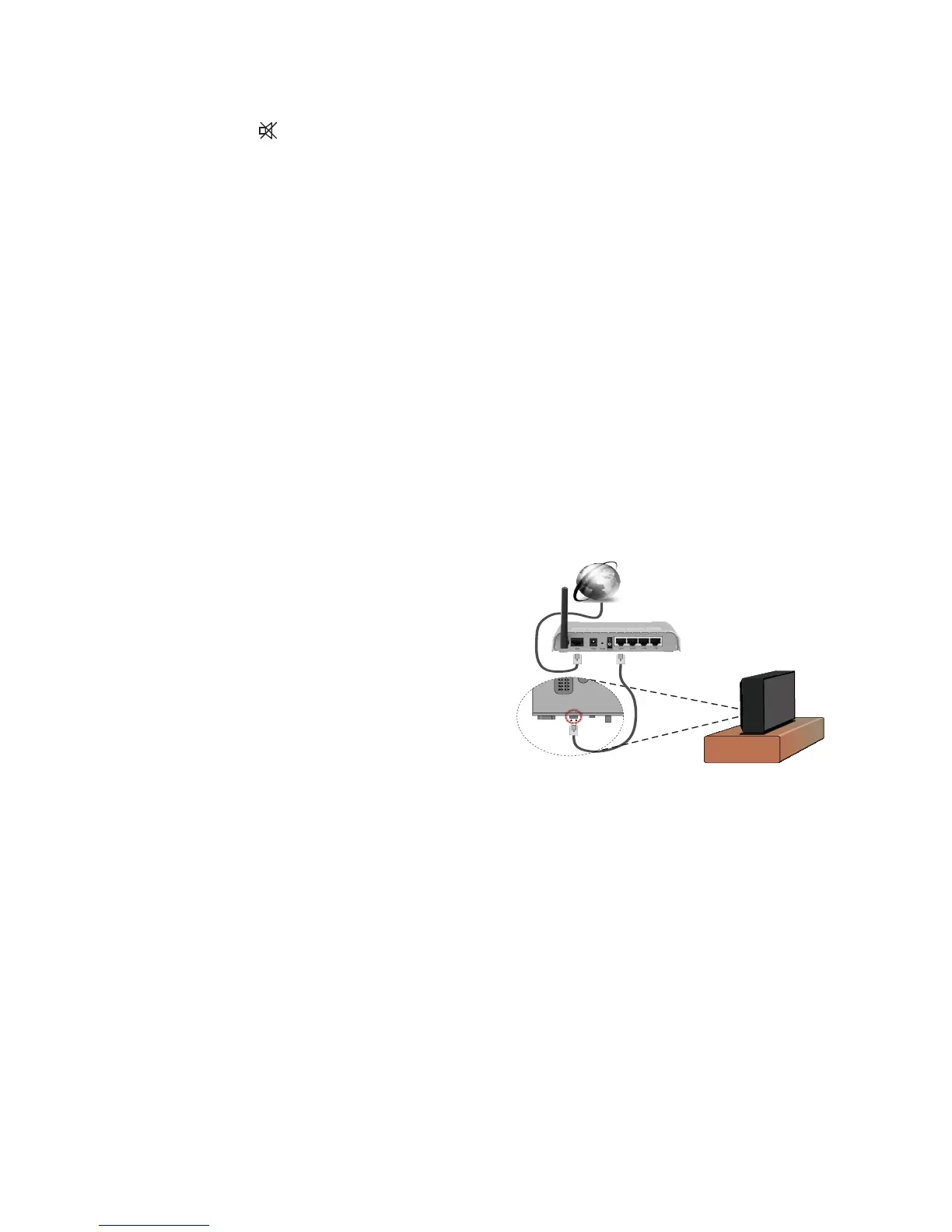
• Connect your TV to your modem/
router via an ethernet cable. There is a
LAN port at the rear (back) of your TV.
• To access and play shared files, you
must select the Media Browser. Press
the Menu button and select Media
Browser. Press OK to continue. Select
the desired file type and press OK. You
must always use the Media Browser
screen to access and play shared net-
work files.
• PC/HDD/Media Player or any other
devices that are DLNA 1.5 compatible
should be used with a wired connection
for higher playback quality.
To configure wired settings please refer
to the Network Settings section in the


 To Next Page