12 [en] Quick Installation Guide
Adding the UTN Server to the Selection List
The selection list displays the UTN servers and the USB devices or USB dongles
connected to their USB ports.
Define the devices you want to use. To do this, you must add the UTN server
including the connected USB devices or USB dongles shown in the network list
to the selection list.
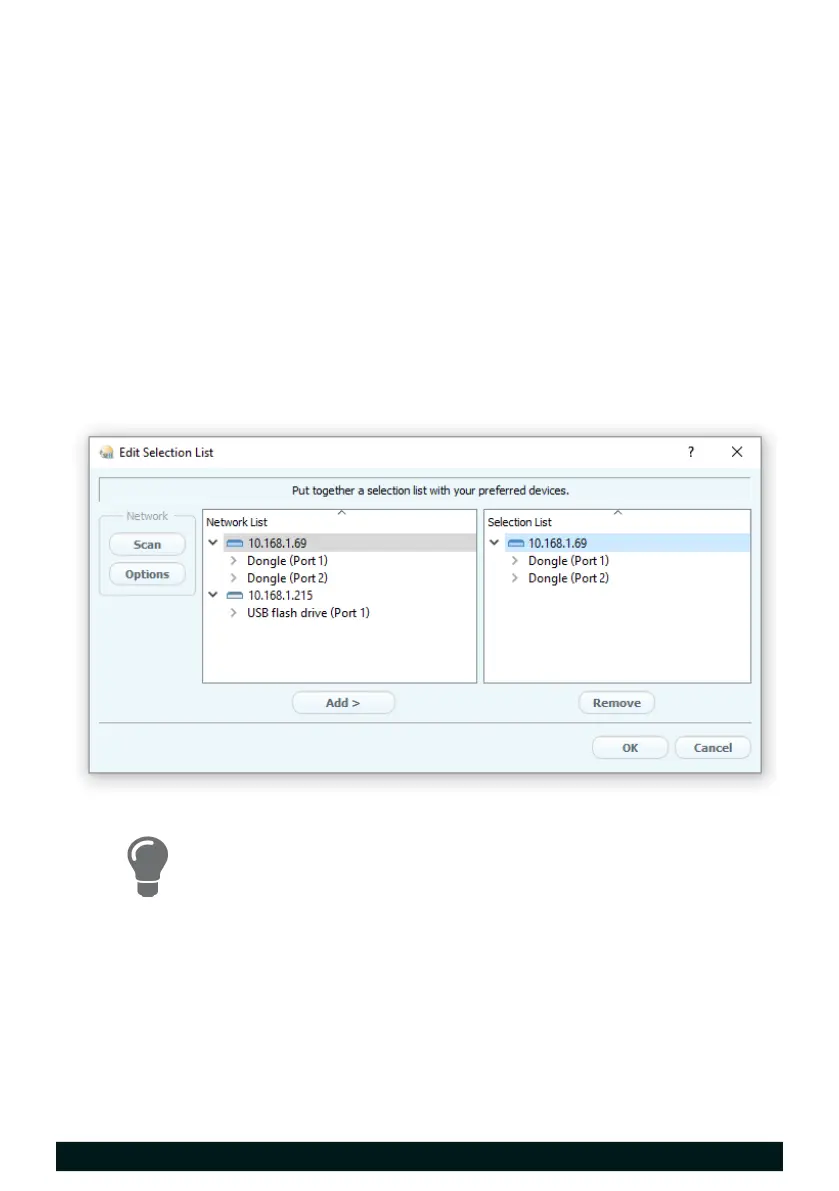
1. In the menu bar, select Selection List – Edit.
The Edit Selection List dialog appears.
2. In the network list, select the UTN server.
3. Click Add.
4. Repeat steps 2 to 3, if necessary.
5. Click OK.
The UTN servers and the connected USB devices or USB dongles are dis-
played in the selection list.
You can extend the search for UTN servers to any network
range. To do this, change the search parameters for the net-
work scan.
Windows: Via Program – Options.
Mac: Via SEH UTN Manager – Preferences.


 To Next Page