Quick Installation Guide [en] 13
Connecting the USB Device to the Client
To use a USB device, a point-to-point connection is established between the
client and the USB port of the UTN server to which the USB device is connected.
The USB device can then be used as if it were directly connected to the client.
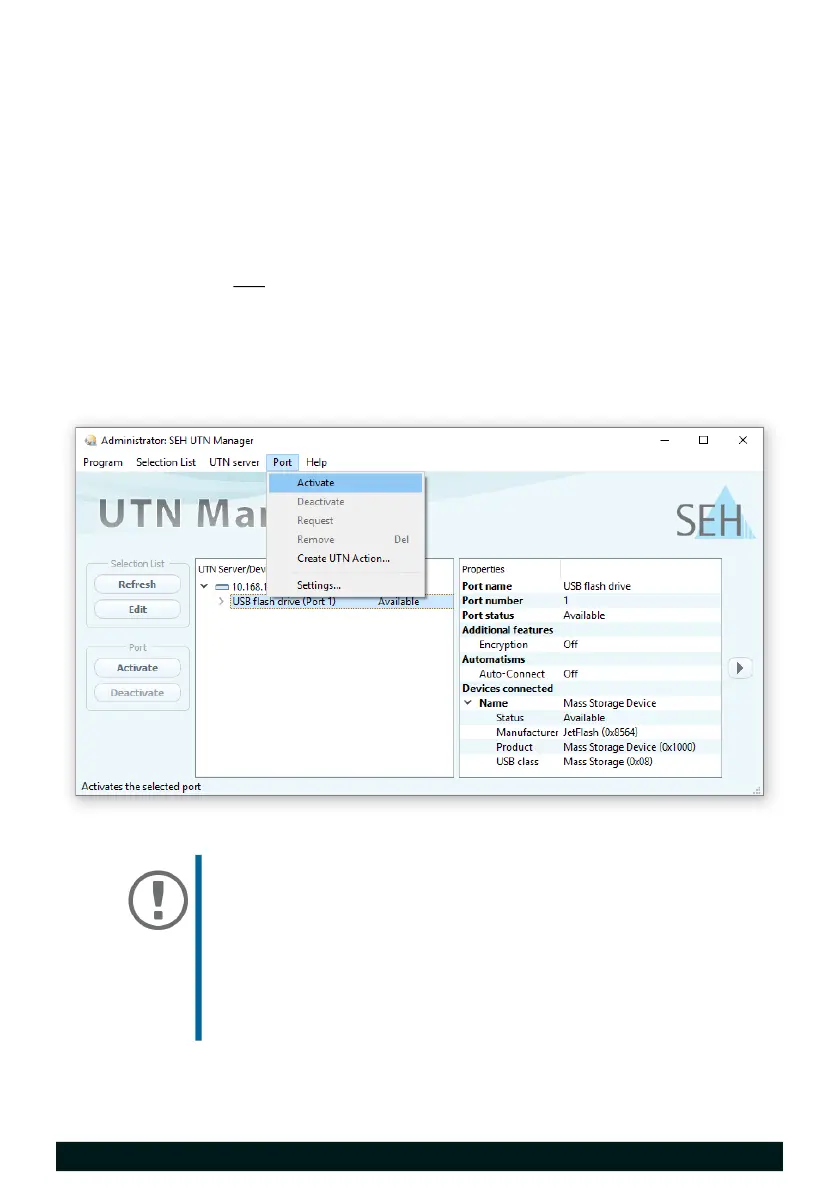
The USB port is shown in the selection list 12.
All provisions (driver installation, etc.) necessary to operate the USB device
locally (i.e. connected directly to the client) have been met on the client. Ide-
ally, the USB device has been connected and operated on the client locally
according to the instructions of the manufacturer.
The USB port is not connected to another client.
1. In the selection list, select the port.
2. In the menu bar, select Port – Activate.
The connection between the USB device and client is established.
Important:
If a USB device is connected to a client, the connection is
of a point-to-point type. As long as the connection is
established, other users cannot connect the USB device
to their client and thus cannot use it. For this reason, you
have to cut the connection once you do not use the USB
device any longer. To do this, select Port – Deactivate
from the menu bar.


 To Next Page