PoolMatch | pH · ORP
0000138883 rev. 1.0 EN
5. SETUP INSTRUCTIONS POOLMATCH SYSTEM
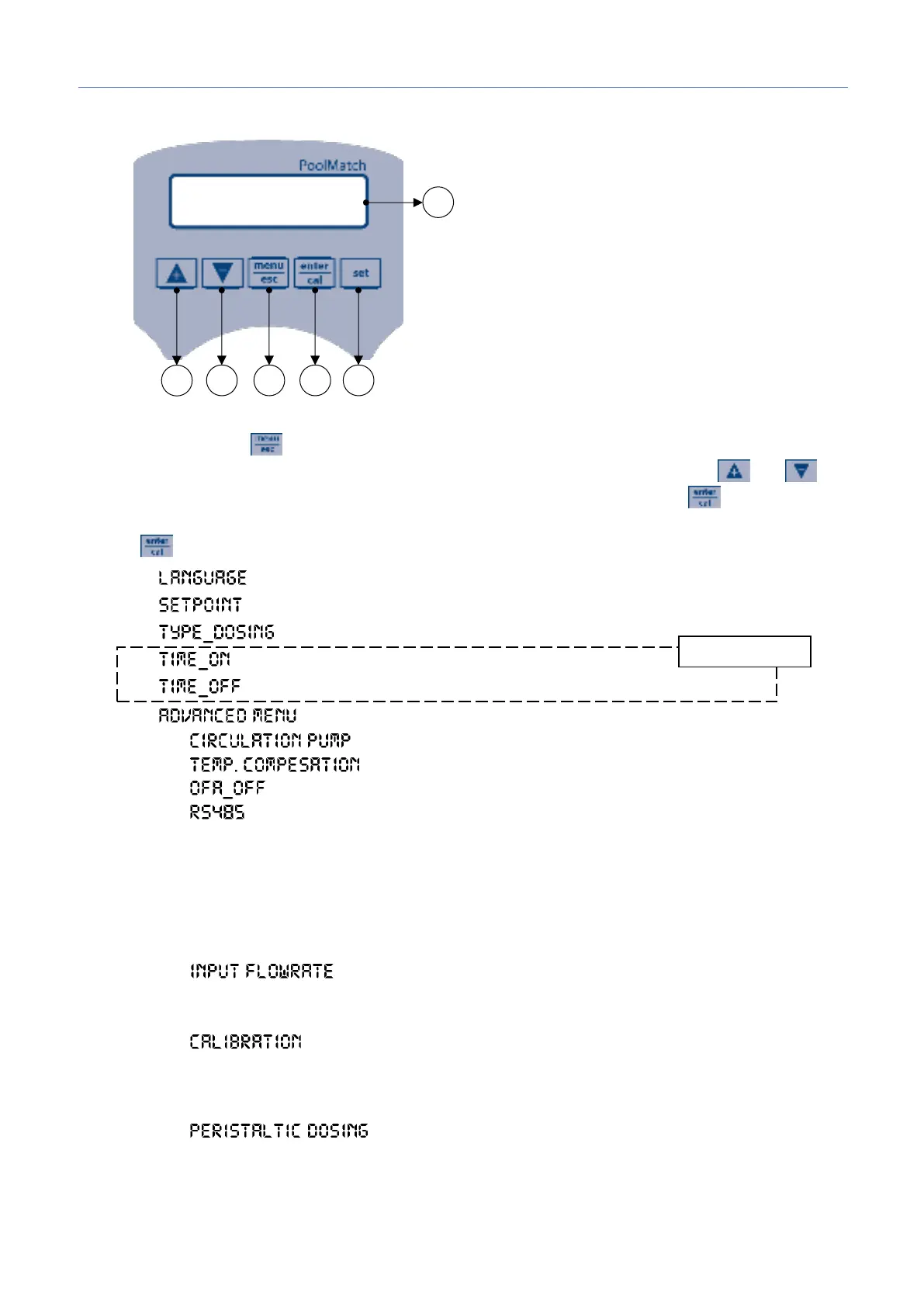
Program Setup – Press for 5 seconds
At the entry of each menu item, the parameter can be directly modified using the arrow keys ( and ).
Confirmation of the current setting and switching to the next item is done by pressing the button.
The menu has a circular structure: once you arrive at last item, the confirmation of the parameter set by
pressing , determines the return to the first menu item.
1 – It is possible to select between 5 available languages: EN, FR, IT, DE, ES
2 – 7.4pH (5-9pH) / 700mV (300-900mV)
3
– Acid (Acid/Alka) / Low (Low/High)
4
= 30seconds (range from 1 to 360 seconds)
5
= 60seconds (range from 1 to 360 seconds)
4
4.1 – (Enabled/disabled)
4.2
– (Auto/Manual 25°C)
4.3
– (0-60min.)
4.4
This menu is available only for models that have the RS485 Modbus connector
▪ Baud Rate (2400, 4800, 9600 or 19200)
▪ Polarity (Even, Odd or None)
▪ Address (from 1 to 240)
▪ RS485 Watchdog (Off, 1-30000 seconds)
▪ Watchdog Config (Hardware Reset, Watchdog Alarm, Stop Dosing, Reset Comunication)
4.5
▪ Pulse/ liter 1:1
▪ Unit measure m³, l.
4.6
▪ Two points
▪ Single point
▪ Referece
4.7
▪ On/Off
▪ Timed
▪ Prop
▪ Off
1) Button to increase the value
2) Button to decrease the value
3) Button Menu/Esc
4) Button Cal/OK
5) Button to set the setpoint
6) Digital display


 To Next Page