6
SEL Application Guide 2020-05 Date Code 20200324
Flash LED
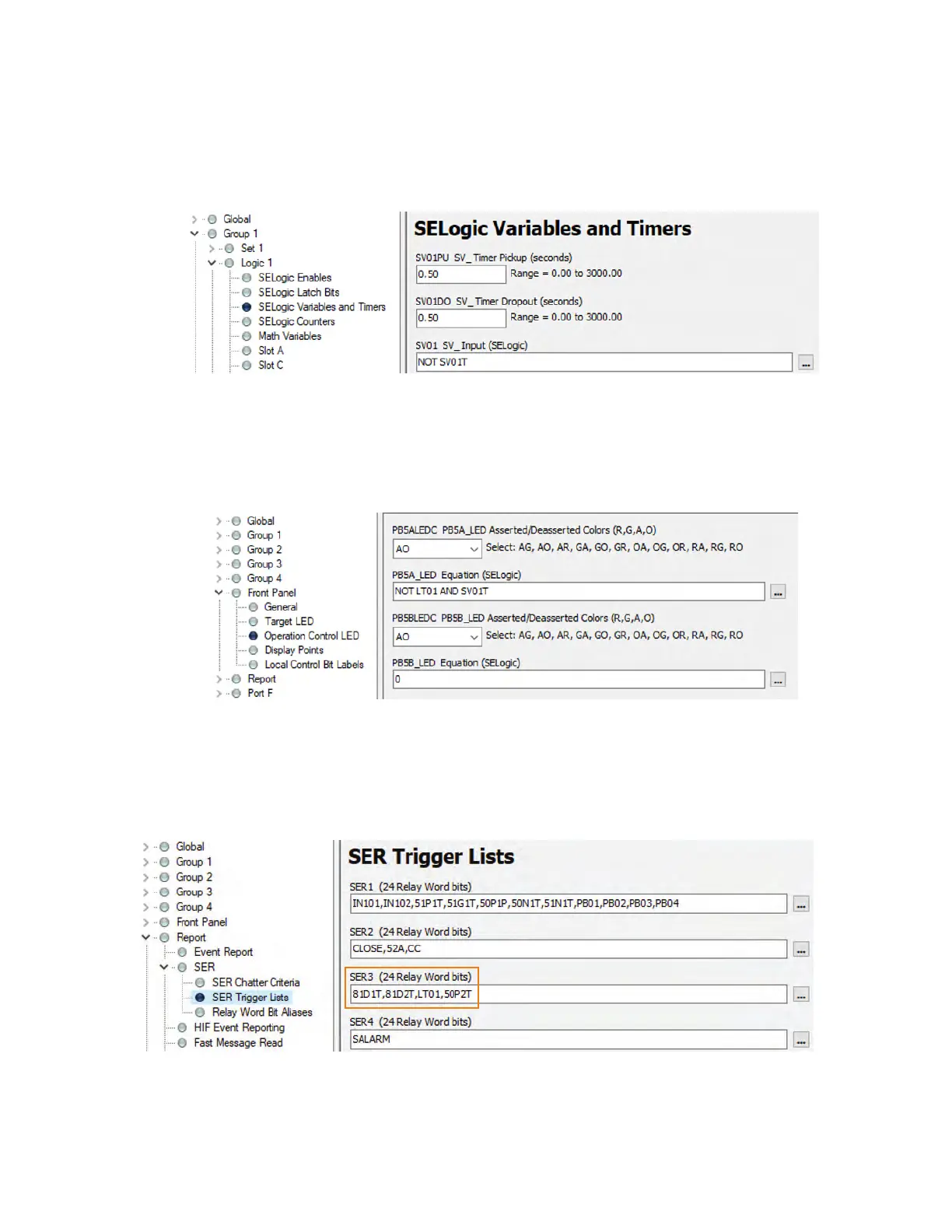
To make the pushbutton LED flash during maintenance mode, set up a SELOGIC variable as shown
in Figure 9. Set the pickup and dropout delay to 0.5 s. These timers control how fast the LED
flashes.
Change the PB5A_LED equation to NOT LT01 AND SV01T, as shown in Figure 10. When main-
tenance mode is enabled, the first part of the equation is true (NOT LT01 = 1) while the second part
of the equation (SV01T) oscillates between 0 and 1, causing the LED to flash with an amber color.
Change the PB5ALEDC setting to change the color of the flashing LED.
UPDATE SER
Add LT01 and 50P2T to one of the SER equations. Figure 11 shows them added to SER3.
Figure 9 Logic to Oscillate Timer Output Between 0 and 1
Figure 10 Logic for Flashing Pushbutton LEDs During Maintenance Mode
Figure 11 SER Trigger List Updated With Relay Word Bits Associated With Maintenance Mode



 To Next Page