21
508.366.1488 | www.semshred.com
5.4 Filters
About the Filters: This device utilizes a 99.7% efficient (based on a 0.3 micron particle), UL certified HEPA filter.
This is coupled with a carbon pre-filter to capture as many air contaminants as possible.
Frequency of Change: The following times are manufacturer recommended. Devices that see heavy use, quick
feed rates, or smaller waste screens will require more frequent filter changes and cleaning.
• Carbon Pre-Filter: Change minimally every 150 drives.
• HEPA Filter: Change minimally twice yearly or as needed and clean every time the pre-filter is changed.
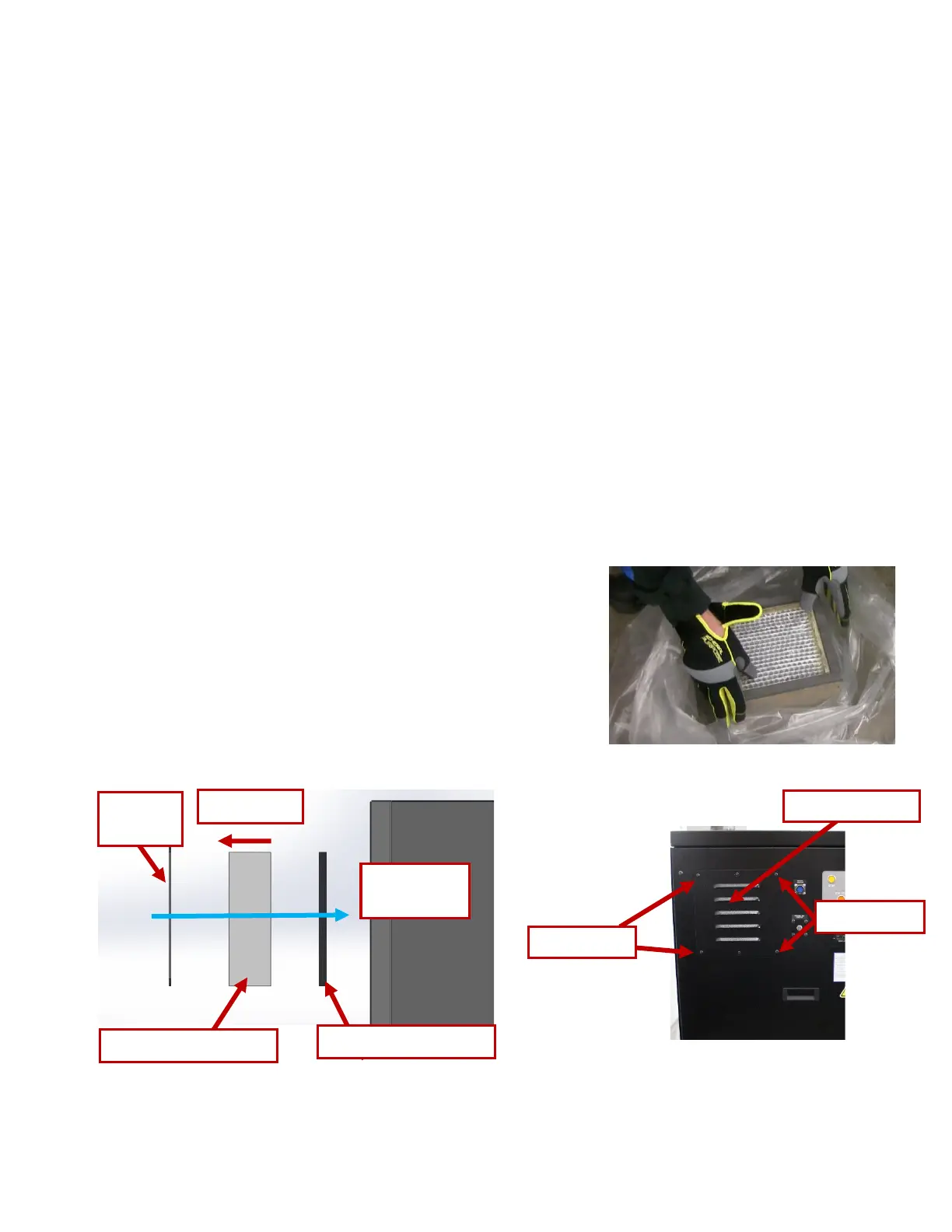
Note: Direction of air flow noted on HEPA filter. The gasket should be toward the outside of the device.
Warning: Failure to change filters may result in hazardous particle emissions.
Instructions:
• Requires 5/32” Allen wrench
• Unscrew 4 screws on the corners of the filter panel cover and remove cover. Warning: Do not remove
the two screws in the middle of the filter panel.
• Remove the HEPA filter and pre-filter.
• Vacuum the inside of the compartment if dirty and insert a new pre-filter.
• Clean dust and debris from HEPA filter if not replacing it. Vacuum if necessary.
• Cleaning HEPA Filter: Put filter in a bag with the airflow
arrow pointing upwards, then drop filter from approximately
a foot high on the floor three to four times.
• Inspect and insert HEPA filter.
• Make sure the airflow indication arrow is pointing towards
the exterior of the device.
• Replace the filter panel cover with four screws.


 To Next Page