9
Basic Conguration
To congure the charger, perform the following steps in the SemaConnect mobile app:
1. Access the Home Charger menu and follow the instructions to add a charger.
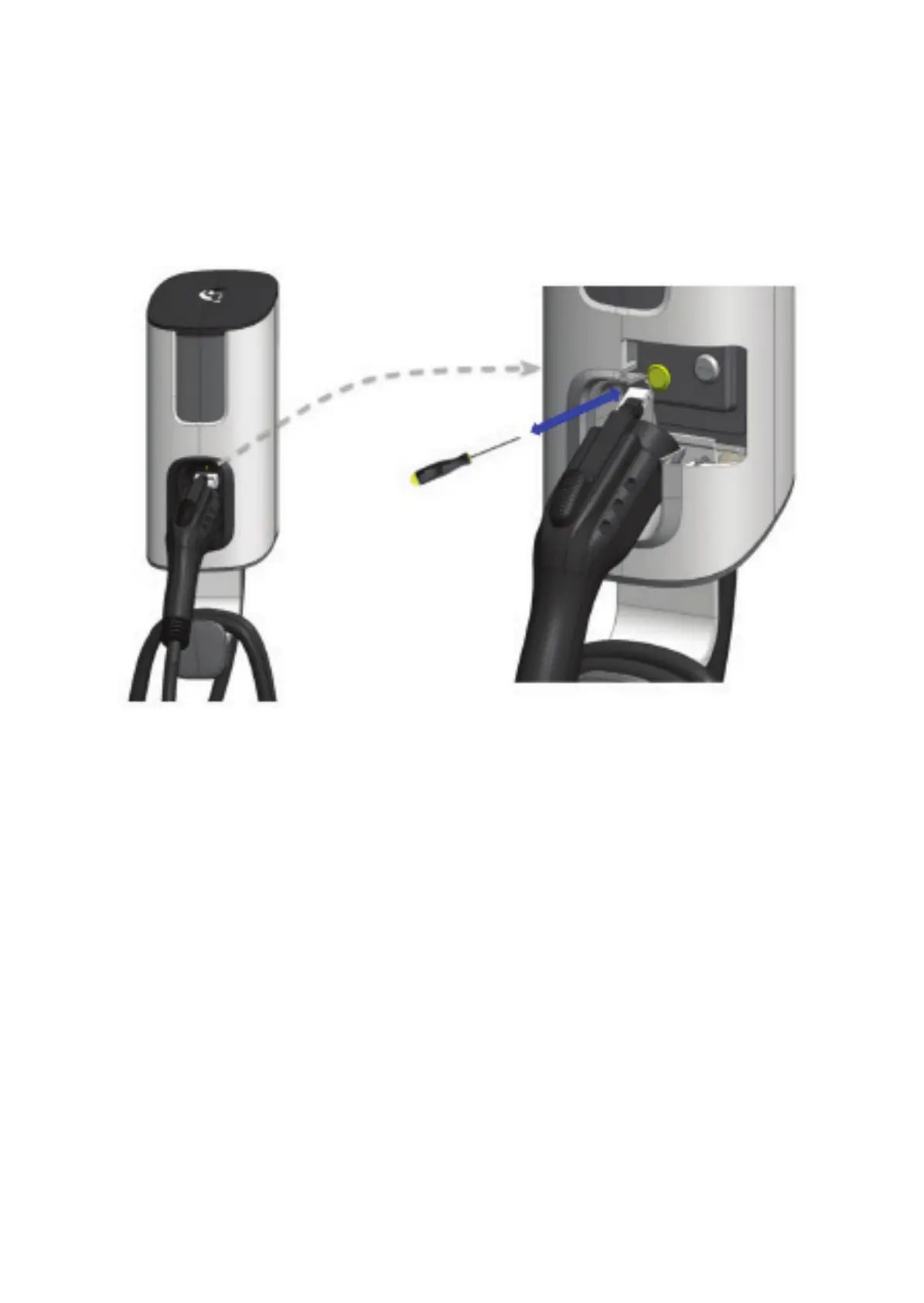
• Initiate the pairing process on the charger by inserting the supplied Allen wrench into the small opening
where the vehicle connector attaches to the charger and briey pressing the recessed button for less
than 2 seconds. See diagram below.
• If connecting to an available WiFi network, select the network and provide the password.
2. The charger will now be listed in the Home Charger section of the mobile application.
Advanced Conguration
Advanced features may be congured if the charger is connected to WiFi.
To perform this conguration, click on the settings icon for your charger in the Home Charger section of
the mobile application.
Select one of the following modes:
• Unlocked (default): The charger will start charging immediately after an electric vehicle is connected.
• Locked: The charger requires authorization (using the mobile app) to begin charging once an electric
vehicle is connected.
• Scheduled: The charger will only charge the connected electric vehicle during the specied schedule.


 To Next Page