12
7. Troubleshooting and Maintenance
Troubleshooting
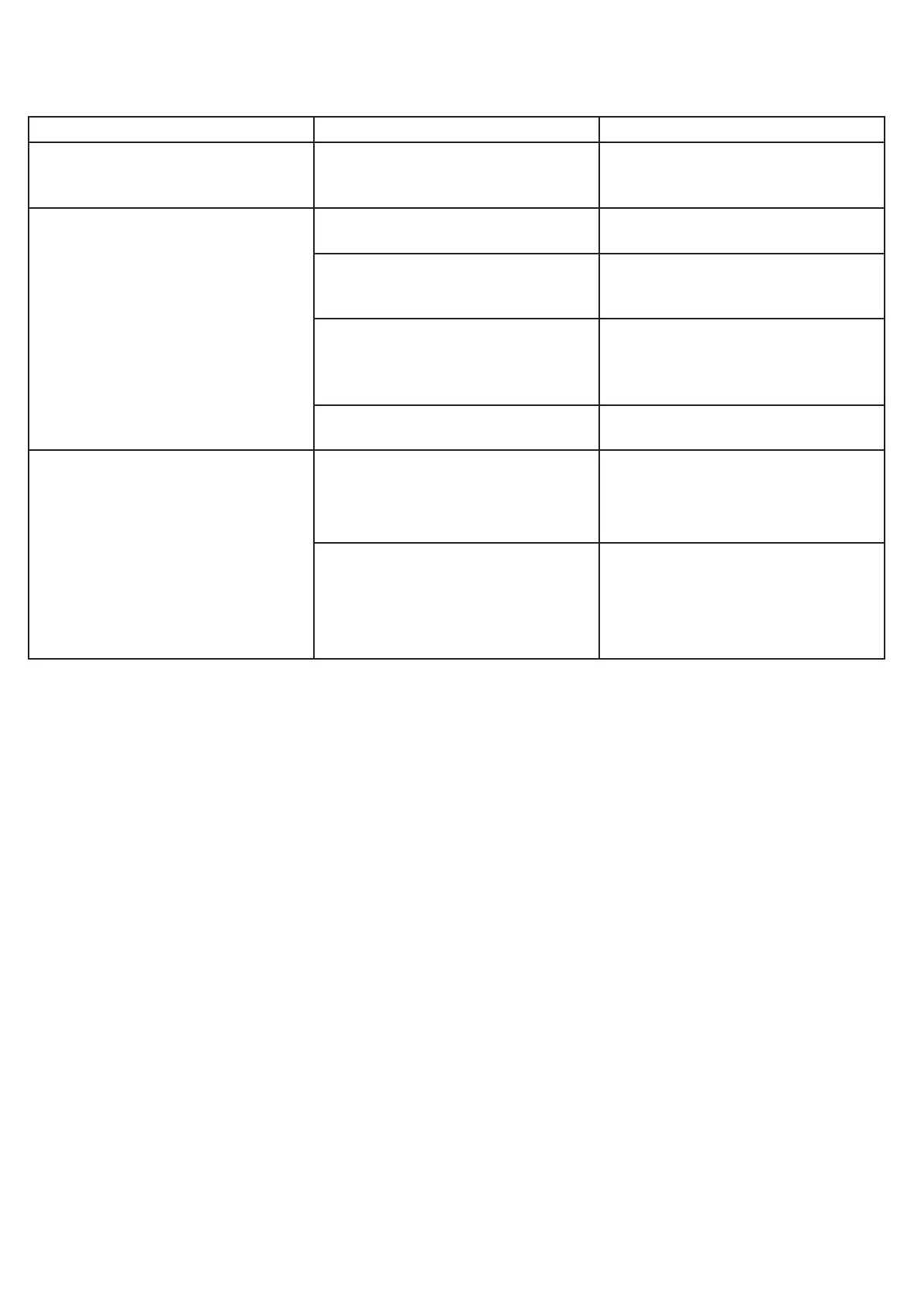
ISSUE POSSIBLE CAUSE RESOLUTION
No light or screen icons are
displayed.
The charger has no power. Ensure the breaker is powered on.
Ensure the charger is plugged-in or
correctly hardwired.
The charger is powered-on but the
connected vehicle is not charging.
The vehicle battery is already full. Reconnect the vehicle when the
battery requires charging.
A schedule is congured on the
vehicle.
Wait for the scheduled start time. To
start charging immediately, clear the
schedule from the vehicle.
A schedule is congured on the
charger.
Wait for the scheduled start time. To
start charging immediately, switch
the mode to Locked or Unlocked
using the mobile app.
Locked mode is enabled. Use the mobile app to start
charging.
The charger is locked and starting
the charging session using the
mobile app is not working
OR
Changes made in the mobile
application are not reected in
the charger.
The charger has lost connection to
home WiFi.
The home WiFi network name or
password has changed.
Check that your home WiFi is
enabled and has sufcient signal
strength to maintain a good
connection with the charger.
Use the mobile app to repeat the
conguration process using the new
WiFi network and password.
Other Troubleshooting Steps
If the above table does not resolve the issue, it is possible that the following steps may be attempted:
• Power cycle: Turn power off at the breaker, wait 20 seconds, and then restore power. Allow up to 3 minutes for
the charger to complete the power-on process.
• Reconnect the charger to your account: Delete the charger from your mobile application in the settings section
of the charger. Then repeat the conguration process described above.
• Factory reset: Delete the charger from your mobile application in the settings section of the charger. Perform
a factory reset by using the supplied Allen wrench to press the recessed button and hold it down for 15
seconds before releasing. Allow 3 minutes for the process to complete. Then repeat the conguration
process described above.


 To Next Page