27
EXPAND
English
9.4.2 End Three-way Intercom
When you are a member of an active three-way
conference intercom, you can completely terminate
the conference intercom or just disconnect an intercom
connection with one of your active intercom friends.
1. Press and hold the Center Button for 1 second until
you hear a beep to terminate three-way conference
intercom completely. It terminates both intercom
connections with (B) and (C).
2. Press or press twice the Center Button to disconnect
intercom connection with one of the two intercom
friends accordingly. For example, by single pressing
the Center Button, you can terminate the intercom
connection with the rst intercom friend (B).
However, you still have the intercom connection with
your second intercom friend (C). To disconnect from
intercom friend (C), press twice the Center Button.
Now both intercom friends are disconnected.
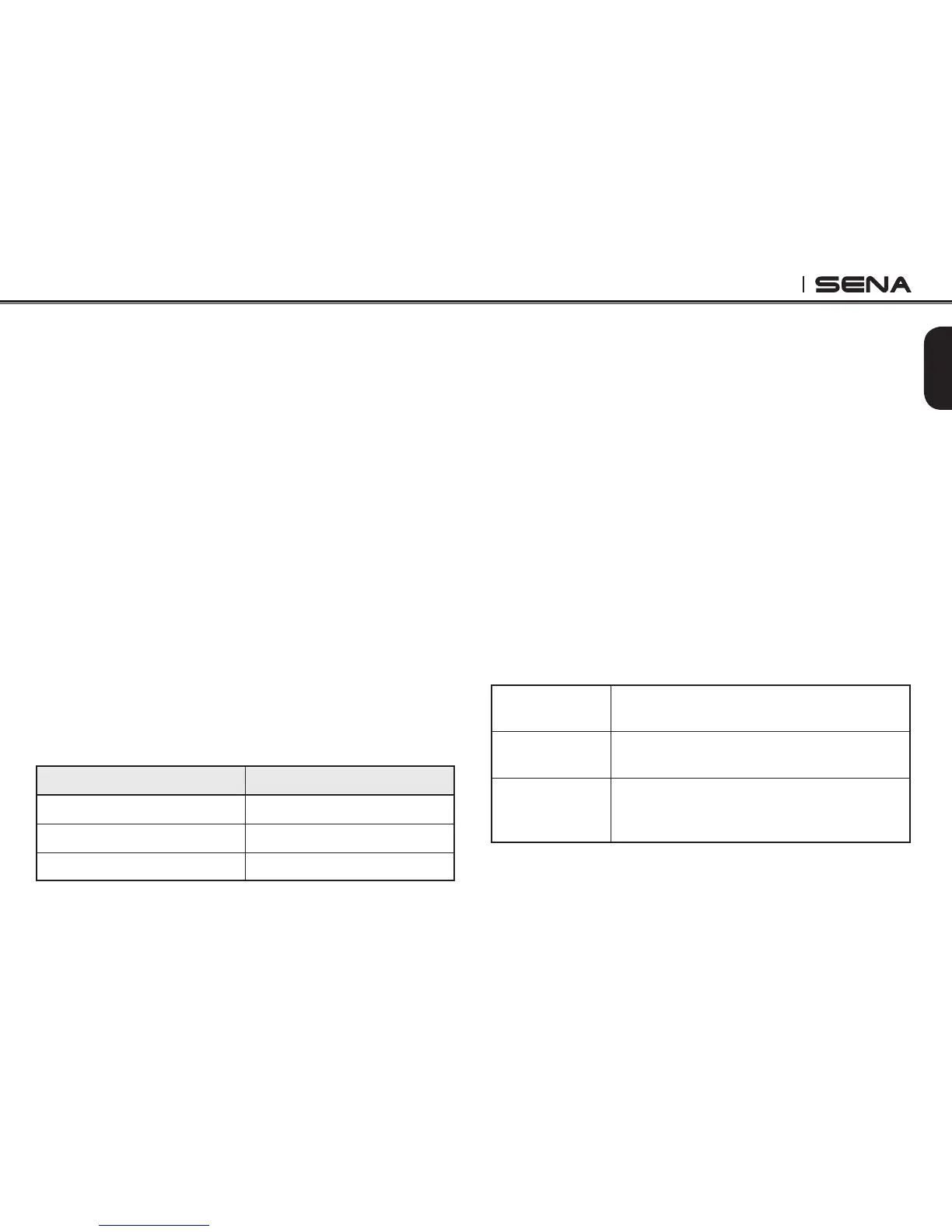
Center Button Result
Press and hold for 1" Disconnect (B) & (C)
Press once Disconnect (B)
Press twice Disconnect (C)
End Three-way Intercom
9.4.3 Three-way conference phone call with
intercom participants
You can have a three-way conference phone call
by adding an intercom friend to the mobile phone
conversation. While having a mobile phone call, make
an intercom call to one of your intercom friends (B,
C or D) by pressing the Center Button once, twice or
three times to form a three-way conference call with
the person on the mobile phone line. To disconnect
theintercomrstandgobacktoyourprivatemobile
phone call, terminate the intercom by pressing the
Center Button once. To end the mobile phone call
rst and maintain the intercom conversation, press
and hold the Center Button for 2 seconds, or wait for
the person on the mobile phone line to end the call.
Start
Press the Center Button while having a
mobile phone call
End intercom
rst
Press the Center Button
End phone call
rst
Press and hold the Center Button for 2"
or
Wait for the called person to end the call
Start & End Three-way Conference Phone Call



 To Next Page