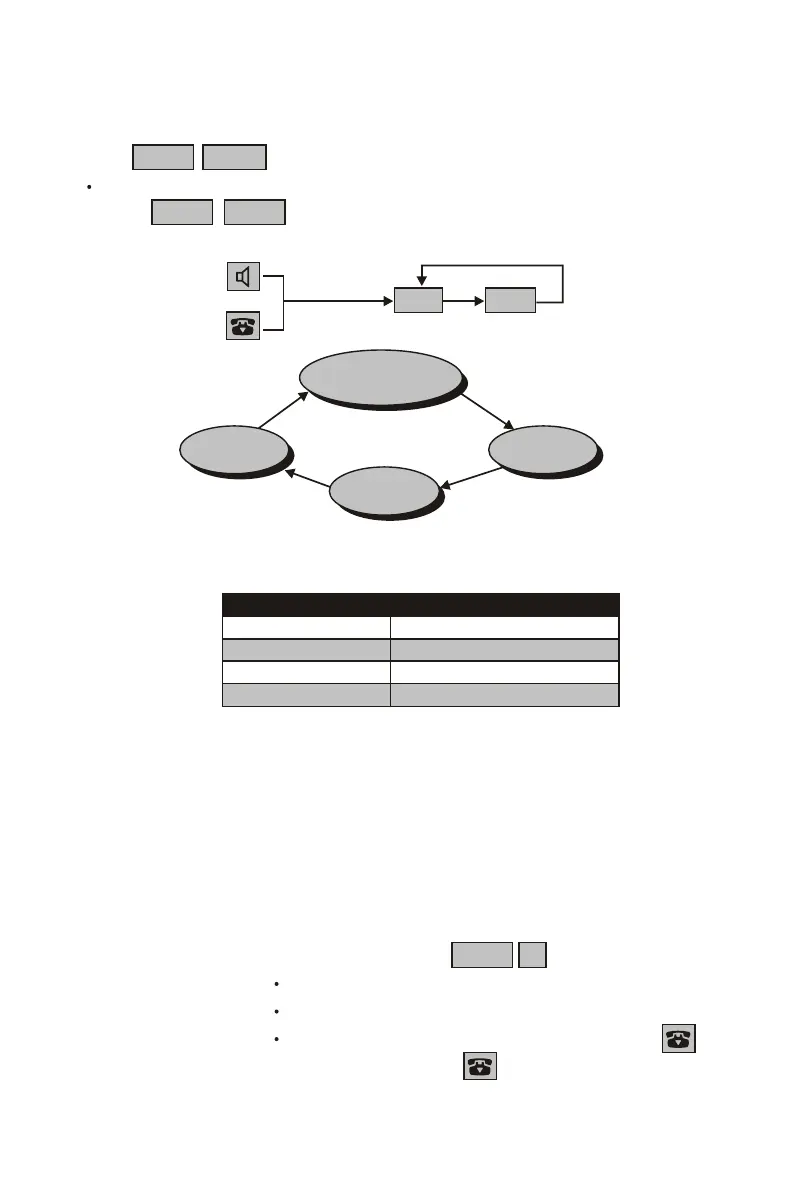
Voice mode SCRAMBLER indicator
Normal light off
Scrambler light up
Voice mutation A slow blink
Voice mutation B fast blink
C. Selecting the Voice Mode
modes
the voice mode will be changed
Press FUNC P/VOL ,while in use, to select the voice mode.
There are 4 available being set in cycle. Each time you
press FUNC P/VOL .
D. Transferring a Call among Handsets
The multi-handset system allows you to transfer a call among the
handsets.
1. Transferring a call from the handset No. 5 to the handset No. 8
(1) Handset No. 5: During a call, press FUNC 8 .
The call is put on hold.
The handset No. 8 rings for 30 seconds (P. 28).
To stop transferring, press any key except .
(2) Handset No. 8: Press any key except or pick it up if is placed
on the base unit or on the charger to answer.
Voice
mutationB
Voice
mutation A
Scrambler
Normal
(Power on default)
or
return to normal
in stand-by
return to normal
in stand-by
P/VOL
FUNC
25-EN


 To Next Page