29-EN
B. Setting the Handset
registered
the
operation
When the setting is finished, a confirmation tone " bi-bi" sounds.
When failed, an error tone "bi-bi-bi" sounds. If misdialed, press to
end setting, then restart.
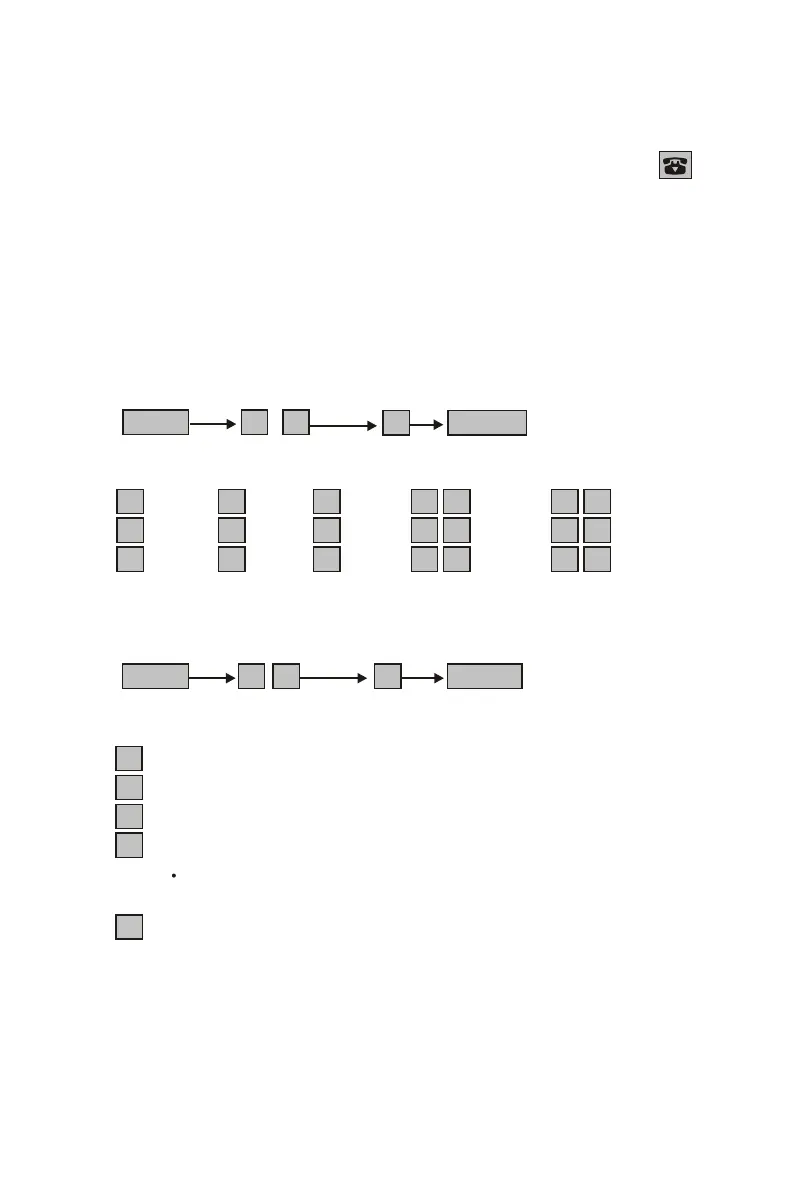
1. Change Handset's ID (in stand-by mode)
To change handset's ID, please make sure that each handset has
an individual ID. It is not allowed that two handsets have the same ID
and the ID number is more than the amount of handsets
to one base unit. Once above setting is being against,
through base unit will be failed.
FUNC 0 1 N MEMO
(N: 1~05) store
N : ID
1 : 1 4 :4 7 :7 0 0 :00 0 3 : 03
2 : 2 5 :5 8 :8 0 1 :01 0 4 : 04
3 : 3 6 :6 9 :9 0 2 :02 0 5 : 05
2. Setting ring mode for each handset (in stand-by mode)
FUNC 0 2 N MEMO
(N: 1~5) store
N : Ring mode
1 : ring (default)
2 : only ring 2 seconds
3 : silence
4 : make calls only, but can not answer calls
Under this mode the battery stand-by time is up to about
200 hours.
5 : answer calls only, but can not make calls


 To Next Page