Putting the devices into operation
16
Charging the accupack
To charge the radio microphone with the inserted BA 2015 accupack (optional accessory):
Use the LA 2 charging adapter to insert the radio microphone into the L 2015 charger
(both the charger and the charging adapter are available as optional accessories).
Changing the microphone head
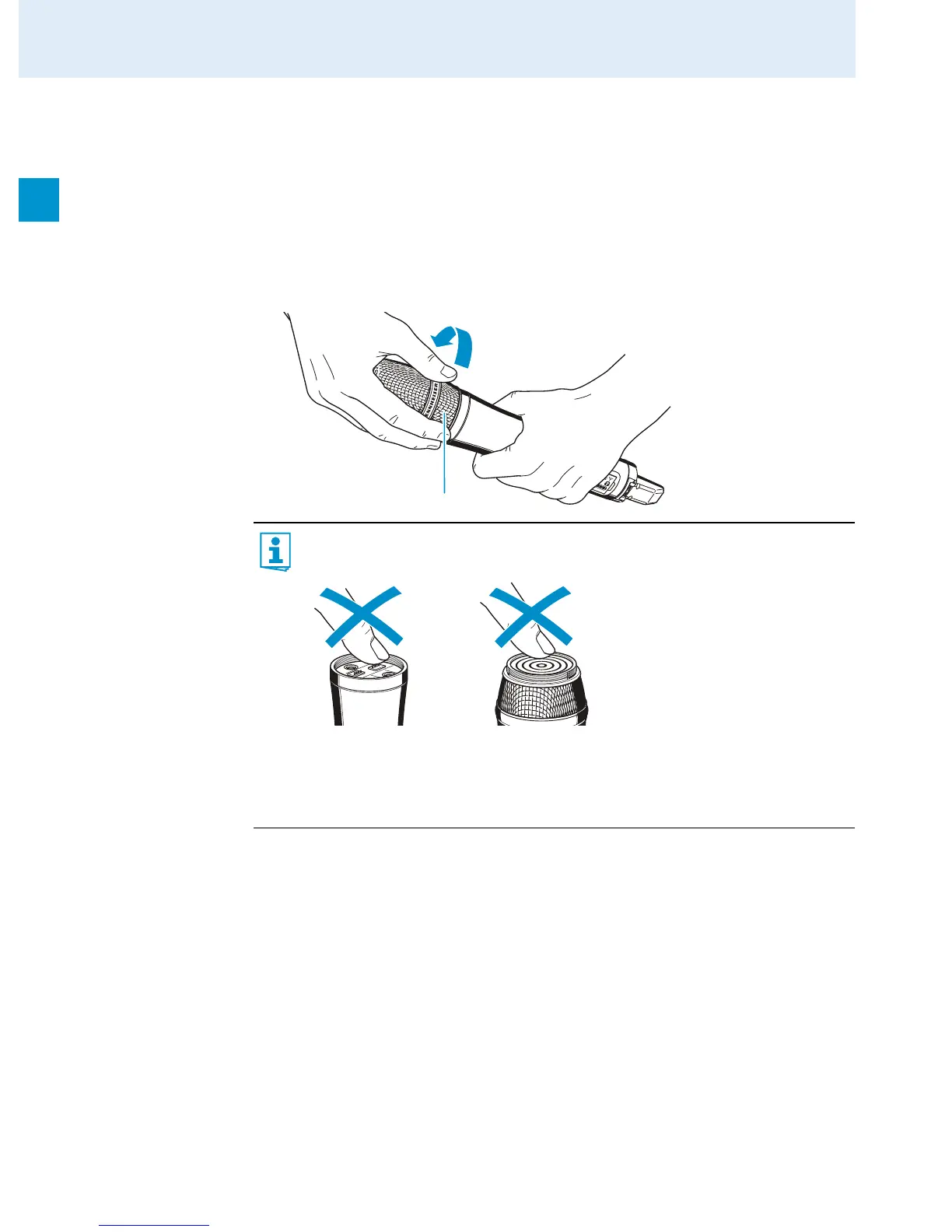
The microphone head is easy to change.
Unscrew the microphone head.
Screw the desired microphone head to the radio microphone.
Put the radio microphone back into operation.
Changing the color-coded protection ring
The color-coded protection ring 쐊 prevents the multi-function switch 쐈 from accidental
operation. Protection rings in different colors are available as accessories. The protection
rings allow you to clearly identify each radio microphone.
Remove the color-coded protection ring as shown in the left-hand diagram.
Put on a new protection ring as shown in the right-hand diagram.
Do not touch the contacts of the radio microphone nor the contacts of the micro-
phone head. The contacts can become dirty or damaged if touched.
When unscrewing the microphone head during operation, the muting function is
automatically activated. “MUTE” appears on the display panel.
When screwing the microphone head back to the radio microphone, the muting
function is deactivated.
쐃













 To Next Page