Using the transmitter
16
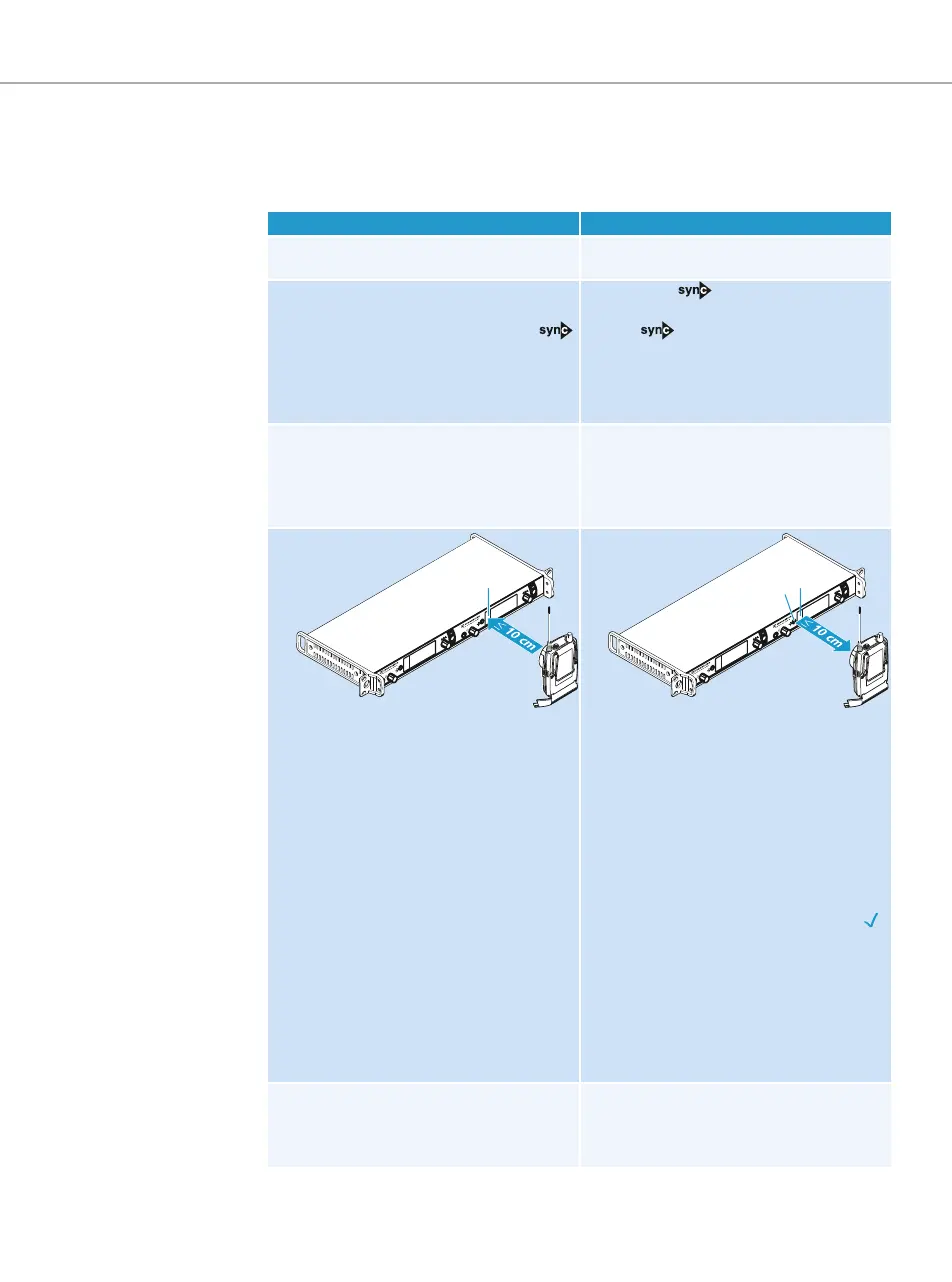
Carrying out an Easy Setup Sync or a Sync function
The following assumes that you are using the Easy Setup Sync function for setting up a multi-
channel system. You can also you the Easy Setup Sync function for establishing a transmis-
sion link between one transmitter and one
EK 2000 IEM
receiver.
Easy Setup Sync Sync
왘 Switch all transmitters and one diversity
receiver on.
왘 Switch your transmitter and your
diversity receiver on.
왘 On all transmitters, call up the “Easy
Setup” menu item.
The text “Easy Setup Sync” and the
icon appear on the display panels of the
transmitters.
The RF signal of the transmitters is auto-
matically deactivated.
왘 Press the button on the trans-
mitter.
The icon appears on the display
panels of the transmitter.
왘 Use your diversity receiver to perform a
frequency preset scan and select a
channel within a frequency bank with a
sufficient number of unused channels (see
the instruction manual of the receiver).
–
왘 Place the infra-red interface of the
receiver (see the instruction manual of
the receiver) in front of the infra-red
interface of the first transmitter.
The next unused frequency preset is
transferred from the receiver to the
transmitter.
As soon as the transfer is completed, the
display panel of the transmitter displays
the numbers of the transferred fre-
quency bank and channel.
Please note that the transmitter does not
automatically store the frequency bank
and channel setting.
왘 Place the infra-red interface of the
receiver (see the instruction manual of
the receiver) in front of the infra-red
interface of your transmitter.
The parameters adjusted via the “Sync
Settings” menu item are transferred
from the transmitter to the receiver
.
In addition, the current frequency bank
and channel setting is transferred.
When the transfer is completed, “ ”
appears on the display panel of the trans-
mitter. The transmitter then switches
back to the standard display.
The transferred parameters are automat-
ically adjusted and stored by the receiver.
The transmission link between trans-
mitter and receiver is now established.
왘 Place the infra-red interface of the diver-
sity receiver in front of the infra-red
interfaces of the remaining transmitters,
one after the other.
–









 To Next Page