Sensaphone
®
Model 800 User’s Manual
102
([DPSOH$'LDORXW7HOHSKRQH&DOO
4HEFOLLOWINGPARAMETERSARESELECTEDFORDEMONSTRATION
purposes:
s -ODEL5NIT)$.UMBERISSETTO
It is currently installed at your place of business.
s $IALOUT4ELEPHONE.UMBERISPROGRAMMED
TOYOURHOMETELEPHONENUMBER
s6OICE2EPETITIONSARESETTO
4HE-ODELISDETECTINGANALARMONZONE
4HETELEPHONERINGSATYOURHOMENUMBER
You answer the telephone and hear the following message:
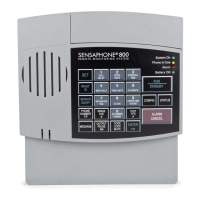
“Hello, this is 555-5674. This is the Sensaphone 800 at John’s
Printing Express. It is now 12:30 A
M. Zone two, back door
security sensor, alarm exists, it is not okay.”
(4-seconds to hear on-site sound from unit’s microphone.)
“Hello, this is 555-5674. This is the Sensaphone 800 at John’s
Printing Express. It is now 12:30 A
M. Zone two, back door
security sensor, alarm exists, it is not okay.”
(4-seconds to hear on-site sound from unit’s microphone.)
“Hello, this is 555-5674. This is the Sensaphone 800 at John’s
Printing Express. It is now 12:30 A
M. Zone two, back door
security sensor, alarm exists, it is not okay.”
(4-seconds to hear on-site sound from unit’s microphone.)
“Hello, this is 555-5674. This is the Sensaphone 800 at John’s
Printing Express. It is now 12:30 A
M. Zone two, back door
security sensor, alarm exists, it is not okay.”
(4-seconds to hear on-site sound from unit’s microphone.)
“Enter acknowledgement code.”
NOTE
)TISIMPORTANTTHATYOURDIALOUTTELEPHONENUMBERS
be answered by you or other authorized personnel in
order to ensure adequate response to an alarm.


 To Next Page